User Profile

shaynetrain
Copper Contributor
Joined 6 years ago


User Widgets
Recent Discussions
Video Ownership Settings with New Stream
I post and caption webinar recordings for a work team. With the Classic Stream I could designate members of the team and a group as co-owners. This is important because I don't want the team losing these recordings if and when I leave. I don't see an option to do this with videos in the new version of Stream/Sharepoint. The video resides in my personal OneDrive/Sharepoint and while I can share the link, if I leave the organization and my account is closed down, what will happen to the video recordings?SolvedRe: Video Recordings with PowerPoint Live in Teams Blanking out Text
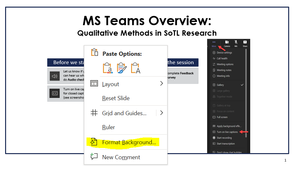
I apologize for not posting earlier. There is definitely a glitch and our Microsoft support reached out to them. Microsoft said that they are already aware of the issue and working on a fix. The issue with the black slides appearing in meeting recordings is happening with PowerPoint decks that have transparent backgrounds. This is because PowerPoint Live in Teams displays the slides over a black background by default in meeting recordings. So, when a slide deck uses no background or a transparent background, the items in the slide deck show the default black background. A workaround to this issue is for presenters to ensure they format the slide backgrounds so that they are white with no transparency. To do this: Right click on a blank area of any slide in your slide deck. Select Format Background from the menu that appears. On the right side of the screen a Format Background menu should open up. It will probably look blank like the one in this screenshot. From this menu, select Solid fill. Choose the colour (in most cases this will be white unless someone wants a fun background). Make sure the transparency is set to 0%. When done, click Apply to All to set the background for all slides in the deck. Save the updated PowerPoint presentation. It should now record properly!4.3KViews1like1CommentRe: Video Recordings with PowerPoint Live in Teams Blanking out Text
Thank you, Steven. it happened to a number of people (including me) when using PowerPoint within Teams. I think I narrowed it down to Present Live and was able to recreate it. Some of the slides were simple text boxes on a slide, nothing fancy. I've escalated it with our university IT team who will contact Microsoft on our behalf. Thank you for your response.4.7KViews0likes1CommentVideo Recordings with PowerPoint Live in Teams Blanking out Text
We've had 3 instances of recording a Teams Meeting where the presenter used PowerPoint Live and the screen went dark except for some text box outlines. I was able to replicate it. Here is a screenshot of one of the slides in the recording. No text is visible at all. Sometimes only headings show up. Sometimes it works. Is anyone at MS working on this? It could be a great feature if it worked consistently.Solved5.1KViews0likes5CommentsVideos on personal account need retention after person no longer at the institution
I am on contract at a post-secondary institution and have a number of institutional videos in my MS Stream account (I corrected captions, posted and made available publicly). When my contract is over, how do I ensure that the videos are still accessible? I have added multiple 'owners' as well as our department's Team group. Is that sufficient?

Recent Blog Articles
No content to show