User Profile

Lewk
Copper Contributor
Joined 9 years ago


User Widgets
Recent Discussions
Re: Dev channel update to 94.0.975.1 is live
Thanks for your response. I managed to figure it out. I first logged out of all the edge browsers I was signed into except one. I removed my only extension of an ad blocker and cleared/deleted all browsing data. Then I tried resetting the settings to default with the option in the settings page. But my banking site still didn't work properly. I have never used about://flags ever, but I read an article to go in there and reset those to default. When I followed their steps and tried that, it fixed my banking website. Again, I've never been in about flags before, so I don't know what's happened but there was something in there that was turned on somehow by something else, that has caused the issue. I waited a couple of hours just in case settings sync needed some time to sync. Then I relogged back into all my edge browsers on my other devices and the banking website started working again on all of them. It also fixed issues with other sites I was having issues with too. Like Outlook.com wouldn't save any of my settings, which is fixed now. And all websites load instantly now too, the performance is incredibly fast now. Which has made me decide to no longer use the dev version of edge. Just in case that's what changed settings on me and caused all my issues.1.1KViews0likes0CommentsRe: Dev channel update to 94.0.975.1 is live
It logs into the site, but most of the UI is messed up or completely missing and there's no text or data being displayed at all. Nothing happens if you click anywhere. The only thing that displays correctly and works is the logout button. The site works perfectly in Edge 92, and it works fine in Chrome 93. Just not Edge 93/94.8.5KViews0likes4CommentsRe: Dev channel update to 94.0.975.1 is live
I have an issue where my banking website no longer works in edge 93/94 on either desktop or Android. I've submitted multiple feedback submissions across the development period but no one from the edge team has reached out to me. My banking website works fine in edge 92, and works fine in chrome 93/94. I'm really concerned you're going to push 93 to public and it's not fixed. Who do I talk to about it getting fixed?9.8KViews0likes7CommentsRe: Dev channel update to 94.0.972.0 is live
So I have an issue where my banking website no longer works in edge 93/94 on either desktop or Android. I've submitted multiple feedback submissions across the development period but no one from the edge team has reached out to me. My banking website works fine in edge 92, and works fine in chrome 93/94. I'm really concerned you're going to push 93 to public and it's not fixed. Who do I talk to about it getting fixed?6.7KViews0likes1CommentLatest Dev Build 80.0.345.0 Brings Rendering Issue
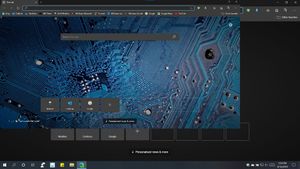
Hi, After updating my Edge Dev build to 80.0.345.0, the entire browser started rendering itself in the top left hand corner of the screen. See my screenshot for precise issue: Edge Dev has been working fine on this old Studio XPS 1640 until now. Windows 10 is set to a scaling size of 125%. When you turn it to 100%, the issue goes away and Edge renders correctly. Also, if you turn off Hardware Acceleration in Edge settings , the issue is corrected. Is there a way to fix this issue without changing the OS Scaling, or turning off Hardware Acceleration? As doing so kills the performance of web pages. Where it worked nicely with it turned on all year before the update. Thanks, Luke.768Views0likes3Comments
Recent Blog Articles
No content to show