User Profile

CMD_KEEN
Brass Contributor
Joined 6 years ago


User Widgets
Recent Discussions
Re: Unable to edit meeting options
Same! Was working fine until about mid-august. Now MS Support is trying to tell me it's not supposed to work without assigning a license to the shared mailbox and enabling it for direct login which is in direct contradiction with the statement in that article... someone fudged up.697Views0likes1CommentRe: Copy a Microsoft Teams channel chat to another Microsoft Teams channel conversation
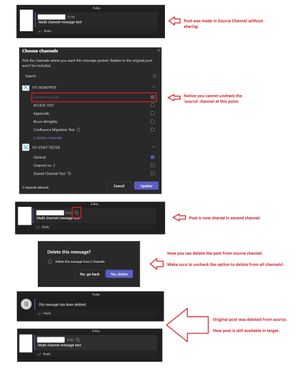
RichardBradley - I don't think it's necessary to switch channels, in my example I've shared and then deleted the post, all from the source channel. Edit: Maybe you tried to remove the post from the source channel by doing an edit and then trying to remove the channel from the multiple channels listed? (hope that makes sense.) But you could do a delete on the post instead and it will offer you if you want to remove it from all channels it's been posted in or only the current one.27KViews0likes1CommentRe: Copy a Microsoft Teams channel chat to another Microsoft Teams channel conversation
Avinash_Damera the process is going to be a chore, but you can use multi-channel posts as a workaround: https://support.microsoft.com/en-us/office/cross-post-a-channel-conversation-in-teams-9c1252a3-67ef-498e-a7c1-dd7147b3d295 Just edit any post you need to copy and include the target channel, then remove the original one.44KViews0likes6CommentsRe: 1:1 chats in Teams, files appear in the chat but not under the files tab within the chat...
djfernandes I see MS has extended their advisory, you should have an admin in your organisation check this page for all details: https://admin.microsoft.com/Adminportal/Home?#/servicehealth/advisories/:/alerts/TM24299016KViews0likes0CommentsRe: 1:1 chats in Teams, files appear in the chat but not under the files tab within the chat...
PMITCHELL1965 I am not sure... I haven't gotten any more reports myself. And TM242990 has disappeared from the admin center already so I assume that issue was resolved. I reckon any issues with viewing files through the Teams desktop client anyone has right now are most likely related to issue 2 I mentioned above. (To solve it, clear the Teams app local cache and check the OneDrive client for any issues.) Issue 3 was resolved for us by MS Support just last week, they had to run a back-end repair sync on the affected accounts in our tenant, so your last resort is to work with them to get an investigation going.17KViews0likes3CommentsRe: 1:1 chats in Teams, files appear in the chat but not under the files tab within the chat...
Karen_D17 I think there might be three different issues mentioned in this thread, one of them is covered by the current advisory. issue 1: File tab in chats does not display / list recently shared files at all or only after days of delay (this is the current advisory) issue 2: User cannot see any files in Teams Desktop app, but their browser interface does show them. (should clean the Teams app cache to resolve). issue 3: User cannot see any files in Teams, neither through desktop app, nor browser interface, while other users can see the same files. User cannot login on OneDrive desktop client but can do everything through OneDrive Online. (Seems to occur on accounts that have at some point been recreated. Still have an active case with MS support to investigate this one.)18KViews3likes5Comments
Recent Blog Articles
No content to show