User Profile

unslog
Brass Contributor
Joined 6 years ago


User Widgets
Recent Discussions
Get-MpComputerStatus output is blank
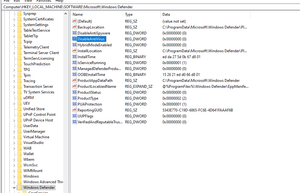
Hello, We recently transitioned from ESET AV to a solution that uses the Microsoft Defender engine. However, we're encountering an issue where domain-joined VMs running Windows Server 2022 return no output when executing the following command: Get-MpComputerStatus | Select AntivirusEnabled The antivirus application (Heimdal Next-Gen Antivirus) relies on this output to verify that real-time scanning is enabled. We have tried several troubleshooting steps, including rebooting the machines, running the command D i s m /Online /Enable-Feature /FeatureName:Windows-Defender, and checking the registry to ensure that Defender is not in passive mode. However, the issue persists. Has anyone encountered a similar issue, or can anyone suggest additional steps to resolve this? Any help would be greatly appreciated!2.6KViews0likes9CommentsHow to centrally switch off Focus Assist / Do not disturb
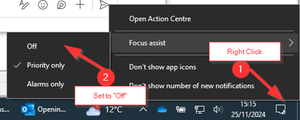
Hello, Please advise if it’s possible to push out a policy or reg edit script that will completely switch off Focus Assist (Windows 10) or Do not Disturb (Windows 11) ? This is causing havoc with our 3CX SIP app – When this feature is on, it prevents 3CX pop-up appearing when an inbound call is routed to the user’s device. I have spent hours researching and testing various registry settings and intune policies, none of which I can get working for both Windows 10 and Windows 11 endpoints. do not disturb is enabled by default OOB. This setting appears to be controlled at user level (HKEY_CURRENT_USER). The only thing that works, is for the user to “Manually” switch off this feature, as per below. This isn’t convenient when you have hundreds of endpoints! Users will not do the steps if you email or message them. or Surely there must be a way to control this functionality via GPO? Examples of changes that do not work; Computer\HKEY_CURRENT_USER\SOFTWARE\Microsoft\Windows\CurrentVersion\Notifications\Settings Intune6KViews0likes7CommentsRestricting unauthenticated sharing / Anyone links to certain users or group
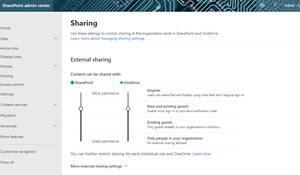
Hello. We want specific users in our organisation to be able to share documents anonymously using "Anyone links". Our current Office 365 "Sharing Policy" is set so that users can share external to "New and Existing guests" , for both sharepoint and onedrive. The problem is that Sharepoint Admin centre doesn't appear to have the option to allow us to maintain our existing policy "New and Existing guests" which applies to 99% of the business and allow only a couple of individuals the option to share files anonymously, within the Microsoft ecosystem. For example, the marketing team want to a share company presentation slides externally without specifying every email address that is permitted to view the shared file. With this in mind, is there a PowerShell script that I can deploy that will allow for certain users or groups to share files anonymously whilst keeping our default policy "New and existing guests" for the rest of the business?891Views1like3CommentsVideo pixelation during MS Teams calls - isolated to AMD hardware
Hi, We have noticed that users with Dell laptops with AMD chipsets are having display issue with their integrated webcam, only when using Teams. I have uploaded an example of the issue. The user will see themselves all pixelated, but the video caller on the otherend can see them just fine. The issue is intermittant, and resizing the MS Teams window will sometimes unpixelate the local video stream. The following steps have been performed to fix this issue, none of which have worked; - Cleared MS Teams cache - Reinstalled Teams - Disable hardware acceleration MS teams - Made sure all Dell drivers and firmware are up to date. - Windows 10 is fully updated. - Rolled back Graphics card driver update - Installed AMD drivers using their automated driver detection tool. I have been able to replicate this issue across 5 Dell vostro laptops with AMD chipsets, RADEON graphics. I'm unable to replicate using other apps, e.g. native camera app, zoom etc.. This is something that has started happening in the past couple of weeks so suspect it's relating to a recent MS Teams update.2.2KViews0likes1CommentRe: Legacy on-prem journal mailboxes
VasilMichev Hi. Thanks for your reply. According to this https://docs.microsoft.com/en-us/microsoft-365/compliance/autoexpanding-archiving?view=o365-worldwide#:~:text=The%20archiving%20feature%20in%20Microsoft,archive%20mailbox%20reaches%201.5%20TB. , there is a restriction of 1GB of data growth per day - would importing the PST files attribute to this data growth limitation and would I technically be able to automate the import of multiple PST files without restrictions? Also, you mentioned about relevant licensing...if I used a shared mailbox would licensing still apply and I assume that 1.5tb archive also applies to shared mailboxes? Thanks1.3KViews0likes1CommentRe: Items that are deleted from a shared mailbox go to the wrong folder in Outlook
I have opened a MS support ticket. They suggested to remove the office registry sub key and using the SaRA tool to remove Office completely and reinstall. Done this and didn't work. Will continue to pursue MS support.6KViews0likes0CommentsRe: Items that are deleted from a shared mailbox go to the wrong folder in Outlook
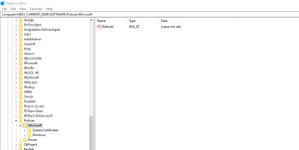
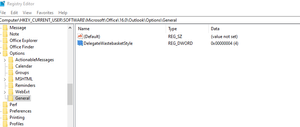
VasilMichev The "Policy" key for office (Office\<x.0>\Outlook\Options\General) doesn't exit nor are the devices connected to domain container for managing GPO. The article doesn't suggest create these keys either. GBO key HKEY_CURRENT_USER\Software\Policies\Microsoft\Office\<x.0>\Outlook\Options\General Please advise6KViews0likes2CommentsRe: Items that are deleted from a shared mailbox go to the wrong folder in Outlook
VasilMichev Hi, I tired that and didn't still work. Even rebooted the laptop and still when deleting an email from a shared mailbox the email is moved to my deleted items (Primary mailbox) instead of the moving to the shared folder's deleted items6.1KViews0likes6CommentsItems that are deleted from a shared mailbox go to the wrong folder in Outlook
Hi This https://docs.microsoft.com/en-us/outlook/troubleshoot/email-management/deleted-items-go-to-wrong-folder suggests a registry fix for Office 365 , however this registry path (\General) isn't available in Outlook for Office 365. I have checked this on multiple devices and all missing HKEY_CURRENT_USER\Software\Microsoft\Office\16.0\Outlook\Options\General If this registry fix it's available to Office 365 , please advise how we move deleted shared mailbox items to the delegated mailbox (i.e. shared mailbox) instead of the primary Outlook profile deleted items6.4KViews0likes9Comments

Recent Blog Articles
No content to show