User Profile

Stephan_Leistra
Brass Contributor
Joined 6 years ago


User Widgets
Recent Discussions
Don't include participants in Teams-meeting recording
Does anyone know if Microsoft is planning on a Teams-meeting recording option which only records the presenters. This is a highly requested option due to privacy legislation in our country. We mainly record online lectures and a Teams live event is not a suitable alternative for us.771Views0likes0CommentsRe: Option "block download" not showing
Looks like it's finally going to happen. The roadmap item has been set from 'In development' to 'Rolling out'. https://www.microsoft.com/en/microsoft-365/roadmap?filters=Microsoft%20Stream%2CWorldwide%20(Standard%20Multi-Tenant)%2CChanged%20Last%20Week%2CRolling%20out&searchterms=821932.9KViews0likes13CommentsBlock download for non-Teams-recordings
We use Stream (on SharePoint) and are very pleased to have the block download feature for Teams-recordings available, but when will it be available for all video (mainly MP4) files? At our University a lot of teachers create their own video's and want to share them with their students without the option to download the file. Microsoft is releasing many video features focusing on Teams-recordings, but regular video files are just as important to us. I tried to recreate a folder with the same 'view only' rights as in channel meetings with the block download feature, but it only works for Teams-recordings and not for other video files.Re: Option "block download" not showing
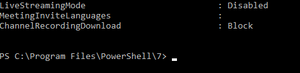
StephenRice We can't change value of ChannelRecordingDownload in the Global policy because the variable isn't there. Any of you experiencing the same issue? We run Teams PowerShell module version 2.5.0 AllowAnonymousUsersToDialOut False AllowAnonymousUsersToStartMeeting False AllowChannelMeetingScheduling True AllowCloudRecording True AllowEngagementReport Enabled AllowExternalParticipantGiveRequestControl False AllowIPAudio True AllowIPVideo True4.4KViews0likes0CommentsCan't change value of ChannelRecordingDownload in the Global policy
We can't change value of ChannelRecordingDownload in the Global policy because the variable isn't there. Any of you experiencing the same issue? We run Teams PowerShell module version 2.5.0 AllowAnonymousUsersToDialOut False AllowAnonymousUsersToStartMeeting False AllowChannelMeetingScheduling True AllowCloudRecording True AllowEngagementReport Enabled AllowExternalParticipantGiveRequestControl False AllowIPAudio True AllowIPVideo TrueRe: Option "block download" not showing
The roadmap item has been changed from "rolling out" to "In development" and will only be released in April CY2021... What happened? We desperately need this option and I know a lot of European universities are also struggling with this issue due to privacy legislation.5.7KViews2likes1CommentRe: Option "block download" not showing
Hi StephenRice I see that the option to block downloads of Team recordings is rolling out. https://www.microsoft.com/nl-nl/microsoft-365/roadmap?filters=&searchterms=70543 Can you tell something about this update? Likes does this also apply to other MP4 files?5.9KViews0likes3CommentsSharePoint video portal
We want to build a SharePoint video portal for our University, since classic Stream will disappear. What direction should we go? Should we work with document libraries and store video's on the SharePoint itself? Should we work with lists and link to the video file in someone's OneDrive or other SharePoint? Of is there another option? We want to make the right choices from the start, so we don't have to change the whole SharePoint when you (Microsoft) offers a different solution. Hope to hear from you soon!
Recent Blog Articles
No content to show