User Profile

Michelle99
Brass Contributor
Joined 6 years ago


User Widgets
Recent Discussions
White space character I've never seen (in Word)
Hello there. I've come across a little "circle" white space character (YELLOW highlight in screenshot) that I have never seen before in word. When I paste it into Notepad++ it appears as just a standard white space. I'd really appreciate if someone could possibly answer my questions please: Q1. What is this "circle" white space called in Word? Q2. How do I create such a white space? Q3. What is a is the purpose of this type of white space? Q4. Anyone know how to define this kind of white space programmatically, (python would be great)? Screenshot - "YELLOW" Thanks in advance, Michelle325Views0likes1CommentAzure Data Studio - default dashboard settings for Server and Desktop?
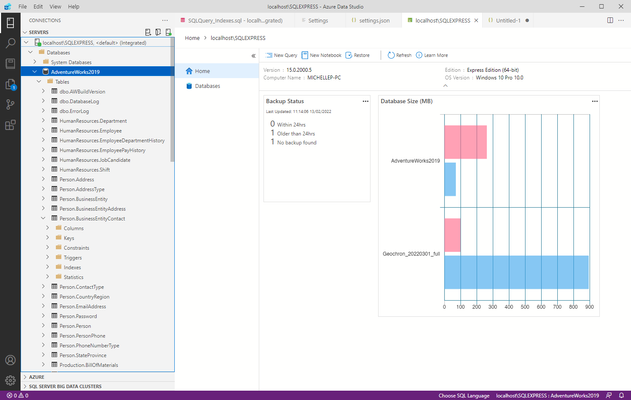
Hello. I am just starting to learning Azure Data Studio. My Server Dashboard and Database Dashboard don't seem to have the same widgets by default as per all of the tutorials. Below are my default settings (which have not changed). Could someone please tell me (or perhaps provide) the default settings I need so that my dashboards display all of the "default" widgets? { "workbench.enablePreviewFeatures": true, "workbench.startupEditor": "welcomePageWithTour", "datasource.connectionGroups": [ { "name": "ROOT", "id": "C777F06B-202E-4480-B475-FA416154D458" } ], "datasource.connections": [ { "options": { "connectionName": "", "server": "localhost\\SQLEXPRESS", "database": "", "authenticationType": "Integrated", "user": "", "password": "", "connectTimeout": "30", "connectRetryCount": "1", "connectRetryInterval": "10", "applicationName": "azdata", "groupId": "C777F06B-202E-4480-B475-FA416154D458", "databaseDisplayName": "" }, "groupId": "C777F06B-202E-4480-B475-FA416154D458", "providerName": "MSSQL", "savePassword": true, "id": "e53c9395-7bd0-4864-b65c-01ad39fbf340" } ], } PS: I couldn't find a specific topic group for "Azure Data Studio". If this is not the correct place, please let me know where best to ask my question. Many thanks Michelle1.1KViews1like2Comments- 1.1KViews0likes1Comment
Searchable dropdown in DESKTOP
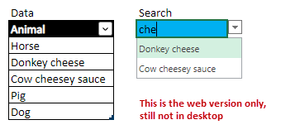
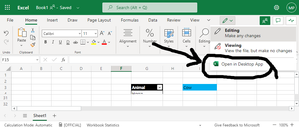
Hello there. A searchable dropdown list is available in the browser version of excel, it looks like this: I've seen numerous posts that the Desktop version of this feature has been in Beta Channel since January 2022 (for example, see here https://www.youtube.com/watch?v=_GWHFT3rEIA. When will this feature will be available to the "Current Channel" ?12KViews0likes3CommentsWhiteboard: Select single object to delete (not object group!)
Hello, Sometimes when I select a single object, for some odd reason Microsoft Whiteboard will select a group. For instance, here I wanted to delete just the big top left circle, not the small bottom right circle. When I selected the top left circle, automatically the bottom right circle was included in the selection. Of course if I hit delete now, both will get deleted. Question: How do I select a single object when whiteboard has automatically created a group selection?1.8KViews0likes1CommentBackground colour of text box (oneNote 2016)
Hello, I have a page with several text boxes. To help maintain a visual structure, I'd like to colour the background of each text box. Is this possible? Please note: I am referring to the background colour of a text box, not to the page itself I'd like to avoid using a rectangle shape as the background of my text box6.6KViews0likes1CommentSearch a group chat for all postings a specific person made
Hello there, "Show me all the posts Joe made to the Escalators group chat"... Is there a way to do this? This is what I have tried (which did not yield the search results I am after): I click on the group chat I press "ctrl + F" I type in the word "Joe" .... but the problem is I get every single message back including those from other people who only mention Joe. How do I limit my search results to ONLY those posts made by Joe? Many thanks. Michelle7.6KViews0likes2CommentsRe: Set same shared properties for all files in folder
VasilMichev I could not just share the folder because I link to the various files from a word document. Also, I wanted to prevent downloading, and that is not possible on the folder level. Thank you once again for your answer.1.1KViews0likes1CommentAnyone Shared files // can anyone truly access it?
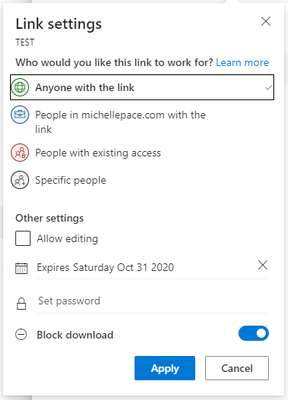
Hi there, I've uploaded a file to my business onedrive and set the access level to the below. Am I correct in saying that you have to be signed into a Microsoft account which has onedrive access to see the file? So whomever I send this file to, I have to be sure they have a Microsoft account? Can someone please tell me if you're able to access this test file: https://michellepace-my.sharepoint.com/:b:/p/michelle/EbNpcmbt_rFNs5MUrgExa3QBt-Q02quo9O_3mNINFmXsDw?e=TcfAR8 Many thanks MichelleSolved1.3KViews0likes2CommentsSet same shared properties for all files in folder
Hi there, Is it possible to "bulk share" all files in a folder? That is, I'd like to make it so that all my pdf files in this folder have a share expiration of 31October, cannot be edited and cannot be download. Is there a way I can do this other than going through each one by one? Many thanks, Michelle1.2KViews0likes3CommentsRe: Do I have to ""Load to.. Table" to populate dropdown?
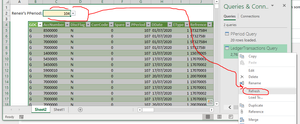
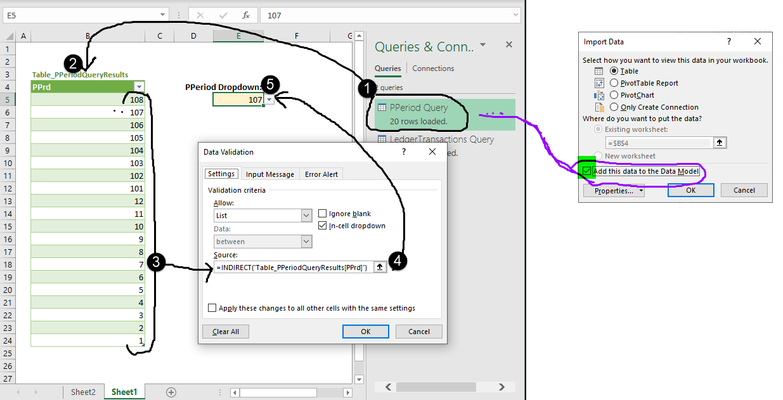
SergeiBaklan thanks (again) for your reply. I am trying to avoid creating a new table in excel. I was hoping I could just load it into the data model rather. I assume by "land it in excel" you mean create the green table as shown?3.4KViews0likes3CommentsRe: ODBC data connection with parameter from drop down
I have one Laaaaast Question SergeiBaklan ... Every time I select a new PPeriod in my yellow dropdown, I have to go and refresh my query for the new data to be reflected in the table. Question: Am I correct that I'll need to write some VBA code to "force" automatic query refresh every time my user selects a new PPeriod?9.9KViews0likes5CommentsDo I have to ""Load to.. Table" to populate dropdown?
Hello, As shown in the screenshot below, I am populating my dropdown (ie data validation list applied to cell E5) from a table (Table_PPeriodQueryResults) which was a result of my query PPeriod_Query. Question: As I have selected "Add this data to the data model" for the query, Is it possible to populate my dropdown list without having to load the data into a table? As always, thank you. MichelleSolved3.6KViews0likes5CommentsRe: ODBC data connection with parameter from drop down
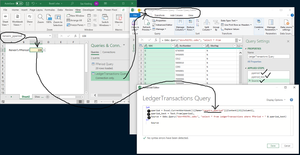
SergeiBaklan thank you that is exactly it! I added the line you mentioned and it works! For anyone else looking for this solution, here it is: let pperiod = Excel.CurrentWorkbook(){[Name="reneirs_pperiod"]}[Content]{0}[Column1], pperiod_text = Text.From(pperiod), Source = Odbc.Query("dsn=PASTEL.odbc", "select * from LedgerTransactions where PPeriod = " & pperiod_text) in Source10KViews0likes6Comments


Recent Blog Articles
No content to show