User Profile

IngeniumGwen
Copper Contributor
Joined 6 years ago


User Widgets
Recent Discussions
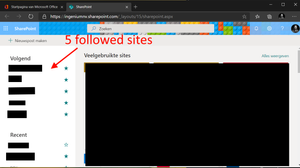
Sharepoint followed sites mismatch
I have been slowly introducing our company to SharePoint online. The most asked feature by my co-workers is saving files from office applications directly to a SharePoint site. I've discovered the 'follow site' feature on SharePoint. By my understanding this should make the 'followed' SharePoint site visible in the 'followed' segment of the save (or open) dialog in an Office Application. However the sites listed in my application do not match the followed SharePoint sites. I started following these many hours ago. Am I missing something? I want to minimize the usage of the OneDrive sync function. To avoid excessive disk usage on our RDS hosts.743Views0likes0CommentsTeams incoming call dialog in background
Hello, We work in Citrix fulltime in fullscreen mode. Teams is installed locally on the computer. For the past two weeks we've noticed a change in Teams. In the past the Teams incoming dialog would pop in front of everything. However this is no longer the case. We can hear that there is an incoming call. When we switch from our full screen Citrix windows to the local desktop we see the Teams Window, but the incoming call dialog is not visible. The only way to answer it is to ALT-TAB. Can we change the behavior to bring back the dialog to the front? Or to make it visible in the task bar? With friendly regards,Solved21KViews1like21Comments
Recent Blog Articles
No content to show