User Profile

Kav777
Copper Contributor
Joined 6 years ago


User Widgets
Recent Discussions
Re: Modify MS 365 unified group membership using PowerShell with Enterprise app authentication
Thanks managed to find graph cmdlets rather than making invoke-webrequest calls (wanted to avoid the latter), ended up with this: To add a member: New-MgGroupMember -GroupId $GroupID -DirectoryObjectId $UserID To remove a member: Remove-MgGroupMemberByRef -DirectoryObjectId $UserID -GroupId $GroupId '$UserID' is the 'id' attribute thats returned from 'Get-MgUser' and '$GroupID' is the 'Guid' attribute returned from 'Get-MgGroup'.2.9KViews0likes0CommentsModify MS 365 unified group membership using PowerShell with Enterprise app authentication
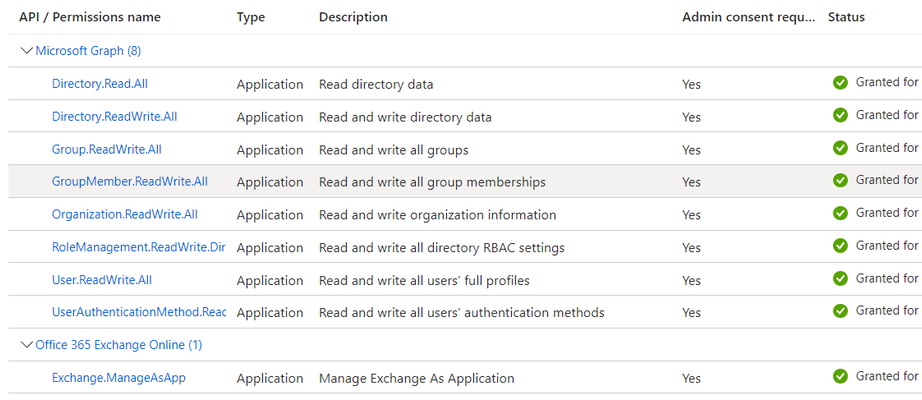
Im trying to run the following command: Add-UnifiedGroupLinks -Identity 'email address removed for privacy reasons' -LinkType members -Links kavehtest114@gelion.com However, the error I am getting is: Write-ErrorMessage : |Microsoft.Exchange.Net.AAD.AADException|We failed to update the group mailbox. Please try again later. Context is I have authenticated using a certificate connected to an Enterprise app I have registered. If I authenticate as the global admin of the tenant via the standard interactive login, the cmdlet works fine, but I need it to work with the enterprise app for unattended scripts. The permissions the enterprise app has are: I've come across this aricle: https://learn.microsoft.com/en-us/powershell/exchange/app-only-auth-powershell-v2?view=exchange-ps which says; "In Exchange Online PowerShell, you can't use the procedures in this article with the following Microsoft 365 Group cmdlets: ...Add-UnifiedGroupLinks" If thats the case, whats the alternative via PowerShell?3.7KViews0likes2Comments

Recent Blog Articles
No content to show