User Profile

rashadbakirov
Brass Contributor
Joined 6 years ago


User Widgets
Recent Discussions
Windows Hello for Business Configuration Issue with multiple Devices
Hello everyone, We are currently facing an issue with our Windows Hello for Business configuration for Multiple Users/Devices, and I'd like to seek your assistance and insights on this matter. We've implemented Windows Hello for Business through Group Policy (User Configuration) and deployed it within our User Organizational Unit (OU). Initially, everything seemed to be working seamlessly. Users were able to log in to their devices, set up Windows Hello for Business, and use it without any problems. However, a problem arises when the same user attempts to log in from another device. Ideally, we expect the same behavior, where the user gets the Windows Hello configuration, successfully sets up their PIN, and can use it for subsequent logins. However, after a reboot, the user is prompted to log in with their password only, and the Windows Hello Sign-in option does not appear. What's even more concerning is that this issue has now started affecting the user's ability to log in with a PIN on their initial device as well. We would greatly appreciate your insights and suggestions on how to troubleshoot and resolve this issue. If anyone has encountered a similar situation or has any guidance on resolving Windows Hello for Business configuration problems, please share your expertise. Thank you in advance for your assistance. Best regards, Rashad BakirovRe: Autopilot Error (0x81036502) - Endpoint Manager
Solved. Hi, thank you very much for your answer. We have many apps configured as required apps on ESP, and a few days before one of these apps was updated by software teams, and the new version has an installation error, which we missed.161KViews0likes1CommentAutopilot Error (0x81036502) - Endpoint Manager
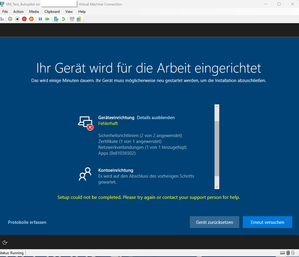
Dear community members, I am facing an issue with my Endpoint Manager's autopilot feature. It suddenly stopped working and I am receiving error code 0x81036502. I would greatly appreciate any help or advice on how to resolve this issue. According to my research, this error is related to either a timeout issue or with the Windows 10 version 22h2. I am running Windows 10 version 22h2 on my endpoint. I have tried several troubleshooting steps but to no avail. If anyone has any information or suggestions, please share them with me. Thank you for your time and assistance. Best regards, Rashad BakirovSolvedOffice 365 Pro Plus - update via SCCM
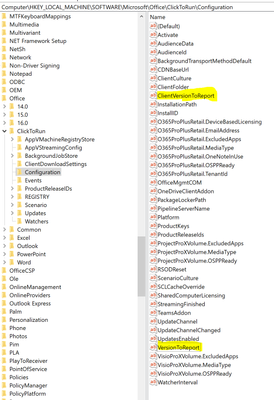
Hello Guys, Few months before we deployed Office 365 Pro Plus 1902 Semi-annual Channel via System Center Configuration Manager 1910 (SCCM) as Application Deployment (not update) over 300 Clients. The client's old version was Semi-Annual Channel Version 1808. Application deployment was successful and all clients were upgraded to 1902. But after this, we are trying to deploy Semi-annual next "updates" from SCCM Office 365 Client Management. But SCCM detected only about 50 Clients as "required" so could update only these 50 Clients. Other look like do not need to update. We opened #SCCM (1910) Case in Microsoft for this problem, but they think a problem is related to #office365 problem, not SCCM. After investing a lot of time I found that in these 50 Clients where update working successfully "ClientVersionToReport" and "VersionToReport" Values are the same in Registry Entry. I mean both value numbers were the same as Office 365 semi-annual 1902 Deployment version. But these 2 Values are different in all other clients. In some of them "VersionToReport" is missing or older, newer than "ClientVersionToReport", on the other hand, "ClientVersionToReport" missed from some clients, or "ClientVersionToReport" value is still 1808 version instead of clients are already upgrade to 1902. As I understood, maybe i m wrong SCCM Office 365 Client Management detection method checking these 2 Values in Clients to add them as "required" or as "not Required" list. My question is, could some explain why Office 365 installation behavior was different per Client? We deployed Application in one Deployment pack to all clients and clients got the same configure.xml and installation was successful for all clients. Only version differences I see in these 2 Values in Registry Entry. How we can solve this problem? Additional I want to say if we want to update Office 365 manual from for example Outlook App it will work and got the latest semi-annual version In the photo, you can see that after Office 365 1808 Version, SCCM could not get correct info about Clients. Best Regards Rashad BakirovRe: Office 365 Pro Plus - update via SCCM
ChristianBergstromHi Christian, thank you very much for your reply. We are interested in solving the problem with SCCM because we are updating our Clients via Configuration Manager. We want to find why SCCM thinks only 50 Clients out of 300 need required new updates, though they are all on the same level. One more example, the latest Microsoft 365 Apps Semi-annual Version 2002 Build is 12527.20988, and a lot of our clients are older than this version (Build 12527.20880 or older). But somehow, Configuration Manager detects only a few of them required build number 12527.20988. We know we can update all clients manually to version 12527.20988. But our goal is to find a problem because we will continue to update our environment always via SCCM. we thought that problem on SCCM so we opened Microsoft Case for SCCM, but they believe it related to Office.4.9KViews0likes1Comment
Recent Blog Articles
No content to show