User Profile

Jack_Eidsmsness
Brass Contributor
Joined 6 years ago


User Widgets
Recent Discussions
Re: Suggestion: URL scheme for onedrive synced locations
LOL @ myself - "For a sharepoint site on the web, URLs are straightforward" ... No, not really! I can't believe I would write that. Generally, of course, the URLs in sharepoint are inscrutable garbage that confuse people to the point of making them un-learn how to use a web browser . . . but the logical, intuitive identifiers are also there (if you know how to get exactly what you want). One CAN find and use straightforward URLs, as one possibility among many. More importantly, though, the original idea (to support the crafting of links that prefer opening an already-synced copy of a SPO/ODB file) is still an important feature suggestion. Trust me, the less you understand this yourself (as long as you use these products as part of a team), the more you would potentially benefit from having it work right when someone else sends you this hypothetical type of link. So, definitely upvote it and beg MS to make it work (right after you pressure them into making Exchange/Outlook support an "all attendees can edit meeting" permission, configurable on all native outlook meetings).47Views0likes0CommentsSuggestion: URL scheme for onedrive synced locations
For a sharepoint site on the web, URLs are straightforward https:// ENTERPRISETENANT .sharepoint.com/sites/ SITENAME / LIBRARY Right now, if you need to coach someone through using a file in a way that requires syncing a folder, it's just a little too difficult. In the interest of making it more possible for coworkers to provide practical instructions to each other, we would really benefit from having a way to link files the implies use of an existing sync or onedrive shortcut, and which falls back to suggest creating a new one. Currently, we have to hope that our colleagues are using sharepoint site syncing the way that we hope they are, if we want to provide really specific context for things. e.g. If my relative path is %USERPROFILE%/My Enterprise Tenant name/SITENAME - Documents/project1 someone else's could be %USERPROFILE%/My Enterprise Tenant name/SITENAME - project1 OR %USERPROFILE%/OneDrive - My Enterprise Tenant name/Documents/project1 OR %USERPROFILE%/OneDrive - My Enterprise Tenant name/project1 Suppose we had new updates of OneDrive that set up a URL scheme that gets attached to an executable interpreter, and the interpreter takes what are otherwise the elements of an absolute https URL, but instead of opening a browser, it would compare it against the locally synced path (i.e. information from the "Accounts" settings). If there's a match, it could then link to a location on disk (probably via some kind of consent screen as an intermediate): -x-ms-onedrivesync://ENTERPRISETENANT.sharepoint.com/sites/SITENAME/LIBRARY/PATH/ If the URL is not represented among the onedrive folders that are synced, so far, then onedrive could propose that the user start syncing this folder, instead. I really prefer the idea of treating a "onedrive shortcut" and a "sync" folder the same, as long as it's for an equivalent location in the cloud. This got really confusing to explain to people, once the "shortcut" feature was introduced. Please? It would make things a lot easier. Does anything like this already exist? Is there a tool or a best practice that IT support at "work or school" organizations are already using to explain and talk about such things?Re: Need better tools for backing out of a huge, failing sync
The hidden option to prompt users with a "Choose Folders" dialog probably should have a default value setting written into the system by microsoft, ahead of any configuration to the organization's group policy. Currently the setting is in MB, but there should be a setting based on the total number of files, too. Probably most of the challenges have to do with the total number of files, rather than the total size. I haven't done extensive testing, but if it isn't already counting bytes or files on the local disk to be uploaded, as well as the already-in-cloud bytes or files that the sync would make available, it should be. That's just a hunch.681Views0likes0CommentsRe: Introducing Scheduling poll in Outlook!
Why put a hat on a hat when MS could just give us a way for an organizer to grant free-for-all edit access only to meeting attendeees? I mean, what *is* the point of sending a meeting "invitation" if it's implied that you must have already asked them, and they have already agreed to attend? There is no meeting without the participation of attendees, it's just junk data. In reality no one is your "organizer," and no one is going to give you a "take it or leave it" invitation to a meeting except for the occasional all-hands. The recipient needs to be equally capable of correcting or changing details.3.9KViews0likes0Comments"Scheduling Poll" unintentionally pitted against "Scheduling Assistant ... Why not both?
As a guest invited to a fellow outlook user's scheduling poll, it is unnecessarily difficult to propose additional times that make any sense. It's a strong start towards solving the scheduling problem it's intended to, but it doesn't usually hit the mark, and that's a missed opportunity. Several times, I received a scheduling poll, and each proposed time has already been rejected by one or more required attendees. This is where the "Propose another time" button at the bottom of the poll should help us, . . . Well it's not actually helpful, and will likely generate a lot of email traffic with low chances of helping. I'll explain. The first part of the problem is that there is just no information available about everyone else's schedule. So, how should we expect attendees to propose a reasonable suggestion, even if they are in the same organization and could have had that Free/busy information they need, elsewhere? Going across domains, it makes sense that the information isn't available. But 9 times out of 10, it actually is, because people are using this with people at their workplace. I just would have had to just start over from scratch, although that's bad form because the poll is already in play and this would nominally appear as a conflict. It's also pretty obvious duplicate effort. There just needs to be a better transition between meeting poll and a standard meeting invitation's scheduling assistant view. A person doing that would have to log in if they weren't already, but that seems perfectly fine. Perhaps more importantly, I've got to point out that this is a side-effect of the organizer-as-dictator problem that has been endemic to Outlook & exchange for decades. "FindTime"/"Scheduling Poll" has its place among cross-domain internet email users, but within a work or school environment, it's just good code thrown after bad. The fact that we sometimes need to do a poll before putting any info on the actual calendar is just silly. That's what the calendar is supposed to be for, but locking in the times and making yourself "organizer" just makes the work more awkward. And one last thing, I think it's a mistake that each "Propose another time" sends out another reply-all message. Considering how I described above that we're left just guessing what time could be any good, then sending two or three suggestions in as many separate email messages seems very wasteful. We should be able to set up a few times before saving them and having the poll email re-sent only one more time.27 years with Organizer-as-dictator problem: Allow attendees to actually change a meeting
As a communications tool, the Outlook meeting invitation is saddled with some deeply unpleasant social implications, because once someone sends one, they are now the "organizer" and no one has any power to fix the organizer's mistakes, present better ideas, etc. without creating disagreeing/conflicting information of their own on the calendar. Small groups of people in a single organization need to be enabled to co-own their meetings, and unilaterally make corrections or other changes. Outlook has never allowed this without granting much broader access to an entire calendar at once. Technically, this would have to be an option, since the "dictator" model is important for things like an employee all-hands with hundreds of people invited. In Google Calendar, it was a simple checkbox option to let other attendees modify the original invitation and keep each other up-to-date. In my time with it, no one at that company ever felt the need to ask someone else for permission (in a preliminary email or phone communication) to send a calendar invite. In an Outlook/Exchange environment, people do this all the time. Some people who want to meet and even know when they want to do it are intimidated to send the invite and make themselves "organizer". We regularly have faulty information on our calendars because it belongs to someone else who doesn't know how or won't fix it. It's all very ridiculous and it's been this way for 27 years. I've seen similar problems with shared information in Teams corrected already, during its brief life. For Outlook/Exchange, it's been intractable. Is there any hope for a change?293Views0likes0CommentsRe: linking to synced file or to suggest syncing a file in Team site or OneDrive?
I asked this some time ago, and since it's still an open question in my mind, I thought I'd see if anyone has a fresh perspective on it. It seems like it ought to be possible, e.g. in a web browser, if a sharepoint or other m365 search comes up with a ...xyz.sharepoint.com/sites/some-site/Documents/Documents/path/to/Not-the-right-doc-but-close.docx, I should be able to get a link to the folder "%USERPROFILE%/OneDrive - {my org}/some-site - Documents/Documents/path/to" in explorer; For the browser to know what the local software has been syncing may or may not even be necessary. Even without that info, if the browser calls out to onedrive, (worst case) onedrive could call right back in to https://......./ ... Not very elegant, but there are so many options, and that's taking for granted that a file:||| link is a lost cause. The example is PC specific, buy Macs have similar mechanisms available. I'm almost considering what it would take to hack it in, with an SPFX component559Views0likes0CommentsRe: Trim feature removed in new Stream?
You may be too young to remember, but back at the beginning of the pandemic, there was a problematic trend dubbed "zoom bombing". Some troll/crank/party crasher/hacker/disgruntled employee joins a meeting, and points their camera at something unsavory. You kick them out, and it's still in the recording. I remember it like it were yesterday, because it literally happened yesterday. So, NO, the never-available feature of "start time" and "stop time" would also not meet our needs for trimming a video.3.2KViews0likes1CommentRe: How to change default document behavior
I don't have the details at my fingertips, but there is a better per-user setting now that didn't exist at the time of my last viewing this thread, in 2021. Recently it's been working much more consistently, and it doesn't depend solely on which document library your link is in.9KViews0likes0Commentslinking to synced file or to suggest syncing a file in Team site or OneDrive?
Could we get a way to link to a synced directory from onedrive? There are some use cases involving 3rd party apps where I want to avoid driving my users towards a "download, modify, upload" pattern, and I don't want to give them a bunch of steps. I'm looking for a way to simplify a process of finding a shared directory in teams or sharepoint, and automatically clicking the "Sync" button (or guiding them to it, per the sender's intentions); Lastly, opening explorer (or Finder) window, to that directory. It seems like it should be possible that we could devise a scheme, something like ms-onedrive-sync://sometenant.sharepoint.com/sites/some-site/some-library/path/to/file If the user was already syncing all of "some-library", or just "path/to" then I'd like for the scheme to recognize either situation and open the correct file from disk. However if they are not, I'd want it to prompt the user to start syncing. A prompt with "open in browser"/"start syncing" buttons would probably do it. Basically I'm proposing a URL scheme that will be processed by local onedrive software, and either open a synced folder (without including C:\Users\... in the text), or fall back to the in-the-cloud sharepoint.com URL. If it already exists, that would be fantastic.812Views0likes1CommentNeed better tools for backing out of a huge, failing sync
I'm just putting this out here, that we have seen some significant adoption challenges for our org, and I'm interested to see what approaches have worked for anyone. Truth be told, I think of this as a bug report, or a comment on OneDrive's technical debt, as much as anything else. From a support perspective, our biggest challenge is dealing with a situation that's already gone out of control - and it's happening a lot. Sometimes a sync will just never finish, if there are too many files either on the local disk or already in the cloud (from a previous sync). I don't know how exactly ODB's is failing in these situations, per se, other than it's not making forward progress, even after 8 - 24 hours or however long we've been allowing it to chug away. maybe it's too many files, too many changes, too slow a network. . . I don't know. It just goes on forever. Carefully looking at logs suggests some kind of loop or recursion after 2 hours, at least in one of these cases, but there's no prompt or error message, just as if all we needed to do was wait. The only way I could tell what was happening there is because of an open source ODL reader on github. Just using MS included tools, I would have nothing but an abiding mystery. Resetting the account just starts the clock over from the beginning, and it still never finishes. On the PC, there's a hidden option (which should not be hidden) to "choose folders" BEFORE a big sync even starts, based on a number of MB of content, which is configurable through group policy. That features is critical because if we waited until the sync starts, there would be no practical way to interrupt it other than to quit entirely, unlink the account, and restart syncing. On the Mac, as far as I can tell (and I looked pretty hard) there is no such option to choose folders before syncing. There needs to be a way to change preferences while sync is paused. Currently pausing sync doesn't buy you anything but a little CPU & disk IO back, but it won't help you change anything with your onedrive situation. Also it would be nice to have some advice for what to do with a lot of files, and I think most likely it means splitting up the document library. If someone has too many files (and they can't be deleted, or can't be deleted, yet), and it needs to go somewhere, I would say probably they need another document library to split up the load and isolate the syncing processes. I'd also like to say that the "shortcut" feature has really made all of these problems worse, by cramming more sync activity into a single folder. And while I'm at it, I really wish we had some kind of overriding admin access tool to the onedrive content. I have seen quite a few problems that I would have been able to solve with an "rsync"-like program that OneDrive just chokes on and never fixes.727Views0likes1CommentGetting a total count of items in SPO list or library
I know SPO has some kind of count of items in document libraries and lists, because I can see it on a ListEdit.aspx page, where it has a warning about going over the list view threshold. I just can't find out how to get it in one of my programs. Any programmatic interface would be fine (graph API, pnp, etc.), so long as it isn't fetching all the records and then counting them. Hopefully this is an easy one, and I've just been searching with the wrong terms to find the right document. I don't need a working code sample, just the right function, other feature, or a link to a doc. I'm looking for the grand total, but I'd also want to know if there's a way to get a count based on filtered items or search results where it's counting more than just the records that I could count myself in a JSON response. My intuition is that the latter would not be available, presumably because of how the load would not be great for MS's cloud. It seems pretty silly if I'd have to do something like a .../items/?$select=id&$top=5000 and just repeat via odata.nextlink until I reach the end.49KViews0likes2CommentsRe: I seem to spend my entire life looking at "Processing changes"
The way I'd look at the issue is that the status message is too vague. The user needs to get more information at least every minute, if not more often. If it's scanning through hundreds of thousands of folders and files, at least show some kind of count, even if you don't know how high it's going to count, at least that would be some kind of frame of reference. If it's a ODB bug and it's caught in some kind of loop, at least show me that it's giving some kind of insane output. The key is that the user needs a clue of whether to stop and start over, or to wait, or even maybe a clue to reset their onedrive configuration. They might even need to be told that it's never going to work well, if they have too many files.2.1KViews1like1CommentRe: How to change default document behavior
Just because no one said it yet - This is obviously a design flaw. There is no logical reason to have this as a document library setting, much less the only place to configure this be at the document library level. This should be a user preference that takes precedence over the document library setting, if the doc lib setting even remains. I'm sure there is some long story that can explain how it came to this, but M365 has come far enough that this sort of bizarre UX can and should be left behind with the old, bad sharepoint of yesteryear.31KViews0likes0CommentsGeneral SPFX Development time savers
I thought I'd share a few foundational tips that I wish I'd had from the beginning. 1) Install and use "pnpm" instead of "npm" whenever possible -- and it has always been possible, in my experience. There was so much wasted disk space (and consequently time) to be saved by doing this. I was able to delete gigabytes and gigabytes of pointless node_modules directories, and pnpm replaced them with directory junctions managed from a central location in %AppData% or similar locations for linux and mac. Every 'yo' commands may undermine your time & disk savings, when it uses "npm" by default. Add "--package-manager pnpm" to your 'yo' commands to avoid wasteful executions and package installations. If you're a bash user, you can make it impossible to forget, with something like this in your .bash_profile: YO=$(which yo) yo (){ $YO "$*" --package-manager pnpm } 2) Install and use "spfx-fast-serve". When you're editing files and saving changes frequently, "gulp serve" reloads more slowly than necessary. spfx-fast-serve sets up a working directory for you to use "pnpm run serve" instead of "gulp serve". The time saved is tremendous. "gulp serve" would normally load your changes and have the updated content served for your workbench pages within 30-60 seconds, but spfx-fast-serve got that down to between 3 - 12 seconds. It is quick and easy to set up. 3) Assuming you review your commits (and I recommend you do), "git diff" can show you a completely unmanageable mess unless you create a ".gitattributes" file in your project roots. This can tell git to stop showing diffs for any machine generated files that are committed. Most git users are aware that the .gitignore is where you list most machine-generated content, but with node development, you aren't supposed to .gitignore the package-lock.json or equivalent files for other package managers. In my own .gitattributes file, I also added a line for jquery*.js, because of some upstream files that were committed with some of the sp-dev-fx-* samples. .gitattributes: *.min.* -diff package-lock.json -diff yarn.lock -diff pnpm-lock.yaml -diff That is something I always add to my first commit in a new SPFX project. If you ever do need to try and read through changes the package lock file, you could temporarily delete any of these lines from the .gitattributes file, and just don't commit that change. I hope that helps somebody out there. Maybe leave a note if it does?1.6KViews1like0CommentsRe: Workbench test of isolated SPFx with Graph permissions
Christophe HumbertWell, you have to have global admin, so if you don't, you might be stuck. If you do, though, then you could try to upload this incomplete version of the program, which will create the request for permission. Then grant the permissions, and delete your package from sharepoint. The permission request appears very simplistic in the admin console. It is my impression that as long as you keep the same ids and package names through the course of development, then your later and final versions will also get your permissions granted. I think it's not really tied to your actual SPFX package, except by the ids in the manifest. I could be wrong about that; my own attempts to do the same were cut short for unrelated reasons. If your problem is not having global admin, you could try to get yourself a development tenant where you have admin privileges, that may be all you need to do your development. Then you won't have to ask an admin until you have something that's complete. IMHO you shouldn't have to have a complete project before the permission is granted, though. The global admin part starts at step 4 in this document, although it's written as if one person would be doing all of this: https://docs.microsoft.com/en-us/sharepoint/dev/spfx/use-aad-tutorial#configure-the-api-permissions-requests Note also that there can be a strange pause before the menu options appeared in the admin console. If you read quickly, you might see a menu option in the document that isn't where it's supposed to be in your admin console. Just give it a minute, though.2.6KViews0likes2CommentsRe: Just one of our Teams can't show or hide channels
Trinetra-MSFTThanks for your reply! I looked through a lot of settings, and nothing seemed to really apply. I can't remember everything I tried, but one thing I did test is changing the setting for whether a channel is shown by default, and adding and removing members to see if the automatic setting worked differently from the manual change . . . but it did not. More importantly though, it went back to normal. I don't know whether a person fixed it or if it was totally automatic self correction inside the system, but it is working now. I suspect it is best characterized as a system level problem that only affected certain teams by coincidence. In the intervening time, I'd been informed of the same problem happening to a number of other teams. Thanks, all5.9KViews0likes1CommentJust one of our Teams can't show or hide channels
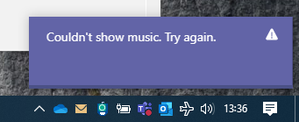
Good day! Some coworkers have a team with about 50 channels where no one can show or hide any of the channels. I did a little troubleshooting on this already but I just can't figure out anything to make it work. The error message is "Couldn't show [channel name]. Try again." This happens in the web client and app alike. It happens for everyone who tries to show any of the channels. When I try to hide a channel that was shown before, it will literally be hidden, but it still shows an error message saying that it couldn't hide the channel. Those are the only ones I can then "show" again, but I think it was not saving the setting to hide it in the first place. I assume if I quit and started again, it would not be hidden. Because I'm also a web developer, I got some more info from the browser developer console. I can see a little bit more error information in the server's JSON response: {"errorCode":201,"message":"User is no longer in thread roster."} That is the message body of a failed PUT to https ng.msg.gcc.teams.microsoft.com /v1/users/ME/conversations/{channel-id}/properties?name=favorite&requirePermanentJoinedState=true I broke up that URL and replaced the literal channel id with {channel-id} because I know it wouldn't be the clickable kind, anyway. I grabbed it from the Network tab of the developer console. The HTTP status of the reply was 400. The user experience is that it just says it failed and to try again, like in the screen cap. This is not a new team, but if it makes a difference, I added a bunch of channels last month, and a bunch of members started using it more, today, and just encountered the show/hide problem. I have personally shown and hidden channels last month on this team, but I can not today. I am in many other teams in this org, whose channels can be shown and hidden normally. No one who has tested in this one team can show or hide any channels and I'm unaware of any other teams that have the same problem.Solved6.1KViews0likes4Comments
Recent Blog Articles
No content to show