User Profile

BlatniBPMCP
Copper Contributor
Joined 9 years ago


User Widgets
Recent Discussions
Re: Azure Metric vs Performance counters show different values
Correctly. According to the tests and metrics collected on the network infrastucture is log analytic value is more exact/ identical to what ststistic is provide. Azure metric is more or less general information, how system behave that is in my opinion.767Views0likes0CommentsHo w to correctly measure Bytes Received/sec &&&&& Bytes Sent/sec
I would like to correctly measure through log analytic and then in Grafana network traffic generated for one or more VMs. For test VMs I have enable Data collection rule and enabled collecting data every 60s for network Interface "Bytes Received/sec" and "Bytes Sent/sec". Inside metric is also enabled. Query that I use in log analytic is : Perf | where TimeGenerated between (datetime(2024-03-19) .. datetime(2024-03-20)) | where Computer == "***********" | where ObjectName == "Network Interface" and CounterName == "Bytes Received/sec" and InstanceName == "Microsoft Hyper-V Network Adapter _2" | summarize BytsSent = sum(CounterValue)/1073741824 by bin(TimeGenerated, 24h),CounterName InsightsMetrics | where TimeGenerated between (datetime(2024-03-19) .. datetime(2024-03-20)) | where Origin == "vm.azm.ms" | where Namespace == "Network" and Name == "ReadBytesPerSecond" | where Computer == "******" | extend NetworkInterface=tostring(todynamic(Tags)["vm.azm.ms/networkDeviceId"]) | summarize AggregatedValue = sum(Val) by bin(TimeGenerated, 1d), Computer, _ResourceId, NetworkInterface Results for Perf is 0,32339 GB/day and for InsightsMetrics is 14.7931 GB/day. If I go to network interface and select metric data for network interface is data that I get return from query in log analytic for Metric same/correct . I have now shorten sample period of data collection rule to 15s, I hope that this will ,give more accurate results. I’m I doing something wrong or I collect data the wrong way. I don’t want to activate inside metric for every VM, I want to activate any data that I’m interesting.MS Team meeting recording sometimes woks sometimes not for SAME meeting
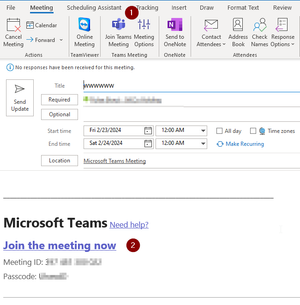
I have Permission to record the meetings and it is working….. But: I have Share mailbox where I have full access. I have created MS Team event. Event popup in my calendar. I click on event I open the event and click Join the meeting now. Option 1 Click join. click More-> Recording and transcribe -> Start recording is grey out ( Unavailable in this meeting) Start Transcription is available. Click Leave. option 2 Click join. click More-> Recording and transcribe -> Start recording is grey out ( Unavailable in this meeting) Start Transcription is available. Click Leave. Close calendar event. Repeat : Same event. Option 2 -> Recording and Transcript is available. Click Leave. Option 1 -> Recording is not available. Click Leave. Option 2 -> Recording is not available. Close calendar event . Open event again. Option 2 , but i select copy url. Past url to Edge browser select open with MS team client. Recording is available. Click Leave. Option 1 -> Recording is NOT available. Open event again. Option 2 , but i select copy url. Past url to Edge browser select open in browser Recording is not available.647Views0likes0CommentsSearch-UnifiedAuditLog ConvertFrom-Json AuditData nested data
HI, I’m searching O365 UnifiedAuditLog fro specific event. Problem is hat there is nested object and when doing conversion from Jason not all data is parsed. AuditData : {"CreationTime":"2020-09-07T11:34:11","Id":"xxxxxxxx-xxxx-xxxx-xxxx-xxxxxxxxxxxx","Operation":"FolderBind","OrganizationId":"xxxxxxxx-xxxx-xxxx-xxxx-xxxxxxxxxxx","RecordType":2,"ResultStatus":"Succeeded","UserKey":"1003200047779776","UserType":0,"Version":1,"Workload":"Exchange","ClientIP":"2603:xxxx:xxxx:xx:xxxx::81","UserId":"upn@doamin.com","AppId":"xxxxxxxx-xxxx-xxxx-xxxx-xxxxxxxxxx","ClientAppId":"xxxxxxxx-xxxx-xxxx-xxxx-xxxxxxxxxxx","ClientIPAddress":"2603:xxxx:xxxx:xx:xxxx::81","ClientInfoString":"Client=REST;Client=RESTSystem;;","ExternalAccess":false,"InternalLogonType":2,"LogonType":2,"LogonUserSid":"S-1-5-21-xxxxxxxxxx-xxxxxxxxxx-xxxxxxxxxx-xxxxxxx","MailboxGuid":"xxxxxxxx-xxxx-xxxx-xxxx-xxxxxxxxxxxx","MailboxOwnerSid":"S-1-5-21-xxxxxxxxxx-xxxxxxxxxx-xxxxxxxxxx-xxxxxxx","MailboxOwnerUPN":"upn@doamin.com","Organizat ":"domain.onmicrosoft.com","OriginatingServer":"VI1P195MBXXXX (15.20.3348.019)\u000d\u000a","Item":{"Id":"YYYYYYYYYYYYYYYYYYYYYYYYYYYYYYYYYYYYYYYYYYYYYYYYYYYYYYYYYYYYYYYY","ParentFolder":{"Id":"YYYYYYYYYYYYYYYYYYYYYYYYYYYYYYYYYYYYYYYYYYYYYYYYYYYYYYYYYYYYYYYY","Path":"\\Send"}}} Problem start with Item":{". Data that is returned Item : @{Id=YYYYYYYYYYYYYYYYYYYYYYYYYYYYYYYYYYYYYYYYYYYYYYYYYYYYYYYYYYYYYYYY; ParentFolder=} Is there any easy solution for this. I would like to pars output to CSV Br, Stane2.7KViews0likes1CommentForwarding email – to external no EPO polices are applied
Important, I have configure policy to allow external forwarding and add effected users to policy.. https://learn.microsoft.com/en-us/microsoft-365/security/office-365-security/outbound-spam-policies-external-email-forwarding?view=o365-worldwide#how-the-outbound-spam-filter-policy-settings-work-with-other-automatic-email-forwarding-controls I have Phishing policy : Anti-Phishing Policy (All Domains) + default Anti-spam policies Anti-spam policies Priority Priority 0 -> (Automatic forwarding On - Forwarding is enabled) Anti-spam inbound policy (Default) Connection filter policy (Default) Anti-spam outbound policy (Default) Issue is the following : Phish email arrive to O365 (I deliberately avoid EOP) : Mailbox with no forwarding : Email is scanned send to quarantine and user is informed Mailbox with with forwarding : Email is scanned send to quarantine and user is informed. <- As expected Same email is also directly forwarded to email defied in forwarding. <- Issue So the second part is Issue , Phish email is delivered to external user in original non scanned state. Is this by design ? I would expect that email should be scanned by EOP and not forwarded if it is detected as Phish. The only option, that I did not test was creating the inbox rue to forward email to external user.1.6KViews0likes1CommentMail enabled Public Folders : After Hybrid decommissioning
Hi, I plan to remove Exchange 2019 Habrid server and or related object. Management server will be left because we use Ad connect….. In this link is written : Use Directory-Based Edge Blocking to reject messages sent to invalid recipients in Exchange Online https://learn.microsoft.com/en-us/exchange/mail-flow-best-practices/use-directory-based-edge-blocking?WT.mc_id=M365-MVP-6771 DBEB is only supported for mail-enabled public folders hosted on-premises. Does it mean, that I need to move to shared mailboxes and disabled mail enabled public folders ? Thank you.351Views0likes0CommentsAnti phishing policy - license requirements
Hi, I would like to implement Anti phishing policy for some key users. Issue that I have is that we have O365 E3 + Mobile & Security E3 license. I have few E5 license available. I would like to create Policy that woud protect Key users and assign them E5 license, but as far as I understand if I chose under “Applied to” specific user those user need to have E5 license. Second part is Add users to protect and / or add domains to protect. If I chose again only specific users, those need license.. but if I chose “domains” all must have E5 license. Is this correct or is as soon I try to use ATP all users need do be license to E5 level. Br, Borut3.6KViews0likes1CommentSearch-UnifiedAuditLog – automation
Hi, I need advice. On weekly bases I am manually running Search-UnifiedAuditLog. Then I import csv file to PowerBi. I would like to automate that Search-UnifiedAuditLog If possible in Cloud and then to import data to powerBi. What would be proper way for this solution. Thank you. Br,Borut881Views1like1CommentCloud app security – MS teams url path */teams/*
Hi, I would like to filter out activity for files stored in SharePoint site that has path */teams/*. If I filter use activity log App == Microsoft Teams , I do not see activity for files that user downloads that are stored inside SharePoint site. All Teams are created under path */teams/* I can not find correct filer to filter this path. If I include SharePoint I get all activities that I do not want… Thank you BorutMailbox in Hybrid environment with LitigationHoldEnabled= False but LitigationHoldDuration = Unlim
Hi, I have migrated (remote move) mailboxes from on premise environment to Exchange online. I did not assign the license, but I do not understand following : This are attributes that bother me : LitigationHoldEnabled : False LitigationHoldDate : LitigationHoldOwner : LitigationHoldDuration : Unlimited RetentionHoldEnabled : False RetentionComment : RetentionUrl : RetentionPolicy : Recoverable Items move to Archive InPlaceHolds : {} IsInactiveMailbox : False Should mailbox be automatically disabled after 30 days ? and from where is coming LitigationHoldDuration unlimited ? Br, Stane1.6KViews0likes1CommentMailbox Move folder TeamsMessagesData
Hi, I’m migrating on-premises mailboxes to O365. Several mailboxes have an issue with folder (I believe is a folder) TeamsMessagesData. I have connect with MFCMapi to effected mailbox, but I can not find this folder. Log : MapiExceptionPartialCompletion: SetProps had property problems (hr=0x40680, ec=0) ROP: ropSetProps [10] ROP: ropExtendedError [250] Folder: type Generic, wkf TeamsMessagesData, entryId [len=46, data=000000003C9EC14A24F56943B0A04A2BED400FE7010030297BE276A00B419527ACAD53F8776000007FE6B7C70000], parentId [len=46, data=000000003C9EC14A24F56943B0A04A2BED400FE70100242AECB3AA549048B74AFA7CED2BED090000000001010000] InnerException : PartialCompletionException: Properties couldn't be set. Exception = Microsoft.Mapi.MapiExceptionPartialCompletion: MapiExceptionPartialCompletion: SetProps had property problems (hr=0x40680, ec=0) Br, Borut4.3KViews0likes3CommentsLog Configuration Changes Office 365
Hi, Is there an option to see configuration changes done by admin. For example, I cannot find who change tenant wide settings for team for example enable or disabled external communication ? This is not in audit logs, compliance center etc… Br, Borut9.6KViews0likes2Comments
Recent Blog Articles
No content to show