User Profile

chuckmi
Copper Contributor
Joined 6 years ago


User Widgets
Recent Discussions
Cannot run batch file in Task Scheduler which runs Python program.
I have Windows 10, we have a network and I log into my laptop with a network Active Directory userid. I have Task Manager v1.0. No idea why the version is so low for Windows 10. When I run a simple batch file called test.bat: echo This is a test >> "C:\Users\MYUSER\OneDrive - COMP\Documents\PythonProjects\COMP\Test\Proforma\logtest.txt" It runs fine. But when I run another batch file called godailyauto.bat in the same directory, which calls a Python program, I get this error: "Task Scheduler failed to start "\crProformaTest" task for user "COMPANY\MYUSER". Additional Data: Error Value: 2147942667." I have the task: Set to use my username and only run if I am logged on, to reduce potential problems. It is not set to run with Highest Privileges. I tried that and it didn't work either. On the Task Settings tab I have checked "Allow task to run on demand". The task starts but gets an error. How do I get godailyauto.bat to run properly from Task Scheduler? Do I need to install updates for Windows Task Scheduler? Thank you.122Views0likes1CommentHow to fix this error "Error encountered while parsing data"?
I have an MS SQL server installation which is an Azure Synapse SQL server. The Azure database is a copy of an original database. I have confirmed the field Shiptable.mydate is in Azure SQL database. I'm using Power BI from July 2024 to read the data but this seems like an SQL Server error. I'm not the SQL Server or Azure admin though. I sometimes look at a date field and grab records from the last N days, like last 60 days. This formula works on all other date fields on other tables: WHERE (mydate >= DATEADD(day, -50, GETDATE()) ) But it doesn't work on a date field Shiptable.mydate. When I do this WHERE (mydate >= DATEADD(MONTH, -13, CAST(GETDATE() AS DATE))) on Shiptable I get this error: DataSource.Error: Microsoft SQL: Error encountered while parsing data: 'Inserting value to batch for column type DATETIME2 failed. Invalid argument provided.'. The field type, seen via SSMS, is indeed datetime2. EDIT: Running the query in SSMS with the WHERE clause above also fails with the same error. It takes over 2 minutes to fail. Any idea how to fix this? Thank you.727Views0likes0CommentsXML to CSV: how to remove CRLF from XML source field?
I'm new to Azure Data Factory. I made an Azure Pipeline with a Data Flow. I wanted to convert an XML file to a CSV file and I used this tutorial: https://www.youtube.com/watch?v=ltR5xof6wq8 In the XML source file there are embedded carriage returns in the <description> tag which appear in the resulting CSV file. This makes the output CSV file invalid since only one record should appear per line. The XML file was created by copying the data from https://learn.microsoft.com/en-us/previous-versions/windows/desktop/ms762271(v=vs.85), pasting it into a plain XML file, and uploading the file to Azure storage. How do I get rid of the CRLF in the Description field? I don't even know where to start looking since I'm pretty new to Azure Data Factory. Maybe I'm asking the wrong question. In your world, would a valid XML file possibly have embedded CRLF in some of its fields? In my world we get all kinds of garbage data from the customer that they don't know how to fix. NOTE: I must use Azure Data Factory for this solution, I cannot use another Azure service or outside service. It is not feasible to manually edit the input file or output file as in production, the files could be quite large. Thank you.197Views0likes0CommentsOne person I email daily does not appear in TO field quick list.
My system: Windows 10 Pro on a laptop with Outlook 365. Here are the steps I take: I email my boss every day. Let's say his name is Gary. When I make a new email, in the TO field I type "Gary" and there are 2 Gary's in our address book. But only one appears in the quick list/autocomplete list that appears below the TO field. If I click the TO button I can see all Gary's when I search for Gary in the address book. Then I can choose my boss's name from there. How do I get my boss to appear in the normal quick list when I type his name in the TO field? Thank you.Solved108KViews2likes13CommentsBetter Wiki app for MS Teams?
Hi, We have a subscription to Office 365. I looked at the Wiki which comes with MS Teams and it's very basic. I can't even add a new page, or edit a link to an external website. Is there another app available to integrate with MS Teams that is a robust information manager? We're going to start out with 20 pages or so, and be adding more over the years so it needs to have multiple Wiki pages which I can organize in a logical fashion. And I'm not familiar with all the apps that can be integrated with MS Teams. I guess I should be more specific in what I'm looking for: The ability to create more pages in the wiki to organize topics. The ability to link to pages inside and outside of the wiki/app. Including images of screenshots are critical. Bulleted and numbered lists are important to list the steps to fix things or get things done. Bold, italic formatting. Making section headers that are a larger font. Most of the basic features of MediaWiki. Ability to comment on a wiki page to suggest changes or ask for clarifications. Footnotes would be very nice to point people to the original source. Thank you!15KViews1like3CommentsHow to cut and paste selected text in a numbered list?
I have MS Teams (latest version, updates are done automatically) on Windows 10, and I use the desktop app. In the MS Teams wiki I made a numbered list under a header. I wrote 4 lines of text, selected it, then chose the numbered list formatting button. But when I selected 2 list items by dragging my cursor over them, I cannot delete the text using BACKSPACE, DELETE key, or use CTL-X to cut it. Can this functionality be added? Thank you. EDIT: This seems to be an intermittent problem. The DELETE key worked this time when I selected text with my mouse. Ok the problem is I see no indicator to tell me if I'm in edit mode for this section of the wiki page or not. If I'm in edit mode the DELETE key seems to work.Solved1.1KViews2likes1CommentRe: How do I change an email folder toolbar in Outlook 365?
Thank you Victor. Those options are for the reading message toolbar (toolbar that is to the right of the sender's name in each mesage), and composing a message toolbar, not for the inbox toolbar. And under the Quick Actions I have "Mark as read or unread" already checked and it does not affect the inbox toolbar.2.6KViews0likes0CommentsOutook 365 does not keep sort order of Inbox.
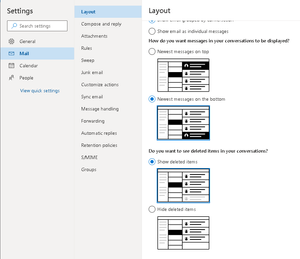
We have a new corporate installation of Office 365. I'm now using Outlook 365 via a browser and outlook.office.com. I use Remote Desktop from home to get access to my work PC. Outlook 365 does not seem to keep the sort settings. Sometimes outlook.office.com does a browser refresh and, regardless of my inbox sort settings, the messages are always sorted "Oldest messages last". I would like it to always use "Oldest messages first". I have already set the sort order via Filter, Sort, Oldest On Top but outlook tends to revert back to Oldest Messages Last for some reason, like any time the Outlook site, or I, do a manual page reload. My settings are already set to show Oldest Messages First, but the messages shown area actually Oldest Messages Last. Below are my settings. Any ideas how to fix this? Is this a known bug? Thank you.1.1KViews0likes0CommentsHow do I set a retention policy for Deleted Items, Junk Email, and Sent Items?
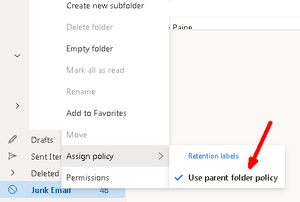
We have a new corporate installation of Office 365. I'm now using Outlook 365 via a browser and outlook.office.com. I'm a user, I don't have admin rights to this system. Office 365 is on my work PC and I use Remote Desktop to from home to access my work PC. I'd like to set a retention policy for these default folders: Deleted Items, Junk Email, Sent Items, but cannot. The RPs for these folders seem to be preset. These are the folders that fill up the fastest so I want to make sure I don't run out of storage space. When I right click on Junk Email to set the RP the right-click menu just says "uses Parent policy". See screenshot below. Do I have to talk to our IT department about this? I'd like to retain only 30 days of messages in Deleted Items, Junk Email, and Sent Items. We just don't have the space to keep a year of messages (the default for Outlook 365 RPs) as we often have large attachments on emails, some 20MB or more. EDIT: The inbox does not appear to be the parent folder of these mail boxes and I don't know which would be the parent folder of them. Thank you!2.8KViews0likes1CommentHow do I change an email folder toolbar in Outlook 365?
We have a new corporate installation of Office 365. I'm now using Outlook 365 via a browser and outlook.office.com. How do I change the toolbar icons above most email folders, like the ones in the red box below? I don't really use Snooze but I will use Mark as Read a lot. I poked around in the settings, did a search for an answer but did not find an answer. The toolbar below is for the inbox. Thank you!2.7KViews1like2Comments

Recent Blog Articles
No content to show