User Profile

Tristan999
Iron Contributor
Joined 6 years ago


User Widgets
Recent Discussions
SPO Advanced Column Formatting - Possible Bug - Details Pane
Hello, Advanced Column Formatting - Blank Values are no longer applied to empty fields. I applied advanced column formatting to a field if the value is blank. This is because we have a background process (Power Automate) that would assign a value to that field, and we didn't want to spend a lot of time creating a Power Apps that does this. It worked a week ago, and there have been no changes to the column formatting. We still see the advanced column formatting being applied to the list view. However, in the details pane, the advanced column formatting is no longer applied if the value is blank. We see the advanced column formatting when there is a value. Please help! Thanks!276Views0likes0CommentsRe: SharePoint 2016 Server - mquery.js event deprecation
Dave66_75 It's unfortunate they haven't given you what could be impacted. I think the patching model is now SaaS --> On-Premises. You could try doing some assessments on your own by installing an early release of Chrome and see if it breaks anything. Mutation events will be removed from Chrome | Blog | Chrome for Developers As an additional option: Origin Trials (chrome.com)3.1KViews1like1CommentSharePoint Migration API - MP4 Files get's an additional version after X amount of time.
Hi all, I have a custom application that which uses the SharePoint migration API. There is a strange behavior where if I migrate MP4 for files it would migrate properly, but after an X amount of time, the MP4 file gets an additional version. For example: I have a Test.MP4 file, it gets uploaded to SharePoint using the migration API. The file in SharePoint is now tagged with the version label 1.0 After some time, the file gets another version, 1.1, which shows the Modified By value SharePoint App364Views1like1CommentRe: Suggestions on Sharepoint Migration
The first step in a SharePoint transformation is to analyze your current content, which will be used in an information architecture. The information architecture defines what your structure will look like (site structure, taxonomy, folksonomy, access, etc..,). Ensure you have governance and change management plans for your digital transformation. This would help transition your users from your current system to SPO and help plan for growth. It is a big undertaking, and I recommend using a SharePoint architect. Some licenses are eligible for the FastTrack program - https://www.microsoft.com/en-ca/fasttrack/#:~:text=FastTrack%20helps%20customers%20deploy%20Microsoft%20cloud%20solutions.%20Customers,FastTrack%2C%20a%20service%20included%20in%20your%20Microsoft%20subscription. Hopefully, this helps! Please like and mark as best response if this helped you 🙂1.2KViews0likes0CommentsRe: SPO List Calculated Column Link Not Displayed in Edit Form
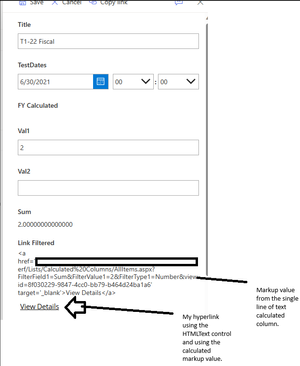
MeganP2095 sounds good. FYI, no advanced formatting can be applied to modify the Edit/New/View forms directly. PowerApps and SPFx Form Customizer are the only way to modify those. I know this since I've had to do this for clients. SPFx is for developers, and PowerApps is for power users/developers. ** Note: You don't have to use a calculated field. I was showing one possibility using a calculated field. You can use the HtmlText and manipulate insert whatever you need in there as a filter for your view.1.8KViews1like0CommentsRe: Sharepoint Calculated field to next date
Glitter140 Unfortunately, you cannot use lookup fields in a calculated column. However, you can create it in the Lookup List where you can use calculated columns. I did a small PoC which may give you some ideas. Here is my Lookup List - Meetings: I created a Meeting Date so it could easily be used in another calculated column. This column would check if that date is in the past: Occurred values would then be used to assign a text value in the Next Meeting calculated column: Then the Meetings list can be used in List/Document Library as a lookup list as field that accepts multiple values with The Meeting Date and Next Meeting to display in the view. In my case, I had created another list and created a lookup field called Meeting ID: It's close to what you are looking for. Note that there is the semicolon separator but you can easily use advanced formatting to overcome that. It's not perfect since you still need to account for other dates that are in the future with this example, but that should give you some ideas. You can use the following advanced formatting: { "$schema": "https://developer.microsoft.com/json-schemas/sp/column-formatting.schema.json", "elmType": "div", "txtContent": "=join(split(@currentField, '; '), '\n')", "style": { "white-space": "pre-line" } } This would display something like this (if applied to Meeting Date and Next Meeting): Please like & mark as best response if this helped you 🙂544Views0likes0CommentsRe: New Teams Bug - Open file using "Open in App"
jhassallclarke Will do! I have not created a ticket since this product is still fairly new, and you still have the option to use classic Teams. I would recommend using the "Give Feedback" functionality in the new Teams so that Microsoft would at the very least give the option to open files in the context of Teams or in Office the application.4.9KViews0likes5CommentsRe: SPO List Calculated Column Link Not Displayed in Edit Form
MeganP2095 I did a quick PoC with PowerApps and here is what my Edit form looks like afterwards: ** NOTE: You can hide the markup if you wanted to. For the purposes of my PoC I just wanted to show it. In my case, I just created and added an HtmlText control and set the value using the calculated column markup. It's just pointing to the same list view with that filters the list items using the Sum value. DataCardValue6 is the calculated column value which is what generates the HTML markup. Please like and mark as best response if this helps you 🙂1.7KViews1like2CommentsRe: Sharepoint Crawling doesn't auto run as per schedule.
Jason120 Running a SharePoint on-premises is very involved. Based on your posts (i.e., the WSS_Content - using defaults, not knowing how to read ULS logs). So far, I gather that you are very new in the SharePoint world. And, I mean no offence by that. We all have to start somewhere! The images and the errors I am seeing look like there's more issues in your SharePoint Farm than just the search service application. You may want to take a look at this book Amazon.com: Deploying SharePoint 2019: Installing, Configuring, and Optimizing for On-Premises and Hybrid Scenarios eBook : Catrinescu, Vlad, Seward, Trevor: Books - I have no affiliation to these guys, but they are both well known in the SharePoint world. Perhaps consider getting some assistance by using a contractor/consultant (specifically an architect) to begin your SharePoint journey as it could be overwhelming to maintain for beginners. If you do end up hiring help, make sure to work with them closely and ask as much questions as possible, get them to generate the build books, information architecture, etc.,1.8KViews0likes1CommentRe: Calculated Column with Dates and "IF"
RJF61 Please include the error when you post. I do get the gist of what you are trying to do. Here is a starter sample of what you were trying to do: =IF(AND(Created>DATE(2021,6,30),Created<DATE(2022,7,1)),"2022",IF(AND(Created>DATE(2022,6,30),Created<DATE(2023,7,1)),"2023","")) Please like and mark as best response if this helped you 🙂20KViews1like1CommentRe: Calculated Column with Dates and "IF"
RJF61 You need to add the error you are receiving. I do get the gist of what you are trying to do so here is an example: In SharePoint, you can use calculated columns to display data based on other columns in your list or library. To achieve your goal, you can create a calculated column with a formula that checks the "Created" field and returns the string "2022" or "2023" or "2024" based on the specified date ranges. Here's how you can do it: 1. Go to your SharePoint list or library. 2. Click on "Settings" (gear icon) and then select "List settings" or "Library settings" depending on what you have. 3. Under the Columns section, click on "Create column." 4. Give your column a name, like "Fiscal Year" 5. For the type of information in this column, choose "Calculated (calculation based on other columns)." 6. In the "Formula" box, enter the following formula: =IF(AND(Created>DATE(2021,6,30),Created<DATE(2022,7,1)),"2022",IF(AND(Created>DATE(2022,6,30),Created<=DATE(2023,7,1)),"2023","2024")) This formula checks if the "Created" date falls within the specified ranges and returns the appropriate string. 7. For "The data type returned from this formula is:", select "Single line of text." 8. Click "OK" to save the column. Now, when items are added to your list or library, this new column will automatically display "2022" or "2023" based on when the item was created. If the creation date does not fall within the specified ranges, the column will be empty. Please like and mark as best response if you found this helpful 🙂18KViews1like0CommentsRe: SharePoint system sizing
Omni_Knight Correct. My mistake on that calculation - 14TB. Your tenant will have a max of 14TB for SharePoint. When you create a site collection, there is an entry to configure the max storage you want to have per site collection. The default site collection setting for max storage is 25TB, but you cannot exceed your tenant max storage. In your case, 14TB OOTB. To give you some context. Here is the SharePoint Admin Center in my DEV tenant with 25 licenses: I just checked and I guess the default site collection size which is Auto. I changed it to Manual and here is the default:1.9KViews0likes0CommentsRe: SharePoint system sizing
Omni_Knight You are mistaken. The 25TB limit is per site collection. SharePoint limits - Service Descriptions | Microsoft Learn So, if you were to go with F1 or F3 based on that table. The limit is 50 exabytes (25 TB x 2,000,000 site collections). With the number of users that you have, you would get 14 TB OOTB and then you can choose to purchase additional storage if you need to - Add more SharePoint storage to your subscription | Microsoft Learn. Just make sure you have all your requirements ahead of time and know the features that come with each M365 plan such as security, compliance, etc., Consider hiring a consultant to implement best practices (implement a proper information architecture, security, governance, adoption, training, etc.,). Being able to store information online is one story, maintaining and keeping the environment secured is another. Let me know 🙂 I know a few people in the industry.2KViews1like4Comments




Recent Blog Articles
No content to show