User Profile

DanMoorehead_PowerWeb5AI
Iron Contributor
Joined 9 years ago


User Widgets
Recent Discussions
Microsoft Office 2019 Now Available – Comparing 2019 vs 2016 vs 365, New Features in Access & Excel
Microsoft Office 2019 is out! Microsoft started the roll-out today of Microsoft Office 2019 for Windows & Mac – with major updates to Access, Excel, Word, PowerPoint, Outlook, Project, Visio, and Publisher – to commercial volume license customers. Microsoft is following up with Office 2019 releases to consumers and other business customers, as well as SharePoint / Exchange / Skype / Project Server 2019 releases, in the coming weeks. Office 2019 provides a subset of features Microsoft has added to Office 365 over the past three years. As Office 2019 is a one-time release, Office 365 is still the better choice with not only far more features (Co-Authoring, etc) unavailable in Office 2019, but also far earlier access to them than on-premises, non-subscription Office 2019, etc. editions. Speculation has been that Office 2019 may be the last perpetual license (on-premises / non-subscription) release of Office, so that Microsoft can focus in on its Office 365 subscription offerings. However, Microsoft has responded in one case that there is likely to be one more perpetual license release after this one. Either way, Microsoft Office 2019 product pages even describe Office 2019 as a "one-time release" with Office 365 being needed to gain access to new features after that. It may also be that there are fewer editions available for Office 2019 than for Office 2016. Whether you move to Office 2019 or 365, it's suggested you don't delay doing so, as Office 2016 cloud support will be dropped in 2020, with Office 2016 installs barred from connecting to Microsoft's cloud-based services, including hosted email (Exchange) and online storage (OneDrive for Business), after Oct. 13, 2020. New in Office 2019 Word – text-to-speech, improved inking & accessibility, focus mode, translator, Learning tools (captions & audio descriptions), @ Mentions PowerPoint – Morph transitions, Zoom, SVG, 3D model, play in-click sequence, 4k video, @ Mentions Excel – Power Query (Get & Transform) enhancements, Power Pivot included with all editions, new functions & connectors, publish to Power BI, AI-driven Excel Insights for chart suggestions, new charts, @ Mentions Excludes Co-Authoring, new Data Types like Stocks, and some other new features only available in Office 365 Outlook – @ Mentions, Office 365 Groups OneNote – OneNote for Windows 10 (Modern App included with Windows) has replaced OneNote desktop app (though OneNote 2016 will be available via Volume License Install tool) All Office apps – Ribbon customizations and roaming pencil case Microsoft Access - including the many updates we've seen recently such as: Modern Charts New Linked Table Manager Dark theme Big Int Salesforce & Dynamics connectors Other Recent Developments with Microsoft Access It's especially exciting to see all the new features, growing user base and communities, new integrations, and development team responsiveness seen with Microsoft Access of late. Inclusion on the Office templates page Which I hope will become permanent soon SQL Server Migration Assistant (SSMA) updates ODBC and OLE DB driver updates – for optimized use and new feature support for SQL Server, Azure SQL and other back-ends databases Power BI support (via On-Premises Data Gateway) Considering On-Premises Data Gateway is shared with PowerApps, hopefully that means we may see PowerApps support too in the future New & growing Access conferences and user communities: New Access Developers' Day in Amsterdam DevCon in Vienna, AEK in Germany, UKAUG in UK, PAUG in Portland, Access Day in Redmond, Access Madrid in Spain Presence at Microsoft Ignite and other conferences Access User Groups (AUG) webinars and local chapters (Chicago, Denver, Madrid, Hertfordshire, etc.) Access now included in most Office editions Included in nearly all (besides Online-only) editions Access in Office 365 Home, Personal, Business, Business Premium, ProPlus, E3, and E5 editions Access in Office 2016 Professional and ProPlus editions With MS Access having been added to most Office editions, presumably it will likewise be available with most Office 2019 editions now too. It's great to see these features available to Office 365 subscribers (or even sooner if opt-in for Insiders program) now being made available to others with Office 2019, and I look forward to the many more new advancements with Microsoft Access and Office to come. Links to More Info about Office 2019 You can find out more about Office 2019 with the following articles, FAQs and product pages: https://products.office.com/en-us/business/office-365-proplus?activetab=tabs%3aprimaryr4 https://support.microsoft.com/en-us/help/4133312/office-2019-commercial-for-windows-and-mac-frequently-asked-questions https://www.microsoft.com/en-us/microsoft-365/blog/2018/09/24/office-2019-is-now-available-for-windows-and-mac/ https://www.computerworld.com/article/3229906/software-productivity/office-2019-is-coming-heres-what-you-need-to-know.html https://www.theverge.com/2018/9/24/17896700/microsoft-office-2019-release-date-features https://www.zdnet.com/article/microsoft-starts-rolling-out-office-2019-for-windows-and-mac/ https://www.engadget.com/2018/09/24/microsoft-releases-office-2019/ https://venturebeat.com/2018/09/24/microsoft-launches-office-2019-for-windows-and-mac-promises-it-wont-be-the-last/ https://www.techspot.com/news/76598-microsoft-office-2019-launches-commercial-customers.html -- Dan Moorehead Founder & Chief Software Architect PowerAccess (https://www.PowerAccess.net "Empower Microsoft Access – with new Tools | VBA Framework | PowerGit | Power Query-like PowerSQL | VSTO-like .NET API | CodeGen | Excel Formulas & Functions | Consulting | Excel ➜ Access ➜ SQL Conversion Tools"Solved413KViews8likes21CommentsRe: Bug: Selecting Text Causing Other Lines to Render as Random Characters (in Edge v81.0.403.1)
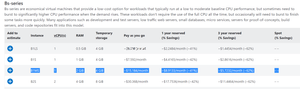
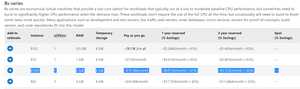
Unfortunately, the major update for Dev channel just out today (81.0.410.1) failed to fix the text rendering issues occurring after text selection. You can see the issue remains in the below screenshot (eg. occurring at https://azure.microsoft.com/en-us/pricing/details/virtual-machines/linux/ ) with random characters under "Pay as you go" above the selected text, which appears as different random symbols every time re-rendering occurs (eg. Alt-Tab and back): Also, the issue remains even after deselecting text, as shown in the below screenshot, even after Alt-Tab or otherwise causing it be re-rendered again:3.8KViews0likes1CommentRe: Dev channel update to 81.0.403.1 is live
HotCakeXUnfortunately, the major update for Dev channel just out today (81.0.410.1) failed to fix the text rendering issues occurring after text selection. You can see the issue remains in the below screenshot (eg. occurring on https://azure.microsoft.com/en-us/pricing/details/virtual-machines/linux/) with random characters under "Pay as you go" above the selected text, which appears as different random symbols every time re-rendering occurs (eg. Alt-Tab and back). Also, the issue remains even after deselecting text, as shown in the below screenshot, even after Alt-Tab or otherwise causing it be re-rendered again:5.5KViews0likes1CommentRe: Dev channel update to 81.0.403.1 is live
jbart007, josh_bodner and Heath Bates I'm also encountering text rendering issues like you'd described occurring when selecting text after updating to Edge v81.0.403.1 and also installing KB4528760 and KB4532938 for Win10, like seen in the below screenshot: I've provided some additional details (as well as referenced your comments) in my attempts to narrow down under what circumstances this occurs in a new thread: Bug: Selecting Text Causing Other Lines to Render as Random Characters (in Edge v81.0.403.1) Hopefully, that new thread will at least help save time for others encountering the issue and considering submitting bug reports regarding it or provide some more details to help narrow down and fix the issue. The issue remains in some cases even after deselecting text, and appears intermittent, as I'd detailed in that thread. Alt-tabbing and other cases where rendering/repaint gets triggered again result in different random characters appearing each time. Please feel free to chime in, in that thread, if have any further details to add.7KViews2likes4CommentsBug: Selecting Text Causing Other Lines to Render as Random Characters (in Edge v81.0.403.1)
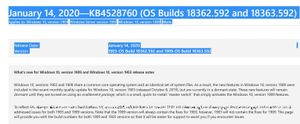
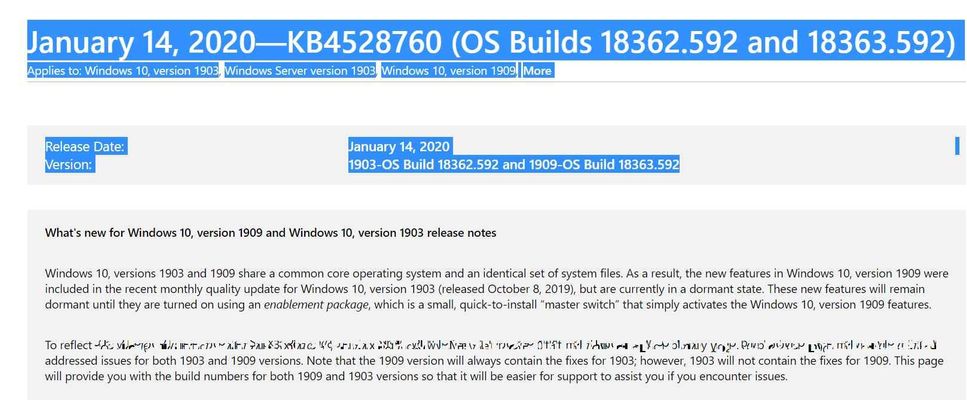
Since updating to Edge v81.0.403.1 (as well as KB4528760 and KB4532938 at the same time in my case), I (and several others) are often encountering a major text rendering issue where nearly whole lines of text end up completely scrambled with seemingly random symbols appearing in place of letters, with different random symbols occurring ever time re-rendering of the text is triggered. You can see the issue in the screenshot below of https://support.microsoft.com/en-us/help/4528760/windows-10-update-kb4528760 (for example, out of the dozens of sites it's occurred on). This issue occurs frequently (up to dozens of times per day), always after selecting text, but not ever time text is selected. This issue has occurred with dozens of different websites, and regardless of whether browsing in InPrivate mode with all extensions disabled. This issue only began occurring around 1/30/2020 after I updated to Edge Chromium Dev v81.0.403.1 (64-bit) and also installed KB4528760 and KB4532938 for Windows 10 Pro 1909 x64 (18363.592) at the same time, and I haven't encountered with any other browsers or Windows apps or UI. This often (but not always) affects nearly a whole line (after word-wrap) of text, often (but not always) in the paragraph following the one where text had been selected. Any action which causes the text to be rendered again – such as Alt-Tab (to a window on top of the browser) and back again, or selecting the affected text (to highlight it), or Win+Shift+S (causing screen to be tinted gray for screenshot selection), etc. – causes different random symbols to appear for the exact same portion of text that was affected. In some cases, deselecting all text will cause the rendering issues to temporarily cease, and in other cases, it just causes the random symbols to change to different random symbols instead. This is an intermittent issue. At times I can reproduce it dozens of times in a row, and other times I can go 20 minutes without being able to reproduce it even when trying intentionally to do so. Refreshing a page can cause this issue to go away temporarily. However, once it starts occurring it seems to occur more often for various pages or every time text is selected on a page. I also reported this issue with steps to reproduce via Send Feedback in Edge Dev, along with my email address. However, as I, unfortunately, have no way to reference that report here or reply to it or know it will be noticed (as can't flag as a bug or critical issue), I'm reporting it here as well. I'd appreciate it if this bug report could be passed along to the development team, especially as others have confirmed this issue here in this forums. I'm reporting the issue here with further details in case it may prove helpful, and also so that it may be easier for others encountering the same issue to find here so don't have to take the time to write up their own details reports regarding it. After, my initial report, I also found others, such as josh_bodner, jbart007 and Heath Bates, in this reply to the Edge v81.0.403.1 release announcement thread. My Configuration Edge Chromium Dev v81.0.403.1 (64-bit) Windows 10 Pro 1909 x64 (18363.592) KB4528760 and KB4532938 just installed at same time as the Edge Dev update For about:flags, I have Disabled #calculate-native-win-occlusion, #web-contents-occlusion and Enabled #edge-autoplay-user-setting-block-option, #dns-over-https, #quiet-notification-prompts. Multiple Edge Dev instances open with different profiles and 3 screens in use. NVIDIA GeForce GTX 1060 (Driver 441.66 installed 12/10/19) 32GB RAM Intel i9-9900K. Issues only began after updating Edge Dev and Windows, not any adjustment of flags, drivers or other configuration or browser usage changes. Additional Screenshots of the Issue As seen in these screenshots, this issue results in different random symbols showing each time re-rendering is triggered for text which occurs in close proximity to where different text had been selected. Sometimes different lines end up affected, sometimes the issue temporarily disappears after deselecting text, and sometimes different symbols appear for the exact same portion of text when triggering re-rendering or when changing what, if any, other text is selected.Solved4.2KViews3likes4CommentsRe: Microsoft Office 2019 Now Available – Comparing 2019 vs 2016 vs 365, New Features in Access & Excel
oliviadudley You have a good point. I would suggest you submit a feature request for changing Dark Themes to have improved readability with font colors used on https://access.uservoice.com/, as the official site for adding feature/change/bug fix requests for Access. If others vote for it, then Microsoft may have address it. You can then post a link here or elsewhere suggesting others vote for that feature (or they can do so if searching for existing similar requests to vote for). You can also vote for and comment on other feature requests there, as well as on the other User Voice sites for https://excel.uservoice.com/ and https://officespdev.uservoice.com/ (for Office.js, VBA, Add-in development, VSTO, and the like). Comments can also help to encourage others to vote or provide details later on (as can't edit once you post) or to provide details on why this should be considered important. I hope that helps, Dan -- Dan Moorehead CTO, https://www.PowerSheet.ai https://www.PowerSheet.ai ● https://www.linkedin.com/in/DanMoorehead/ ● https://twitter.com/PowerSheetAI ● https://www.facebook.com/DanLMoorehead ● https://www.youtube.com/channel/UCgmqX5jfVjZHlVnfc2HwXrA ● (206) 792-9969 ● dan.moorehead (Skype) Free Easy AI-powered BI, Data Cleaning & Collaboration in Excel & Online ● Business Intelligence ● Reporting ● Collaboration ● Data Cleaning ● BI Dashboards ● Database Building ● Forms ● Accounting ● Financial Reporting ● Cloud Templates ● Instant Version History & Compare ● Collaborative Editing Anywhere/Offline ● Web Publishing in ● Excel ● PowerPoint ● SharePoint ● Online277KViews2likes0CommentsRe: Procedure Name
McPegasus Unfortunately, it is not possible to obtain the name of the currently executing procedure or function in VBA. There are many limitations with VBA compared to other more modern languages like JavaScript, TypeScript, C#, and .NET, with runtime reflection, async / multi-threaded coding, function pointers/objects/passing, callbacks, multiple classes per file, try-catch (vs On Error Go To), shared try-catch/logging (by passing inline arrow function definitions, like try(() => console.log)), easier debugging, more concise code, large class libraries, regex, more modern (tabbed) IDEs/editors, and the like. However, you may find it helpful to enable "Break in Class Module" under VBE (VBA Editor) > Options, and/or use Ctrl+L to show the Call Stack window when debugging, and add Watches there as well as use the Immediate Window. You can handle errors via On Error GoTo OnError statement for example and write error handling code like OnError: LogError(funcName) function which calls Debug.Print, but that requires writing out LogError("MyFuncName") for each function. However, if you're scripting macros and events with JavaScript or C#-like TypeScript macros in Microsoft Access - as is now possible with the PowerAccess.js Framework for Microsoft Access, as I'd just presented on and demoed at Access Day 2019 in Redmond last week -- which makes it possible to run JavaScript without any WebBrowser Control and use any JavaScript API and library from within VBA and use the full Access VBA/Automation API from JavaScript, as well as use IE11 HTML5 UIs embedded into forms -- then you could use arguments.callee or getCallerFuncName() (defined via: function getCallerFuncName() {return getFuncName.caller.name;}) (when don't have Strict Mode enabled). You can also pass functions around as objects/variables, for event handlers and the like, and use var func = (arg) => { console.log(func.name); } for example. In that case, you can write JavaScript macros (and C#-like TypeScript macros and event handlers) using PowerAccess' included Script Editor (an embedded version of Visual Studio Code provided install-free with PowerAccess.js or with the PowerAccess All-in-One Toolset) or else using full Visual Studio Code or Visual Studio instead of older limited VBE. With PowerAccess.js, you also then have access to 800,000 libraries, web APIs and NPM packages available, to use from VBA and JavaScript, and C#-like TypeScript macros alike, whether for Microsoft Graph, Azure Active Directory, QuickBooks, FTP, web APIs, logging or anything else you could imagine, without needing to rewrite it all from scratch in VBA, and all without needing to compile and COM register or install (like an add-in) as needed with .NET. This is why macro & Add-in development for Excel and the rest of the Office applications has moved to JavaScript / TypeScript with Office.js, where all the new Automation (Macro) functions / APIs are being developed. JavaScript / TypeScript is also what we had used to build PowerExcel.ai and PowerAnalytics.ai to provide install-free, workbook embedded Excel Add-ins for AI generated Power Query and enhanced Pivot Tables and other AI powered tools and formula functions. And it's how we brought rich Pivot Table reports to Microsoft Access (also provided as part of PowerAccess.js, and available for Excel as Power Reports for PowerAnalytics.ai). Once we began porting PowerAccess VBA Framework and PowerSQL Functions to TypeScript / JavaScript with PowerAccess.js, we've been able to simplify and speedup development greatly, and enable code reuse across our Access databases, Excel, SQL Server, mobile, Azure cloud, web and other solutions, and avoid reinventing the wheel through use of dozens on NPM packages / existing libraries and samples instead. If you're interested in PowerAccess.js for JavaScript and C#-like TypeScript macros or rich Pivot Tables with end-user sort/filter/grouping, charts and inline data editing, then you can register as PowerAccess.net to get notified once available for early adopters. We are planning to include some of our dozens of new power tools for MS Access, like Global Find & Replace and/or Power SQL Editor (modern SQL editor with Intellisense code completion, syntax highlighting, Find & Replace, etc.), in a free PowerAccess Express edition as well, in addition to inexpensive subscription options for all the tools and features. Also, if you're interested in http://PowerExcel.ai AI power tools (like Power Query and Pivot Table auto-generation) and new functions or PowerAnalytics.ai AI automated Data Prep for Excel, Access and Cloud, then you can register at https://PowerAnalytics.ai or begin using the cloud based version available online now. I hope that helps. Best regards, Dan -- Dan Moorehead Founder & CTO, https://www.poweraccess.net/poweraccessjs-javascript-pivottable | http://PowerExcel.ai | https://PowerAnalytics.ai1.9KViews1like1CommentRe: Microsoft Office 2019 Now Available – Comparing 2019 vs 2016 vs 365, New Features in Access & Excel
Mwandingi_03 You can use either of the following 2 formulas in Excel to accomplish what you had asked about, so that the first non-blank date cell is returned, either in Sheet1 A4 (preferred) or else Sheet1 A1, or else, if both are empty, then the result is an empty string, so that the result is also a blank. =IFS(NOT(ISBLANK(Sheet1!A4)),Sheet1!A4,NOT(ISBLANK(Sheet1!A1)),Sheet1!A1, TRUE, "") =IF(ISBLANK(Sheet1!A4),IF(ISBLANK(Sheet1!A1),"",Sheet1!A1),Sheet1!A4) As you can see this common use case is far more complicated than it should be. That is, in part, why I had developed http://www.PowerExcel.net, which is an install-free (JavaScript-based) and workbook embedded Excel Add-in which brings dozens of new functions for use in formulas, enabling the following instead: =FirstOf(Sheet1!A4,Sheet1!A1) PowerExcel also provides other functions like IsNotBlank, IfsOr, IfsOrZero, IfsOrBlank and dozens of other powerful, intuitive and convenient functions for Excel, as well as a number of new Dynamic Array functions (which can return multiple results which can spill over into multiple cells automatically). Similar to the new functions provided for formulas in PowerExcel, https://www.PowerAccess.net/Microsoft-Access-Toolset-VBA-Framework-Excel-SQL-Addin provides hundreds of new PowerSQL functions for Query Design and hundreds for MS Access, along with dozens of new tools and common database features. The http://www.PowerExcel.net and the https://www.CrushErrors.com are two new install-free Excel Add-ins which automate and simplify creation of Pivot Tables (auto-generated with template support), Power Query, Slicers, Interactive Dashboards & Charts, Named Table / Range / Column use, Split & Merge (for Spreadsheets, Folders of Workbooks, Row Groups), Pivot / Unpivot, Duplicate Removal, Fuzzy Lookup / Merge / Compare, Data Prep / Transform, Finance, Accounting, Reporting, Reconciliation, QuickBooks, converting Hierarchical / Multi-dimensional data (eg. accounts with rollup grouping or indentation levels from Hyperion, OLAP cubes, etc.) into usable form (for Pivot Tables, Grouping, Filtering), as well simplifying and automating daily use of Excel — all through machine learning guidance and artificial intelligence, which understands your data and learns from your actions and Pivot Table and other designs to automate what is otherwise tedious and make it auto-maintained instead of broken whenever columns names or orders are changed or differ.356KViews1like2CommentsRe: Welcome to the Access Tech Community!
Microsoft Access included with Microsoft Office 365 (the annual subscription) is the latest version, which has new major tools and features like the new Linked Table Manager, which are unavailable even in Access 2019 (the version of Access included with Office 2019 one-time purchase perpetual licenses). Office 365 will continue to get new tools, features and updated released monthly with Office 365, whereas Office 2019 will not, and will therefore fall farther behind. There are also some Office 365 features (especially with Excel, etc. and cloud features) which were specifically excluded from Office 2019, even though available at the time of its release. You can check out the new https://www.youtube.com/watch?v=Zz-lxoHKfMg&feature=youtu.be – as just https://www.geekwire.com/2019/microsoft-clear-favorite-office-dispute-twins-battle-365-2019-versions-software/ (where you can find the other series of Office 365 twin challenge videos) – for an excellent (and pretty funny) example of the many new features, with AI and otherwise, which will only ever be made available in Office 365, indicating why it makes the most sense to go with that subscription model for MS Office. If you have Office 365, I suggest https://insider.office.com/en-us/join under File > Account > Office Insider in Access (or any Office app) as described here for earlier beta (or actually more stable post-beta) access to the latest new Office 365 features, fixes and enhancements. You can select Level = "Insider" (for fastest access) or "Monthly (Targeted)" (for slower and potentially more stable access) when enabling / joining Office Insiders.13KViews1like0CommentsRe: Need someone to design an Access database for this firm in Los Angeles
Hi Genesun, We can assist in developing your Access database solution. Please feel free to reach out to us at mailto:Info@PowerAccess.net and we can setup a call to discuss your requirements in more detail. As developers of https://www.PowerAccess.net/Microsoft-Access-Toolset-VBA-Framework-Excel-SQL-Addin, as well as of the first AI-Powered Data Prep, Finance & Reporting Automation solution for Excel, we have leading Access & Excel experts as well as extensive experience in developing a https://www.poweraccess.net/solutions for https://www.poweraccess.net/customers, including Nissan, HP, Rio Tinto and Raytheon, as well as the U.S. government and defense. I look forward to speaking with you further. Sincerely, Dan -- Dan Moorehead Chief Software Architect PowerAccess (https://www.PowerAccess.net – All-in-One Toolset ● Framework ● Consulting for Microsoft Access CrushErrors Data Prep AI (https://CrushErrors.com) – AI-powered Data Prep ● Reporting ● Finance ● Compare ● Merge for Excel Add-in ● Embedding ● Cloud https://www.PowerAccess.net | https://www.linkedin.com/in/DanMoorehead/ | https://twitter.com/PowerAccessSQL | https://www.facebook.com/DanLMoorehead1.4KViews0likes2CommentsRe: Need someone to design an Access database for this firm in Los Angeles
Genesun, I can call you at or after noon on Tuesday if that would work for you to discuss your requirements further. Would you be able to screenshare, such as over Skype, for that? You can reach me on Skype at dan.moorehead and can also email any materials you'd like us to review first, or be able to reference during that discussion, to Solutions{at}PowerAccess.net. I hope you have a happy New Year's Day and look forward to speaking with you soon. Sincerely, Dan -- Dan Moorehead Chief Software Architect PowerAccess (https://www.PowerAccess.net – All-in-One Toolset ● Framework ● Consulting for Microsoft Access CrushErrors Data Prep AI (https://CrushErrors.com) – AI-powered Data Prep ● Reporting ● Finance ● Compare ● Merge for Excel Add-in ● Embedding ● Cloud https://www.PowerAccess.net | https://www.linkedin.com/in/DanMoorehead/ | https://twitter.com/PowerAccessSQL | https://www.facebook.com/DanLMoorehead1.4KViews0likes0CommentsRe: Help with Query Criteria
perrycheng, Great, I'm glad to hear you worked it out. Best regards, Dan Dan Moorehead Chief Software Architect PowerAccess (https://www.PowerAccess.net – All-in-One Toolset ● Framework ● Consulting for Microsoft Access CrushErrors Data Prep AI (https://CrushErrors.com) – AI-powered Data Prep ● Reporting ● Finance ● Compare ● Merge for Excel Add-in ● Embedding ● Cloud https://www.PowerAccess.net | https://www.linkedin.com/in/DanMoorehead/ | https://twitter.com/PowerAccessSQL | https://www.facebook.com/DanLMoorehead1.5KViews0likes0CommentsRe: Help with Query Criteria
Can you please paste the entire query here as shown in SQL view, along with a screenshot of the results you are seeing in Datasheet view? A screenshot of the form you are using for criteria selection / binding may also help provide some context as well.1.5KViews0likes2CommentsRe: Access with a server and mobile device
pweber, Does that answer your questions? You can read more in my post about RemoteApp vs. VPN and alternatives for mobile / cloud / Mac / web / multi-user use of Microsoft Access here. I hope those tips help. Sincerely, Dan ________________________________________________________________________ Dan Moorehead Founder, PowerAccess https://www.PowerAccess.net/Microsoft-Access-Toolset-VBA-Framework-Excel-SQL-Addin 👉 Subscribe to Empower Microsoft Access & Excel with: ● https://www.PowerAccess.net/Microsoft-Access-Toolset-VBA-Framework-Excel-SQL-Addin (All-in-One Toolset | Framework for Access) ● https://CrushErrors.com (AI for Finance | Fuzzy Match | Dedupe | Excel) ● PowerVBA (COM-free C# / VB.NET for Access / Excel / Office) ● PowerExcel (SQL | Dynamic Array Functions for Excel) ● PowerSQL (Power Query for Access) ● PowerAccess2SQL (Access to SQL Server – AI-automated | optimized)2.4KViews1like1CommentRe: Access with a server and mobile device
You can setup **VPN access** for your Windows tablets and place the Access database file on a **shared folder** to enable multi-user Access up to 255 simultaneous connections (though practically the max number of simultaneous users you want is likely to be less, depending on usage). Any Windows tablet or PC should work well for multi-user remote Access database use. Surface Pro should work well. Just avoid the old failed non-Pro surfaces with ARM cellphone CPUs. I would highly suggest going for Office 365 as every other version now, even Office 2019, is far behind and will remain so with many major features excluded from it too. I would also suggest Windows 10 to use latest versions of Office. You can opt for good wireless card and 4GB+ of RAM for better performance, and can use Ethernet cable connections for even better performance with VPN / shared folder access when feasible (though not required). An alternative to VPN would be RemoteApp. This is a form of Remote Desktop which only shows the app window and therefore scales very well compared to standard RDP and without every showing the desktop or needing to launch the app. You can use this to enable access from any client (or even web browser) such as even an iPad, with a RDP client app installed. However VPN is suggested over RemoteApp for performance in many cases. In all cases, you can directly use the full-featured Forms, Macros, Queries and even VBA Macros you built in Microsoft Access and without the restrictions of non-discontinued Access Web App development or the order of magnitude higher cost of web app UI development. You might also want to consider using the PowerAccess All-in-One Toolset & Framework for Microsoft Access (for which you can subscribe at https://PowerAccess.net for early access) to develop to your Access solution. PowerAccess provides tools for enabling RemoteApp use (even for use on iPads, browsers and Macs) to even be hosted with unlimited connections from a single Windows (not just Windows Server) workstation PC, among dozens of other new tools and hundreds of other new features for MS Access. I hope that proves helpful. Sincerely, Dan — Dan Moorehead Founder of PowerAccess — All-in-One Toolset & Framework for Microsoft Access https://PowerAccess.net2.5KViews1like2CommentsRe: Microsoft Office 2019 Now Available – Comparing 2019 vs 2016 vs 365, New Features in Access & Excel
Even when using Modern Charts, as are new in Access 2019 and 365, you can still open the Access database file with Access 2016 and many earlier versions that support .ACCDB files, but just without the chart showing for those versions which don't support them.393KViews0likes0CommentsRe: Microsoft Office 2019 Now Available – Comparing 2019 vs 2016 vs 365, New Features in Access & Excel
Yes Microsoft Access 2019 and 365 are backwards-compatible with Access 2016, so that databases produced with them can be opened and used by Access 2016 and vice versa. Even if you use new features in Office 365 like Modern Charts393KViews0likes1Comment
Recent Blog Articles
No content to show