User Profile

LSolom
Copper Contributor
Joined 6 years ago


User Widgets
Recent Discussions
Re: Any way to hide or shrink message header in Outlook 365 preview pane?
Great question. It's been a year since this was posted and still no reply. I found it when searching for the exact same thing - how do I get Outlook to stop showing the stupid headers in emails? Like google with their ever increasing grab for screen space at the top of Chrome (bleh!), Microsoft also seems to be in a quest to take up more of our screen space by lot letting users permanently hide all message headers in the read pane.2.8KViews0likes0CommentsRe: Windows Mail App does not work with Gmail accounts
heygbriz I was alerted that someone had posted a reply to your thread. Reminded me that it has been months since I chimed in to point out that the contents of Gmail "labels" do not get populated into their corresponding folders that are set up when you first have the Windows 10 mail app* linked to your Gmail account. I've also made my own thread on that problem, which no one from Microsoft, nor any insiders such as yourself has responded to. If you are still monitoring this thread, could you give me any suggestions about fixing that problem, or how I can get any help on it? Would very much appreciate it. * btw, isn't anyone else wishing Microsoft would give it real name, so we don't have to keep writing "the Windows 10 mail app"? Imagine if we all had to call Word "the Windows 10 word processing app", or Excel "the Windows 10 spreadsheet app", etc. Why can't MS give it a proper, short name?288KViews0likes0CommentsRe: Windows Mail "Ap" & Gmail
What does it take to get an answer on these forums (this is a genuine question, not being sarcastic)? I've posted multiple questions about the "folders" in the Windows 10 mail app (does no one else feel the thing should have an actual name, so we don't have to keep calling it "the Windows 10 mail app"?), along with pictures, asking how to use those folders, why the "app" does not populate those folders when you link to a Gmail account, etc. But Not a Single response. I need some answers. At this point, seems my only option is to call Leo Laporte's radio shown on Saturday. Is there any way to get a response from these forums (as bad as the Google forums are, they seem more responsive than Microsoft's - odd).1.7KViews0likes0CommentsRe: Windows Mail "Ap" & Gmail
Does Microsoft monitor these forums? I have asked two BASIC questions, several times w/out getting any actual answers. This is the same experience you get on the Google forums when asking questions about the many, many odd things that Gmail, Chrome, Youtube do. Not good.1.7KViews0likes1CommentRe: Windows Mail "Ap" & Gmail
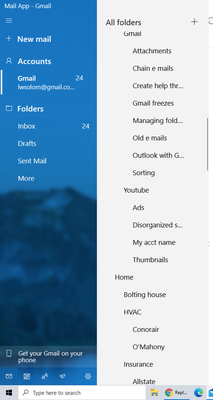
LSolom As I said, I already deleted then restored that mail account. My prior post which you are replying to now also explained what I did wrong (I mistakenly selected an Outlook.com account). In that same post, I asked again another question, which I will ask again: "Now my next question, which I have asked more than five times already and not received any answer - this mail "app" shows all of my messages in Gmail, and also set up folders to mimic the "labels" I have in Gmail. However, it did NOT populate any of those folders - they're all empty. They are full of emails in my Gmail account. Do I have to now go through my hundreds of message and drag each one into the folder where it was in Gmail? If so, why the heck can't the mail "app" do that for us when it copies them from Gmail?" Ok, so I have now asked these questions six times, but I will give some more detail just in case my two questions are still not clear: (1) in Gmail the folders I created (Gmail insists on calling them "Labels" instead of folders) to organize my messages each contained numerous emails. After I linked my Win 10 Mail "App" to my Gmail account, I can see those folders (along with the subfolders that are in many of my folders) in the Win10 Mail App However, it is showing ALL of my emails in the Inbox, even though many of the messages are in my folders & subfolders. How do I fix so that the messages that are in my folders & subfolders in Gmail are also in those same folders in the Mail App? I do not want to go through hundreds and hundreds of messages and put them back into the folders/subfolders manually (that would be like copying the contents of a hard drive to a hard drive, then having all the files in various directories and subdirectories show up in the new drive's root directory). I can't find anything about this on line. If I have to fix this manually, it is a HUGE error that should be pointed out to the developers of the Mail "Ap" software to be fixed. Your answer: ________________________ (B) As noted, and as can be seen from the screenshot I attached, I have folders and subfolders. In Gmail, I can click on the right pointing "arrow" next to a folder, and it will expand or collapse the folders & the subfolders within it. When I try to do that in the Mail App, nothing happens. Why?? Does this function also not exist in the Mail App? If so, this also needs to be highlighted to the team at Microsoft who are responsible for this App. Your answer: ________________________ I hope you can answer these two questions, as I would much rather not keep asking them over and over and over. Thank you1.7KViews0likes2CommentsRe: Windows Mail "Ap" & Gmail
KapilArya I do not know why the response I posted to your answer does not show. I'll post it again. The issue was that I did not realize that multiple options were listed in whatever the name of this Win10 Mail "app' (come on Microsoft, there has got to be a better name for it than that!); including Outlook . com (it's listed twice - reason unknown), Live . com (whatever that is, unknown), Google, Yahoo, etc. I should have selected Google to relink my Gmail account, but accidentally selected one of the Outlook.coms. I redid it listing my Gmail address, and it reestablished the link to that. Now my next question, which I have asked more than five times already and not received any answer - this mail "app" shows all of my messages in Gmail, and also set up folders to mimic the "labels" I have in Gmail. However, it did NOT populate any of those folders - they're all empty. They are full of emails in my Gmail account. Do I have to now go through my hundreds of message and drag each one into the folder where it was in Gmail? If so, why the heck can't the mail "app" do that for us when it copies them from Gmail? Last question (also posted many times before without getting any answers). As you will see in the attached screenshot, I have folders and subfolders. In Gmail these can be expanded so each folder, and the subfolders below, are shown individually, or the subfolders can minimized by clicking the arrows next to the folders, so that the subfolders are not shown. I have tried doing that in the Mail app, but nothing happens, and I cannot find any info on how that works (I can't even find a Help function in this "App" - does it have one?). How do I minimize and expand the folders & subfolders in the mail app? I'd appreciate if you could answer these last two questions. Thanks1.7KViews0likes3CommentsWindows Mail "Ap" & Gmail
I was reading another thread about someone's problems with Gmail and the Windows 10 mail "app" (btw, what is the name for this program, app, whatever it is?), and one of the suggestions was to go into the settings in the App for the gmail account, and make sue they are synchronized. When I looked at my settings, I noticed my Gmail account was listed twice - one was named Mail 1 and the other was named Mail 2. They had the same gmail address listed, so I told the Mail "App" to delete the second one. All my mail then disappeared, along with the folders I had set up in Gmail. I still see the Mail1 that has my Gmail address, but none of the emails in that account show in the windows mail app. How do I gt them back? Thanks btw, can someone confirm if this Windows mail "app" is or is not simply a clone of Gmail with some tweaks. Based upon the other problems I've been having with it (such as nested folders that no one can tell me if they can be minimized & maximized), I"m guessing it's just a clone of Gmail. But I'd like knowing for sure.1.9KViews0likes5CommentsWin10 Mail Ap - what forum ("hub") do we use to post our questions?
I just posted a question about issues with importing Gmail emails and folders into the Windows 10 Mail "ap". Posted them in the Windows 10 "hub", after not seeing one specifically for the mail ap. I had found one for Outlook but didn't think that was the right place. Can you confirm where I should post threads with questions ON the Mail ap that comes with Windows 10? So far, the ap is far and above better than the (IMO terrible Gmail interface. But I'm sure I'll have some more questions as I start using it. Thank you.1KViews0likes3CommentsWin10 Mail Ap - importing Gmail folders & contents
Experimenting with the Mail in Win10. Question if anyone knows - I have been searching for a better, Outlook-like front end to replace Gmail, so I am trying out the Win10 mail ap. I gave it \my Gmail address, and it cloned all my messages and "folders" (Gmail calls them "Labels") I had in Gmail. Great. But it did not populate the folders with the messages that were in them (in Gmail). So the Win 10 mail ap now has all my messages in its "Inbox", instead of the individual Gmail "folders" . Is there anyway to get the Mail ap to fix this; i.e., to move the email that is in my Gmail folders into the corresponding folders Mail created for them? Or do I have to do that myself?745Views0likes0CommentsRe: Windows Mail App does not work with Gmail accounts
Just setting up a new Win 10 laptop and activated the Win10 Mail app for my Gmail account. Noticed that it imported all my Gmail folders I had set up, but it failed to populate those folders with any of the messages that were in them Is there a way to get that fixed, or will I need to move them into the folders manually?291KViews1like0Comments
Recent Blog Articles
No content to show