User Profile

MichaelJMelone
 Microsoft
Joined 6 years ago


User Widgets
Recent Discussions
Re: Detection Rule based on Kusto Query
Hello dmarquesgn , The best way to accomplish this would be to use either the arg_max() or arg_min() operator. Both of these operators bring back a single row and as many columns as you want when the specified value is maximized. In your case you would want to minimize the Timestamp column to find the first time it was seen. Try this: DeviceInfo | where OnboardingStatus contains "Can be onboarded" and MachineGroup contains "Windows Server" | summarize arg_min(Timestamp, DeviceName, OSDistribution, OnboardingStatus, ReportId) by DeviceId3.7KViews1like1CommentRe: Quantity of bad emails vs legit email query
Ok, I think I understand the ask now. When you get a chance try the below query. If you don't care about clean emails you can comment \ uncomment the lines noted to make it more performant. Let me know if this works for you. let vip = pack_array("email address removed for privacy reasons"); EmailEvents | where RecipientEmailAddress in~ (vip) //| where isnotempty( ThreatTypes) // Uncomment this line if you don't care about clean email count | summarize Phish = countif(ThreatTypes has 'Phish') , Spam = countif(ThreatTypes has 'Spam') , Malware = countif(ThreatTypes has 'Malware') , Clean = countif(isempty(ThreatTypes)) // You can comment this line if you don't care about clean email count by RecipientEmailAddress2.4KViews2likes1CommentRe: Quantity of bad emails vs legit email query
Hello davinelm, While this sounds like it should be a simple query its actually quite complex :). Technically you're representing multiple dimensions in a single table which is great from a reporting perspective, but a bit awkward from a data perspective. To accomplish this you need to union together two tables: - one that is a pivot of the e-mails per recipient and threat type - one that is a sum of the e-mails per threat type If you simply summarize the dataset you will get one row per column name which is a different schema from your format of counts per user and data type. Essentially we need to flip one of these tables on its side. The query below unions together your pivot query above with a summary per column. To flip it I pack the rows up as JSON objects, make them a property bag, then mv-expand them to turn it back into a table. Let me know if this accomplishes what you hope! let PerUserSummary = ( EmailEvents | where RecipientEmailAddress has_any (vip) | project RecipientEmailAddress, ThreatTypes ); union ( PerUserSummary | evaluate pivot(ThreatTypes) ), ( PerUserSummary | extend ThreatTypes = iff(isempty(ThreatTypes), '_Empty', ThreatTypes) | summarize count() by ThreatTypes | project ThreatTypes, count_ | where isnotempty( ThreatTypes) | project packed = pack(ThreatTypes, count_) | summarize make_bag(packed) | evaluate bag_unpack(bag_packed) | extend RecipientEmailAddress = 'Total' )2.3KViews1like3CommentsRe: MDE Action Value Mapping in M365 Defender
I searched around and I don't see much in the way of documentation on this field. It should map to the antimalware action enumeration which we have documented for the Defender CSP here: https://docs.microsoft.com/en-us/windows/client-management/mdm/policy-csp-defender#defender-threatseveritydefaultaction .3.7KViews0likes1CommentRe: Query for file hashes in MDE portal
You have a couple of options here. If you wanted to keep it all in the query you can do this: let Hashes = pack_array('foo','bar','baz'); DeviceFileEvents | where SHA256 in (Hashes) ...or you could upload a text file containing the hashes to blob storage and use a SAS URL like this: externaldata (SHA256:string)['https://some.blob.core.windows.net/files/myhashfile.txt?SasTokenHere'] | join kind=rightsemi DeviceFileEvents on SHA25634KViews1like2CommentsRe: MDE Alert Policy Tuning
Hello KB850VR . Have you looked at our suppression rule capabilities? This will enable you to suppress a specific alert based on conditions you specify. These conditions include device, device group, file hash, command line, folder path, etc. doc: Manage Microsoft Defender for Endpoint suppression rules | Microsoft Docs3.7KViews0likes2CommentsRe: How To Hunt For LDAP Reconnaissance
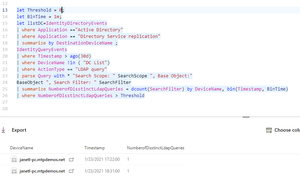
Hello AusSupport180! Let me break this one out. In the outer parentheses we have an and condition checking four conditions (objectClass=user) The first test is looking for user class principals in Active Directory (this is more than just user accounts, it also includes computer accounts) (objectCategory=CN=Computer,CN=Schema,CN=Configuration,DC=prod,DC=tdomaina,DC=com) The second filter reduces the results to look specifically for computer objects. At this point we know the user \ application is searching for computer objects in Active Directory ( | ( ! (lastLogonTimestamp=*) ) (lastLogonTimestamp=0) (lastLogonTimestamp>=132813001255230000) ) I color coded the parenthesis for the third filter to make it easier to read. All three terms are looking at the lastLogonTimestamp attribute which is essentially the last time a user principal performed an interactive logon. Its worth noting that there are a lot of nuances to this attribute that I won't go into here. This portion of the query is an 'or' query (note the pipe). The first term in red is a not which applies to the blue section that checks that the lastLogonTimestamp is set to any value at all. In other words, this portion is checking for when lastLogonTimestamp is set to nothing, The term in teal is checking for when lastLogonTimestamp is set to 0, another check to see if it has never been set before. The last term in purple is checking for when the lastLogonTimestamp is greater than that large number. This value is an integer representing the number of 100 nanosecond intervals since January 1, 1601 UTC. Its usually easier to just find a converter like this one: LDAP, Active Directory & Filetime Timestamp Converter (epochconverter.com). This part of the query is checking for lastLogonTimestamp attributes on or after November 13, 2021 18:02:05 UTC. Summing this up, we are checking where the lastLogonTimestamp is null, set to 0, or was after November 13, 2021. As I mentioned, the lastLogonTimestamp is a bit confusing as there are conditions where it is never set - such as I think cluster computer accounts (don't hold me to this though). Looks like its looking for active or unused computer accounts so far. ( | ( ! (pwdLastSet=*) ) (pwdLastSet=0) (pwdLastSet>=132813001255230000) ) This last one is checking the pwdLastSet attribute which corresponds to when the password was last set on the account. pwdLastSet is pretty straightforward though, unlike lastLogonTimestamp. We're doing the same tests, so this is easy. We're looking for conditions where the accounts password was never set, or the password was last set since November 13, 2021. By default, a computer account changes its password every 30 days (based on the local security policy) so we're looking for computer accounts that are either active since November 2021 or have never set their password. In summary, this needs to be taken in context. The LDAP filter isn't looking for something inherently malicious unless there is a known piece of malware that uses this exact search filter. What it would yield is all computer accounts in Active Directory that are either active since November 2021 or have never been used.7.1KViews1like0CommentsRe: Use case to check for new installed application on Windows devices
Hello dmarquesgn! I am not 100% sure this will be totally accurate at the moment, but I think you might be able to get newly detected software after a specified datetime by using the export software inventory API. If you look at the parameters in section 1.6.1 you'll notice an option for sincetime. You can also use it without that parameter and you'll be able to get the time it was first seen in the softwareFirstSeenTimestamp field. doc: https://docs.microsoft.com/en-us/microsoft-365/security/defender-endpoint/get-assessment-software-inventory?view=o365-worldwide#1-export-software-inventory-assessment-json-response3.2KViews1like0CommentsRe: Share Your Hunting Challenges!
Great question! This can definitely be a challenge, especially because one patch may be superseded by another. The best official source would be the National Vulnerability Database (NVD) which is run by NIST (https://nvd.nist.gov/vuln/search). As far as advanced hunting goes, this is not currently available in the product today - but definitely makes a great feature request. We will definitely keep this in mind!6.7KViews0likes0CommentsRe: Share Your Hunting Challenges!
Thank you for all of the great suggestions! Tali Ash and I are excited to announce that our next webcast will be on November 17th. Be sure to join us for our new series l33tSpeak where we will share some of the latest Microsoft 365 Defender Advanced Hunting capabilities and provide demos based on your requests. We are looking forward to seeing everyone virtually again! To attend please register for our winter series of webcasts here: https://forms.office.com/Pages/ResponsePage.aspx?id=v4j5cvGGr0GRqy180BHbR_0A4IaJRDNBnp8pjCkWnwhUMjY1MERNU0FFUU9MN08yUFhaMUxNRDMxVi4u6.7KViews2likes0CommentsRe: How to Deal with Undetected Malware?
Hi Reza_Ameri-Archived , On DART, we used a lot of Microsoft Threat Protection \ Defender ATP custom detections paired with response actions to deal with this. Using this approach, you can isolate machines, block files by hash or certificate, run a quick scan, or collect a forensics package. What you're referring to falls more in line with hardening than preventing a 0-day. You can definitely use AppLocker to prevent malware, but it really depends on how it was set up. I'd recommend checking out AaronLocker - a config written by Aaron Margosis some time ago: https://github.com/Microsoft/AaronLocker. Other protections would be attack surface reduction (ASR) https://docs.microsoft.com/en-us/windows/security/threat-protection/microsoft-defender-atp/overview-attack-surface-reduction, exploit protection (sort of like the new EMET) https://docs.microsoft.com/en-us/windows/security/threat-protection/microsoft-defender-atp/enable-exploit-protection, or Application Guard https://docs.microsoft.com/en-us/windows/security/threat-protection/microsoft-defender-application-guard/md-app-guard-overview. At the end of the day, what really makes an attack successful (in my opinion) is availability of credentials with widespread administrative authority. Keep tabs on delegations made on the root object of the domain (the domainDns object), user rights (especially on domain controllers), and permissions to the AdminSDHolder object. Its that whole assume breach mentality, and why many customers are moving towards Azure AD joined devices since it decouples identity from authorization, uses strong authentication, and decouples authentication from authorization. Check out the famous Pass the Hash whitepaper for those: https://aka.ms/pth Last, microservices are the way to go. Avoid having one huge monolithic infrastructure, instead favoring smaller containerized services which only have access to what they need to operate. The other place to keep an eye on is Defender ATP's threat and vulnerability management capability which can identify vulnerable applications, including which applications have an exploit in the wild. This paired with the Threat Analytics dashboard should keep you informed of many of the exploitation-centric threats to your infrastructure.3.6KViews0likes2CommentsShare Your Hunting Challenges!
Hello world! Tali Ash and I would love your input on anything you would like demo'ed in future webcasts! Want to see us demonstrate a specific hunting capability? Got a query challenge on your mind? Reply with your idea or like a reply from the community - we'll pick some of the popular ideas and put together future webcasts on the topics. Also, if you are looking for a great introduction to advanced hunting in MTP and KQL, be sure to check out our four part series Tracking the Adversary at http://aka.ms/securitywebinars, or download the query files to practice on your own MTP instance at https://aka.ms/TrackingTheAdversary. Happy hunting!7.7KViews4likes12CommentsRe: MDATP KQL Query isolated machines
Good morning agattsek , I can validate that isolate and unisolate are listed on the timeline, but I was unable to find those specific events within advanced hunting today. I tried to find something in the timeline that corresponded with the isolation event (i.e. a process launch or whatnot), but was unable to find a reliable indicator.6.1KViews0likes2Comments

Recent Blog Articles
No content to show