User Profile

Jan_F1801
Copper Contributor
Joined 6 years ago


User Widgets
Recent Discussions
Azure Identity Governance via Powershell
We want to introduce idententy governance for some of the groups in Azure. The problem is that these groups are created quite dynamically. Therefore, every few weeks/months I have to recreate the review to have all affected groups in this review. Since we are talking about close to 100 groups (all starting with the same prefix) I would like to automate the whole thing and create it e.g. via Powershell. Unfortunately I can't find any useful instructions for this. PS: Since we don't want to overload the users, we can't evaluate all groups in our tenant but want to start with a part that is used for the authorization to a system.731Views0likes0CommentsTags in an Advanced hunting query
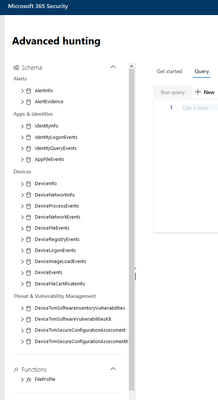
The only answer I find so far on the subject was written over 2 1/2 years ago, so I create a new post. Is it now possible to evaluate and process tags attached to a resource by query? With reference to this old request: https://techcommunity.microsoft.com/t5/microsoft-defender-for-endpoint/advanced-hunting-query-to-include-assigned-tags/m-p/2059566 We have built a query that works well at least for our notebooks, but for VM's would need the evaluation of the tag.1.8KViews0likes1CommentSync Tags für AzureVM to M365 Defender
Is there an easy way to sync the tags stored in Azure for a VM in M365 Defender? It would be good if the responsibilities that have already been tagged in Azure were also visible in M365. Or do you really have to write a LogicApp or something like that? What would this look like?Show only last status of a service
I am trying to write a query that shows me on which VM a service is not running. The basic framework is quite easy to find on the net: Event | where TimeGenerated >ago(1d) | where EventLog == "System" and EventID ==7036 and Source == "Service Control Manager" | parse kind=relaxed EventData with * '<Data Name="param1">' Windows_Service_Name '</Data><Data Name="param2">' Windows_Service_State '</Data>'* | where Windows_Service_Name contains "choco". | sort by TimeGenerated desc | project Computer, Windows_Service_Name, Windows_Service_State, TimeGenerated But now I want to display only the last state. (As you can see in the example, the service was stopped at first, but then started again). In this case I am only interested in the fact that the service is running again. But I can't do this with the summarize.Solved1.2KViews0likes1CommentNo license available
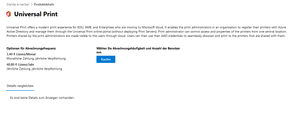
Since the service is now apparently public, we would like to test this again with us. Unfortunately, the instructions are not very clear in my eyes. We use an Azure tenant (Azure AD Premium P2). Each user has a Microsoft 365 E5 license assigned. Now when I try to activate the Universal Print service as a global admin I get the message. "You don't have access to this data. Please make sure you have a Universal Print subscription, that you're a Printer Administrator or Global Administrator, and that your account has been assigned a Universal Print license. Otherwise, please contact your global administrator to get access. " Since I am the global admin I am a bit perplexed as to how the setup will work now. Nowhere in both the Azure portal and the Office Admin Center do I see anything about a Universal Printer license. In the Troubleshootings it says something about: "From the Microsoft 365 admin center Sign in to the https://admin.microsoft.com/Adminportal/Home#/licenses in the Microsoft 365 admin center. Click on "Universal Print". If "Universal Print" is not available in the list of licenses, that means that Universal Print is not enabled in the tenant. Check whether https://aka.ms/UP_TryNow for a Universal Print license." According to the overview, I should be eligible for this service, right? Can anyone give me a step by step guide?7.4KViews0likes3CommentsTime delay for messages in Sentinel
We have set up the connector to MDATP. Messages that are displayed there take a long time until the info is displayed in Sentinel. How do we get the information displayed in Sentinel in real time? Such a long delay is not very nice from a security point of view.2.2KViews0likes3Commentsdata, sdata and reserved parameters in Office-ATP-Safelinks
We have received a request from a "worried" user. With us, links are converted into mails by ATP. So the users get links like: https://eur04.safelinks.protection.outlook.com/?url=https%3A%2F%2Fgetsupport.atlassian.com%2Fservicedesk%2Fcustomer%2Fportal%2F20%2FGHS-191321%3Fsda_source%3Dnotification-email&data=01%7C01%7C%7C571bb1d7861543bac5c708d850981062%7C6e0bfede3fcb4518a16565dc14fe5620%7C0&sdata=SYE9eiOYbZb5HG8EPKlo%2FGsvhL9sJQ%2BpSpVr4TjZJbI%3D&reserved=0 That this is a security feature is quite clear. But what is behind the "data", "sdata" and "reserved" parameters that are integrated into the link? What is this data needed/used for? Some of our Users are worried that they can be tracked through these parameters.3KViews1like2CommentsJOIN auf Last-Logon
Ich habe im Netz eine sehr gute Query gefunden um ungepatchete 3rd-Party-Apps zu finden let CVEs = DeviceTvmSoftwareVulnerabilitiesKB | project CveId, IsExploitAvailable, PublishedDate, VulnerabilityDescription; let latestVersions = DeviceTvmSoftwareInventoryVulnerabilities | where SoftwareVendor != "microsoft" | where isempty(CveId) | summarize arg_max(parse_version(SoftwareVersion), SoftwareVersion) by SoftwareName | project SoftwareName, LatestSoftVersionInstalledInTenant = SoftwareVersion; let deviceVulnerabilities = DeviceTvmSoftwareInventoryVulnerabilities | where SoftwareVendor != "microsoft" | summarize arg_max(DeviceId, DeviceName, SoftwareVendor, SoftwareName, SoftwareVersion, VulnerabilitySeverityLevel) by CveId; latestVersions | join kind=inner (deviceVulnerabilities) on SoftwareName | join kind=inner (CVEs) on CveId | project DeviceName, CveId, VulnerabilitySeverityLevel, IsExploitAvailable, SoftwareVendor, SoftwareName, SoftwareVersion, LatestSoftVersionInstalledInTenant, PublishedDate, VulnerabilityDescription | sort by DeviceName asc Die Abfrage klappt soweit ganz hervorragend. Ich würde allerdings die Abfrage erweitern und den User der sich zuletzt auf dem PC eingeloggt hat mit ausgeben. Diese Infos bekomme ich ja durchaus mit DeviceLogonEvents | where ActionType == "LogonSuccess" heraus. Jedoch brauche ich nur den letzten User der sich auf der Maschine/dem Rechner eingeloggt hat. Ich bekomme es jedoch bislang nicht hin beide Abfragen mittels join zu verheiraten.869Views0likes0CommentsNo email queries available
First of all: Thanks for the great webinars about MTP/Sentinel etc. I hope my question is right here. We use an E5 license in the company. But the MTP does not offer me the possibility to check emails. All options that refer to mails are not offered to me. Unfortunately I can't find a check mark to activate this area (or I don't know in which portal I should find it) I'm pretty sure that I could see the corresponding menu items last week.31KViews0likes2CommentsApp wurde gelöscht
Nachdem wir etwas Stress hatten und ein Admin in der App-Registrierung aufgeräumt hat ist die App für UPS scheinbar gelöscht worden so das wir nicht weiter mit UPS testen können. Ein neues registrieren ist nicht möglich da der Code ja bereits eingelöst wurde. Gibt es die Möglichkeit einen weiteren/neuen Code zu erhalten?845Views0likes1Comment

Recent Blog Articles
No content to show