User Profile

TomMoser
Copper Contributor
Joined 6 years ago


User Widgets
Recent Discussions
how can precheck a system for incompatible MSI software before i install with O365 C2R
Hi I would like to know how i can check a computer for any incompatible software before i run the Office 365 Install routine with Click2Run. Situation: I have here a few software developer with a lot of installed software (SQL Server, C++ routines etc.) They use Office 2016, Visio 2016 and MS Project 2016 also (installed with .msi installers). I know, when i want to install Office365 with Click2Run there will be a message that says that is not possible to install Click2Run and MSI products on the same machine i will have to uninstall Office 2016, Visio 2016 and MS Project 2016 first. How can i preckeck if there are other incompatible products on the system before i uninstall anything ? I do not want to remove Office 2016, Visio 2016 and Project 2016 and then see that there are a lot of other programms that are not compatible with Office365 click2run technology - these developer machines are quite complex and i do not want to crash these development environments because i had to uninstall a software to get Office365 to run. Thank you very much for your help615Views0likes0CommentsChat, Voice and Video calls with user with personal accounts (private users)
Hi Happy new year to all of you. Today i tried to use that new functionality that was implemented in december 2021 by Microsoft. I should now be possible to chat and call with external users who have no organisation account and do not work in an other company if i am informed correctly. I tried it and i can now chat between my private teams account and my organisational Teams account but i can not call or videocall between them. I find no policy where this is denied / defined. I checked our global meeting policy, call policy and teams policy. Does someone know what kind of policy / settings this is or is this right now not possible ? Thank you for your help!1.7KViews0likes0CommentsHafnium - Patch for Server 2013 only with installed CU 23 ?
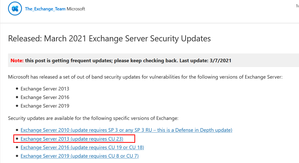
Dear community I try to figure out if the patch for Exchange 2013 only can be installed if you have CU23 already installed ( Screenshot). Does someone know if this is really true? We have planned to install an Exchange Server 2016 and move all mail boxes to that server and uninstall Ex2013 but that was planned for next week so we are now in a bad situation. Does someone know if this update only works with CU 23 installed and if that is true, how can we minimize the threat for our EX 2013 ?4.2KViews0likes3CommentsOnprem Users have already an Office 365 Mailbox because of Teams trial phase
Dear Office365 pros. We use per default Skype for business in our company but we already work with teams with a few users because other companies who use Teams, want that our emplyees also use teams to work together in some projects and we want to migrate all employees to Teams in the near future. All this users in our company now have also a mailbox created in Office365 automatically In these mailboxes are messages from teams and planer app only. When we migrate to Teams, will these mailboxes merge with existing onprem mailboxes after we moved the onprem mailboxes with Exchange Hybrid Wizard to Exchange Online / Office 365 or how can i bring them together manually after Teams migration and Exchange Online migration ? Thank you for your help1.1KViews0likes1CommentUser for Hybrid Wizard - create new one or use existing ?
Dear Exchange Pros. We are here almost ready to deploy hybrid wizard on our Exchange 2013. While the setup, we have to enter user credentials from an user account with Domain Admin and Org Admin rights in Exchange and a user with global admin rights in Office365. So i have 3 questions and i hope you can give me some hints. 1 - Do you create new users for the HCW Setup or do you use existing users ? 2 - When i create a new user just for this, can i disable the account after the setup ? 3 - Do i run the setup direct on the exchange server ? ( Maybe a stupid questions but AAD Connect is also not on a Domain Controller like i expected the first time i heard about it) Thank you very much for your help!690Views0likes0CommentsRe: We have Exchange 2013 onprem and we want to deploy Hybrid configuration > Update Server first ?
Hi Dominik. Thank you for your feedback. When will be the right point in time to upgrade the onprem Exchange 2013 to 2016. I mean, in 2023 there is end of life for Exchange 2013, should i wait until then ?1.4KViews0likes1CommentRe: We have Exchange 2013 onprem and we want to deploy Hybrid configuration > Update Server first ?
dfeifer Re: We have Exchange 2013 onprem and we want to deploy Hybrid configuration > Update Server first @dfeifer Thank you for your feedback. We have about 120 Mailboxes, Users, Shared mailboxes and ressources. We would like to move all the mailboxes to the cloud so that the onprem Exchange Server is only for management / configuration purposes. I read that it is not supported to remove the last onprem Exchange Server and that i need that server to configure several parameters that are not available online for configuration, so configuration has to be done always on prem. would you still update the server in this scenario ? When everything is moved to Exchange Online, will it be easier then to change the onprem Server ?Lifecycle End for Exchange 2013 is April 2023 and time goes fast. Thanks again for your help and your advice.1.5KViews0likes4CommentsWe have Exchange 2013 onprem and we want to deploy Hybrid configuration > Update Server first ?
Dear community. We work with an Exchange 2013 onprem and now we want to migrate to Exchange online. For that we want to configure hybrid configuration with the hybrid configuration wizard. Should I update the onprem server first to a higher version (2016 or 2019) before connect to Exchange online with the Hybrid Wizard ? We also use Skype for Business (including Phome Calls in PSTN Network) and we want to migrate to Teams also in the next few month.. Thank you for your feedbackSolved1.6KViews0likes7Comments
Recent Blog Articles
No content to show