User Profile

CarstenB
Iron Contributor
Joined 9 years ago


User Widgets
Recent Discussions
Specific Group does not show up in Forms to move/save to
Hi all, I just noticed that in my selection of Groups where I can save in or move to my Forms some specific Groups don't show up. All Groups were automatically created by Office 365 as underlying structures for Teams. I am owner in the Groups that don't show up. Which conditions do Groups have to match so that I can move personal Forms to them? When I create a new Form in the corresponding Team per Forms register app, I can see the new form. But I don't get it why I can't see it in the Group selection drop down.5.2KViews1like4CommentsCommitment to Identity API/SSO in Office clients?
Hi all, Rick Kirkham dumped in the SSO example project issues section on GitHub two months ago this here: "I'm not sure that we don't support multitenant. The SSO preview program is in an uncertain state right now, so I can't give you any information yet." Source: https://github.com/OfficeDev/Office-Add-in-NodeJS-SSO/issues/13 What exactly does that mean? Doing this kind of SSO integration of Office Add-In is an important way of bringing functionality to clients, especially when organizations com from a heavily customized Groupware system like Lotus Notes. If we are investing in this kind of pattern (which is around for a long time now), is this something we should better not do?API getAccessTokenAsync gives Token with empty payload
Hey all, I am actually doing plenty of stuff with Office Addins, following the guides and patterns Microsoft is giving especially for the use of the new Identity API in the Office clients for an SSO experience. Everthing is fine on the dev stages, after some wrapping my head around the concepts I have my React app as Word/Outlook Addin with Node.js/Expressjs middleware and plenty other stuff that does not matter here. When bringing this from Dev to Prod, I struggle with a strange effect in the customers Office 365 tenant that prevents a decoding of the token one gets from the Office client on the users side ( see https://docs.microsoft.com/de-de/office/dev/add-ins/develop/sso-in-office-add-ins#add-client-side-code for reference, we are talking about getting the local token as starting point for a AAD V2 endpoint authentication by calling Office.context.auth.getAccessTokenAsync()). After a lot of debugging I figured out that the token does not contain the data it should have and therefore is not able to be decoded in the middleware. Looks something like this: Token in our very own Office tenant -> Screenshot 1 Token in customer tenant -> Screenshot 2 As one can see the whole payload is empty. I can't do much more here than calling the JavaScript method and make sure the API is loaded (works as I get at least something). Has anyone an idea what is happening here?2.2KViews0likes1CommentDeploy Addins - Button "Save" is not there when conscenting to Add-In rights
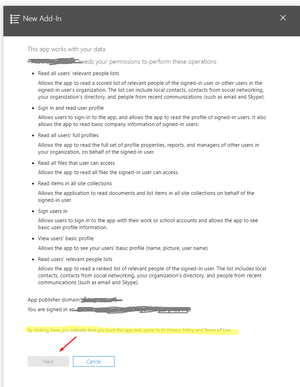
Hey all, I am quite puzzled at the moment: I try to upgrade an Addin manifest like I've done it a hundret times before. After uploading the manifest and defining the target group I get to the screen to give permission that the app may have the rights given in the manifest. But I can't get further in the dialog than this: Tried with another addin, tried with another tenant, same result. Has anyone a hint what I am missing here? Thanks, Carsten968Views0likes0CommentsRe: Project for the web tasks in To-do app
AdamTreadwell I agree that this is most probably a working way, but I don't see this as the solution. Why do we have to do so if there is an intended use of To-Do? This is the same pity that we already had in those old SharePoint days 15 years ago - different product groups and an overall story that is rather driven by marketing and gets a different understanding as soon as we talk about overall implementation. Project for the web is such a promising tool and I really want to get people involved in our company. But not with another additional licensing in PowerApps and things we have to create and maintain what should be delivered with those 15€ we lay per user/month. I can't get the story straight for my users and this just destroys adoption. They just will use Planner and Excel for PM with all the shortcomings we are aware of.27KViews4likes0CommentsRe: Project for the web tasks in To-do app
These are nice workarounds to implement this on a user-level, done by people who know what he/she is doing. But it can never be a company-wide solution. Please don't accept this as "solved" - if you want people to adopt the whole task management, push Project on the Web in the right direction where Planner and To-Do are going from an individual point of view. Gosh, even Exchange has joined the game long ago.27KViews3likes2CommentsRe: Project for the web tasks in To-do app
Any news here? This is crucial for our adoption story as people are becoming more ans more comfortable with the Planner integration. They try to accomplish everything with Planner instead checking for Project on the web. Not having the integration here lowers the appeal to deal with the tool at all.29KViews4likes1CommentRe: PnP: Add ListTemplates during provisioning in modern SP sites
Hey Joel, thanks for answering. I am completely aware of this article and the pattern described here. That was unfortunately not my question. My question is how to upload a list template into the list template gallery resp. how to define a list template with PnP for provisioning.1KViews0likes1CommentPnP: Add ListTemplates during provisioning in modern SP sites
Hi folks, I am digging for some time now but I don't get it. I want to provision modern SPO sites with Site Designs/Site Scripts. To add the option for end users to instantiate lists and libraries that include globally provided content types and fields, I want to include list template as we did this ten years ago with that clunky old feature framework. :) For now I want to trigger a flow as part of the site script, allowing me to use PnP to provision these list templates, but I can't find a solution here. Can anyone guide me to a good supported and future-proof way to archive this?1.1KViews0likes3CommentsRe: Save list as template on modern team site
jcgonzalezmartin I see these methods for new list instances. Any clue how we should realize offering custom list types as app from the New -> App menu? Use case here is that I want to offer the site owners a bunch of predefined lists with content types etc. so he can chose and create what he needs.6.3KViews0likes0CommentsRe: Office 365 Group Expiration and SharePoint Group Connected sites
You define the policy and can add them to all, none or selected groups. This means as soon as a Office 365 group is created (from all those self-service buttons), the underlying group is added if this is set to all. We managed it several times now in projects to define the policy for selected groups and create processes with Forms/Flow/Approval/Azure Functions (PowerShell) to distinguish permanent ("admin") groups from those adhoc groups that people can create on their own. Therefore we run a script every night which puts the new groups that are not adhoc-groups into the new policy as a Azure Function with a timer trigger. Adhoc groups are put into the selected groups for expiry, other groups are not afected by this (and miss also the default naming convention as the PowerShell runs with appropiate rights to overrule the policies).934Views1like0CommentsRe: Autofollow people policy in UPS 2016 not available anymore?
Just wanted to share the solution here. It seems that the behaviour of SharePoint to suddenly auto-follow was just caused by a fix in the July CU. Until then, the AD sync did not fill the Reports To field in the profile correctly, thus leaving any organizational structure blank with no team whatsoever. When we updated with the latest feature pack, the fields have seem to be updated then, allowing auto-follow to kick in for newly created MySites. The policy to steer this behaviour is still there, for some reason it just vanished from the policy UI in the UPS. When I looked at the PowerShell objects, I had it right before my nose.. $site = Get-SPSite "CentralAdminURL" $serviceContext = Get-SPServiceContext $site $profileManager = New-Object Microsoft.Office.Server.UserProfiles.UserProfileManager($serviceContext) $policy = $profileManager.GetPrivacyPolicy().GetAllItems() | ? {$_.DisplayName -like "*auto-follow*"} $policy.PrivacyPolicy = [Microsoft.Office.Server.UserProfiles.PrivacyPolicy]::Disabled $policy.Commit() I wrote a bit more in German on this topic over there: http://spmoshpit.de/2017/12/auto-follow-von-teammitgliedern-in-sharepoint-2016-verhindern/996Views0likes0CommentsAutofollow people policy in UPS 2016 not available anymore?
Hi all, when setting up the MySites in a SharePoint 2016 on-prem environment, I am missing the user policy settings of the whole Privacy section in the User Profile Service Application. Due to company restrictions this server should not automatically create follows to team members when a MySite is provisioned (policy Auto-follow people from team, see https://social.technet.microsoft.com/Forums/forefront/en-US/eec7532f-6a5a-4fa8-9b5b-928b2d619c67/how-to-disable-auto-follow-people-from-team?forum=sharepointadmin). Obviously it is possible in 2013 to set this here, so maybe I am missing some feature dependencies. Some other explanation could be that everything regarding this was moved to PowerShell, but I am not able to find this nor any 2016-specific hint in the net. Anyone of you also stumbled upon this and can give me some advice? Thanks, CarstenSolved1.1KViews0likes1Comment
Recent Blog Articles
No content to show