User Profile

loadedlouie27
Brass Contributor
Joined 6 years ago


User Widgets
Recent Discussions
Alert monitor - Rules that dont change to fired and keep trigger themselves
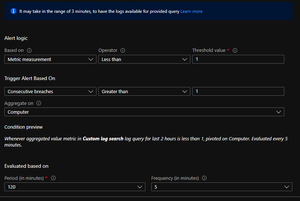
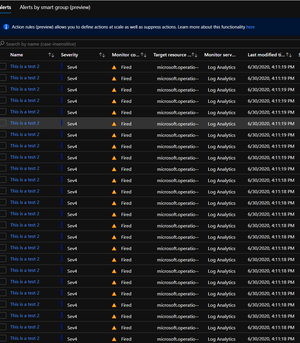
I created a rule called Test Rule Notepad. The rule is simple. Its based on a custom log search and it looks if notepad is running on a VM. This is the rule: -------------------------------------- Rule -------------------------------------------------------------- Perf |where Computer == "ServerName" |where (CounterName == "Process ID") or (CounterName == "ID Process") |project TimeGenerated, Computer, ObjectName, CounterName , CounterValue,InstanceName |summarize count() by bin(TimeGenerated, 1m), Computer, CounterName, CounterValue , InstanceName |summarize AggregatedValue=avg(InstanceName=="notepad") by bin(TimeGenerated, 1m), Computer,Running= InstanceName=="notepad" |extend Running = iff((Running=="true"), "1", "0") |render timechart -------------------------------------- Rule -------------------------------------------------------------- I have tried multiple flavors of this rule, but feel free to suggest. the configuration of the rule is this: And the end result is something like this: The behavior that I get is that the rule is triggered, multiple times, instead of the rule being triggered 1 time, or at least "aggregate" the alerts. I just want to "use" the custom log search "like the metric". One alert one entrance. This creates a major issue, when you are trying to manage multiple client subscriptions, and honestly kind of shoots in the foot, the tool itself. How can a custom log search be used in the same way as metric alerts, and trigger only 1 alert. I don't want to use suppression on alerts, because it still creates an entrance on the alert tool for every time it verifies the alert, creating like 1000 alerts for just one situation. This only happens with Custom log Searches, either been a "metric" (using the aggregated value, like the rule above) or a count. PLEASE HELP ME!! I have already looked into a lot of post's here and in some of the they talk of a bug, and fix in azure monitor, however, i still see this happening today.1.9KViews0likes1CommentLogAnalytics Workspaces - Suppression of alarms from specific Resources
Hi all just a quick question. I currently have a suppress rule for the resource group with all of the resources in that RG suppressed. I also have another RG with log analytics workspace, and this workspace is getting all the PERF counters from all the machines, like a bucket from all "Perf" counters. I want to suppress only the alarms from that machines on that resource group that is currently suppressed. Is it possible? or do I have to suppress all the alarms from that Log Analytics workspace? Is there any way I can only suppress some alarms from log analytics? Thanks in advance for your time and help. Best Regards.Solved1.8KViews0likes3CommentsIngesting from a SQL Server to Log Analytics
Hi I want to ingest logs from a table in a SQL Database that contains logs. Is there a "easy" way out ? From what i can see the only way is to create a job in the SQL Server, and export the tables that i want, into a file, a read that file to log analytics. Is this correct ? Or is there any other way ?1.4KViews0likes1CommentAzure Monitor - LogAnalytics - Delay in sending alerts
Hi all... I'm currently using log analytics and alerts for our company and implementing monitoring only through Azure Monitor. I´m experiencing a lot of delay in receiving the alerts from the monitoring platform over the last days. Thus this resulting in massive spam Messages to the TeamsChannel/email/SMS Contacts, for that purpose. Here's a preview of what I'm talking about: The same alert was triggered at the same minute a couple of times, I'm guessing by delayed ingestion on the component that actually triggers the alerts, and not the log analytics itself since I can see a process running on a machine within a few minutes. First question: Is this supposed to be a viable product at this point? Is this something companies can really rely on or am I pushing too much and expecting much more than this type of behavior from this solution? Second Question: Is there a way to see whats the actual delay on the alert side? I know I can see the ingest time of the log analytics, however, I can tell nothing is wrong on the time its ingested, instead, we see a massive delay on sending the alerts, and showing them on the alert console. resulting in a non-reliable product... Third Question: Is there a place we find a "bible" on monitoring with azure, I find the documentation, sometimes too much vague. And there's not that much info about monitoring with azure monitor, sentinel, log analytics, create metrics from log analytics, etc... But it can be me... I'm new in the cloud... Fourth Question: Why do alerts, that are fired, using a custom search, don't change the monitor condition to resolved? even with metric type, using aggregated and time generated Anything I need to do in my query? Thanks in advance for your time and help.6.3KViews0likes4CommentsRe: Alert "Monitor Condition" never changes
Noa Kuperberg Thanks You for your help. "I understand this is difficult to work with..." I woke up this morning to a total of 12652 alarms from 7 days mainly caused by the same 3 rules, that are "searching" if a process is running... and keep triggering themselves. so "difficult" is a nice word to put it... 😄 i had to close 6849 alarms ... from the weekend shutdown of the VM's.. 🙂 So if I cant set the basic monitoring of a process, and expect a rule to work... it's kind of hard to "trust" and keep using the Azure Monitor. That I actually like I must say. IF YOU HAVE THE SAME PROBLEM PLEASE VOTE HERE: https://feedback.azure.com/forums/602299/suggestions/399893953.1KViews0likes1CommentRe: Alert "Monitor Condition" never changes
changc009welcome to the club... Noa Kuperberg Sorry for calling you here, but do you know if this ever is gonna get solved, this is kind of a deal breaker in monitoring using your tools... Can you also tell me who can I "call" in here that have the ownership of customer care ? or works directly with the roadmap for azure monitor. I see a great monitoring tool in place, but a few big gaps, that arent expected on a provider like Microsoft. This is something that still happens today on azure monitor. at least on my subscription. Is there anyway to solve this... ?3.2KViews0likes3CommentsRe: Getting SQL query performance into log analytics
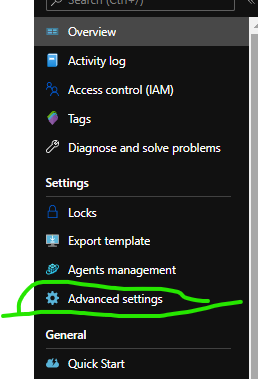
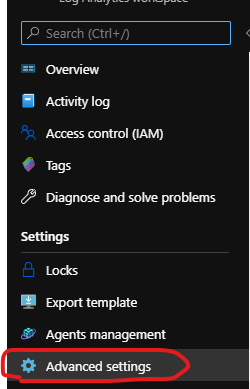
Hi all , im not entire sure what is the performance counter you need, but you can try something like this. go to the log analytics, -> Advance (In the settings like image below) : then choose : Then I think you just need to add something like this : You can also add the performance counter of your choice. You need to check what is the perfomance counter you need. Hope this helps.5.1KViews0likes3CommentsRe: Azure Monitor - LogAnalytics - Delay in sending alerts
yalavihi thank you for your time, If you don't mind I have a few questions, I encounter a major issue, in my opinion, using the current solution, and I would like to know if they are gonna be addressed, or if they are out of the scope for the current road map. Are you guys thinking about making the alerts fired being grouped? This is one of the major issues I currently see in using the Solution. What I mean is: I have the same alert been checked every 5 minutes, and if it triggered, the alert just keeps on repeating itself and having like 2000 alerts for the same threshold/rule, its kind of a killer, for using the tool correctly, in my opinion. If you go asleep at night, you might wake up the next morning, for a rule that has created 2000 alerts in 8 hours, and have to close the alerts "by hand". What I'm suggesting its something a bit kind of Azure Sentinel grouping. Is the "Alert Console" going to be reworked, or allow further customization? On the Monitoring Side is there any place i can find a direct match from the tables been monitored? What I mean is: is there a way I can see where to activate, and what, in order to get data into a given table in log analytics? Thanks in advance, and I'm sorry for my questions, they may be seen a bit noobish, but I think some of the topics are like elephants in the room, at least in some documentations in Microsoft. Or the information is so dispersed, that I have trouble getting it.5.9KViews0likes0CommentsRe: Getting memory consumption per process in a VM
Juval You can actually... it took me a while to understand, but basically when you add this counter : Processor(*)\% Processor Time Your collecting for all the VM's, but if you putt it like this: Processor(YOURVMNAME)\% Processor Time It will only collect the VM you specified. Don't ask me multiple VM's how-to, because I don't know but I'm guessing one line for each VM. 🙂 hope it helps. Hit That Like 😄 loool8KViews1like0CommentsRe: View/Query data in Log Storage
shockotechcom not really sure but i think you need to ingest them into a log analytics to check the contents, (importing them manually) or accessing the storage account by using Microsoft azure Storage Explorer... Hope this helps: https://docs.microsoft.com/en-us/answers/questions/25850/how-to-get-the-access-log-for-the-storage-account.html Best Regards.1.3KViews0likes1CommentRe: Getting memory consumption per process in a VM
Juval Hi to enable performance counters, events from event viewer etcs... you need to go to log analytics workspace that you are using, and enable what you need in advance settings. Aftear this you have to select what you need : Hope this helps, you can also use this : https://docs.microsoft.com/pt-pt/azure/azure-monitor/platform/data-sources-performance-counters Hope it helps it took me a while to understand what was needed. 🙂 Just a side note keep tracking of what you enable, because log analytics is payed by ingestion... You can take a look at your ingestion and cost, in the "usage and Cost" on the log analytics workspace. Hope it helps. Best Regards.8KViews1like2CommentsRe: Azure Monitor multiple subscriptions
PMorgan_1116 Hi don't really know what your thinking on monitor, but from my nearly no experience to Azure Monitor, you cannot monitor the resource itself from your subscription, however, you can create a alert rule , and send a notification to a logic app or a email (action groups) to your support team, on your subscription and send your alerts from another subscription to your designated "teams Channel", or send a email to someone. I know this is not the answer to your question, but I hope it helps you figure out what you need.26KViews0likes1Comment

Recent Blog Articles
No content to show