User Profile

BrettA343
Copper Contributor
Joined 6 years ago


User Widgets
Recent Discussions
Customizing the point a Fly-in animation comes from (override Effect Options)
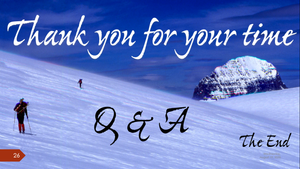
Hi! Is there a way to customize the point a Fly-in animation comes from (effectively 'overriding' the Effect Options)? I want to Fly-in "The End" from the middle-left of the pic below, letter by letter, to the location it's at (with bounce), so it looks like the letters are sliding down the glaciated slope. The 'Q & A" fades in afterwards. Help, please? TIA. Cheers, BrettA343. & A" 3rd.652Views1like0CommentsI have an 'On Click' Animation problem (On Click does nothing); I need to know the fix, Please(?)
Jeffry L. of the Help Desk solved an 'On Click' animation issue for me on 1 of 26 slides (the On Click did nothing for the final slide) yesterday & I need to know how to fix for another file (a copy of the same presentation). He said he had to fix a setting for the slide, but didn't say specifically what was done. Help, please! It seems your help desk is down today (as in common IME) and I need to send a .ppsx out this afternoon. Thx!759Views0likes1CommentRe: I have an 'On Click' Animation problem (On Click does nothing); I need to know the fix, Please(?)
BrettA343 - Further to this problem, I'll note that pressing <Enter> does in fact bring up the animation. It's only the left click that fails. Hope that helps - I'd still like to know the fix, please! Cheers, BrettA343.692Views0likes0Comments
Recent Blog Articles
No content to show