User Profile

user1la2
Copper Contributor
Joined 6 years ago


User Widgets
Recent Discussions
Re: SharePoint List View Error
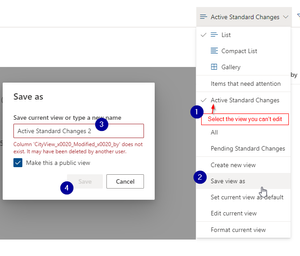
I finally figured it out! Every time I tried to edit a particular view I was getting this error. To fix: Instead of clicking "Edit current view", I clicked "Save View as", gave the view a new name *i.e. "MyView2"and clicked Save. This displayed the actual error/issue that needed to be solved. I was told that a specific column didn't exist and may have been deleted. This column that it thinks may have been deleted was the same name of a column I recently hid from my view (from the List page). I decided to try to add that column back to the list. I clicked "+Add Column" from my list and selected the "Show/hide column" option. I toggled the column in question back on so it displayed again in the list. After that column was displayed in the list again, I could Save the new view, Edit the view that previously threw an error. To safely hide the column from my view I had to toggle off from the "Edit View" page, not hide from the column interface on the SharePoint list. Crazy SharePoint 😉17KViews3likes2Comments
Recent Blog Articles
No content to show