User Profile

BradD
Brass Contributor
Joined 6 years ago


User Widgets
Recent Discussions
Re: Client ID - 0c4b69a8-adac-4ec1-b310-6c28ff9fa263 Does NOT exist in App registrations.
You need to create your own client from your own tenant, apply the necessary roles/auths and go from there. You need to read up on creating a service principal. https://docs.microsoft.com/en-us/azure/active-directory/develop/howto-create-service-principal-portal#register-an-application-with-azure-ad-and-create-a-service-principal1.6KViews0likes1CommentRe: Re: API to search list of videos or channels with strings in microsoft streams
API’s are coming but haven’t dropped yet. There was an announcement a little while back. If you can’t wait, you can build some kind of flow and throw the videos into Azure Media Services and from there, you can get a transcript and then use that to search and link to your video. A little long winded but all possible. Someone may have a better answer so not sure if that helps.1.4KViews0likes0CommentsRe: Excell has won this round
Byn138 yeah, that'll never work. It's not that simple and you'll never get a result using VLOOKUP like that. I changed it which is more complex and there's probably a better way but it works. It's using an array formula which you should probably read up on if you want to go with this approach. I also changed the format of your fees table so it's using scales rather than ranges.1.6KViews0likes1CommentRe: Currency Conversion List to List Calculation
You could use a Logic App to read for updates to the two lists and then use an Azure function to perform the calculation using the Graph API. The part I’m not clear on though, where do you want to store the EUR amount? In the main list on the same record where the local currency amount is?9.8KViews0likes0CommentsRe: Excel save issue for xls type file when office 365 is installed
XLS files are now extremely old and support for such files is diminishing especially with the cloud approach. XLS files are binary whilst the newer XLSX files are XML based. You should ask yourself the question, does it need to be XLS? If there’s absolutely no good reason then you should just convert it to XLSX/XLSM.1.8KViews0likes3CommentsRe: Copy SharePoint List to the another new site
sbhan4 you can add a new list via "Site Contents" referencing the list from the other site. This will being over the structure and any dependent lists. Then, export all of the data from the other list(s) out to Excel and then import it into the new list(s). You'll lose, history, etc. but at least you have your data. There may very well be cleaner/better ways but it's simple enough.292KViews1like17CommentsRe: How does file size of a PowerPoint work?
PowerPoint files are already zip files. If you convert the extension of the file to .zip you’ll see it contains a set of XML files and the like. The user could check the zip contents before and after to see which specific files are or are not changing and where the volume of the KB's are located. You'll find images and all sorts of things in the zip file so targeting specific files and their sizes will be easy. I can't promise that the person comparing the zip contents will always understand what they're looking at though.1.4KViews1like1CommentRe: record contact form entries to Microsoft List
liverlarson well, that's a completely different approach then and depending on your expertise and ability, could be a lot more complex. Bottom line, if you're not catching the event via some kind of PHP hook on the back of the contact form then you need to poll the database. Alternatively, you could apply an approach like that mentioned in this post ... http://www.mooreds.com/wordpress/archives/1497 ... and use DB triggers but it looks shakey and potentially problematic, still worth a shot though I'd say. Once you have the data though, using the Azure based services (like a Logic App or Azure Function or Power Automate) to create the list item is a sure fire approach. You can also connect to MySQL from Logic Apps but depending on where your DB is hosted and how accessible it is could depend on how much complexity needs to go into the solution, i.e. you may need a gateway instance to connect. Honestly, catching the email is the easiest path but I guess, if you don't trust it then that's not going to get you across the line.2.8KViews0likes1CommentRe: record contact form entries to Microsoft List
Use Power Automate/Logic apps. Send the email from the contact form, poll the email address in the aforementioned technology, parse the contents of the email and map it to the relevant fields and create an item in the list of your choice.2.9KViews0likes3CommentsRe: How to lock a spreadsheet in Sharepoint
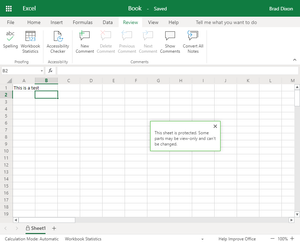
SheriW but regardless, again, it's still Excel. I just tested it myself. I created a new workbook, opened it in the desktop app, locked it (and it saved automatically) and then when I go back to the online view, it's locked and I cannot edit it. You can't edit the protection in the online view but that doesn't stop you from opening it in the desktop app and making those changes. If that's now what you're after then I'm clearly misunderstanding your issue.53KViews0likes0CommentsRe: SharePoint access from third party application
Graph is a framework, REST is the method you use to access Graph and although there are other ways to access SharePoint, I’ve found Graph to be the easiest and provides additional functionality that you can use to scale. I’ve never done it from Python but even from C#, the Microsoft delivered packages do nothing more than call REST end points. If you want to use a service principal, create an application in Azure and assign it the required application (not delegated) roles. From there, start exploring the end points by using the documentation. These may help. https://docs.microsoft.com/en-us/graph/api/resources/sharepoint?view=graph-rest-1.0#sharepoint-api-root-resources https://docs.microsoft.com/en-us/graph/auth-v2-service https://docs.microsoft.com/en-us/graph/api/overview?view=graph-rest-1.0 Good luck!10KViews0likes2Comments
Recent Blog Articles
No content to show