User Profile

MikeBrady
Copper Contributor
Joined 6 years ago


User Widgets
Recent Discussions
Re: Printing Forms - questions view
Damien_Rosario Wow. That just updated tonight, because I have been all over this looking for print, and now you mentioned it and it's there. Go figure. I read somewhere on here that they were adding that feature in September, and here it is. Thanks for making me check one more time.2.6KViews1like1CommentRe: Printing Forms - questions view
MeeraJayaraj Unbelievable. Going back to Chrome to correctly print a Microsoft Form because Microsoft doesn't make that possible. Makes me wonder why in the WORLD am I using MS Forms. Thanks for the work around. Leave it Google to provide a workaround for a Microsoft Product.21KViews0likes0CommentsRe: Create a SharePoint Course Page in Teams
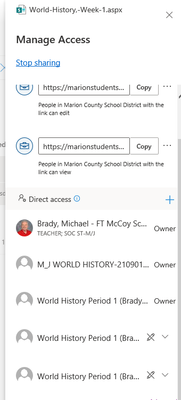
MariusPretorius I got it. Two things: I had to type the entire class name before the class would appear in the dropdown, and two, I had to use the url from the top bar, neither of the urls in the Get Link feature would work. Thank you, Marius, for your help on this.4.6KViews1like0CommentsRe: Create a SharePoint Course Page in Teams
MariusPretorius Ok, that almost worked. I had tried searching before, but this time I had to type out the entire name of the other Team before it found it. So I gave that Team access rights, although it did not appear in the list of Teams with access to that site when I was done. Anyway, I got the sharable link from the same menu and pasted it into a channel in the team I had just give access to, and I got the same message. I did some more research and Sharepoint Maven says to save the site as a template, but I can't find that option where he says it should be.4.6KViews0likes0CommentsRe: Create a SharePoint Course Page in Teams
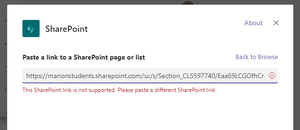
MariusPretorius Ok, thank you so much for taking the time to explain all that. I followed your directions carefully, and when i got to the point of adding the other groups/teams to the access, there was only one team listed, and that was the team the SharePoint site is based on. Why can't I see any other of my teams in that list? And if use either of the Share links when I try to add the SharePoint app in the other Teams, I get an error message. This SharePoint link is not supported. Please paste a different SharePoint link. Any ideas? Mike4.7KViews0likes3CommentsRe: Create a SharePoint Course Page in Teams
MariusPretorius Ok. So I'm teaching 5 classes of 6th graders. If I create a Sharepoint page for one class, can I create a tab in the other 4 classes that points to the same Sharepoing page, or do I need to create a Sharepoint page for each class, which would sort of defeat the purpose. The purpose being I'm trying to avoid having to post the same materials and activities in tabs across all 5 classes. If I could post the activities, tasks, videos, in one Sharepoint page and then link all 5 classes to the same page, wouldn't that work as well? Mike Update: I successfully created a site in "Class A" and then added a tab in Class A containing that site. Then I went to "Class B" and added a Sharepoint Site tab and pasted the url there for the site in Class A. As the teacher/owner of both sites, it worked. I could access the Class A Sharepoint site from within Class B, but not as a student., the Class B student was unable to access the Sharepoint site that was linked to Class A. Is there a fix for that?4.8KViews1like7CommentsMissing teams
Like so many other school districts, our Teams were auto-populated by data center operations according to our class rosters. I had 9 teams, but only 5 periods. Several of the teams had the ESE students in them, so my intention was to rename the core Teams and then add the ESE kids into the appropriate class team, trimming my Teams list down to 5. First, I renamed 5 of the 9 teams I have and gave them all cute little icons to make them user friendly. I opened them up here at home with the desktop app and noticed the icons were gone. Then I closed the desktop app and opened Teams through Office 365 in the portal, the web app. They were all listed there as well (still no icons) ---for about 5 seconds, then the 5 renamed teams all disappeared. Yes, "right before my very eyes." Gone. I closed the online app and went back to the desktop app. No luck. My renamed teams are gone. Any ideas? It's been over a week now. Data center said they thought they could pull them out of the Recylce bin, but found that they teams are still active. Well, I'm still not seeing them! More troubleshooting ideas. What do the invisible teams have in common? They were all renamed to begin with either 1st Period, 2nd Period, etc. (So did using a numeral on the front mess something up?) I only added the extra name, I didn’t change the rest of the nomenclature, so all the missing teams end with the letter C. I am the only teacher/owner on the missing teams, the teams that didn’t disappear have two owners, me and the ESE teacher. I can see the missing teams in the listing that comes up when I click the Assignments button on the main menu bar to the left. (Well, that's interesting.) I tried searching for the teams in the Search window that is offered in the Create/Join Teams window. Nothing comes up. I’ve rebooted every day. I’ve logged out of Teams completely and logged back in. I’ve cleared the cache on every browser. I’ve tried a total of 5 different computers, 4 different browsers, in 3 different locations. I ran a Powershell script at home that was supposed to clear the MS Teams cache files, rebooted, logged out and in. Nothing. I have prayed and burned incense in front of my computer. WHAT THE HECK?!?531Views0likes0CommentsRe: Teams chats and groups not visible/disappeared on laptop
adam deltinger I'm having the same problem. I'm a teacher. Data Center uploaded my classes into teams. I renamed 5 of 9 of the teams on my school desktop. When I got home I opened Team in the web app, and after all 9 teams appeared, the screen blinked and the 5 teams i had renamed vanished. They are not hidden or archived. I've rebooted several times, used several different browsers, several different computers both at home and at school. Data Center says the teams are still active. But I can't see them. I tied logging out of MS Teams and logging back in, I also tried clearing the Team cache according to the instructions on the link you provided. Nothing has worked so far.236KViews0likes0CommentsStudents deleting files
I have another issue I would like some feedback on. Logged in as a student, I was able to delete files from the Files Channel that were put there by the teacher (me) a few minutes earlier. And when the "student" deleted them they were deleted from my teacher page as well where I was administering the class from. Why is that possible?Solved5.5KViews0likes5CommentsAssign To drop down menu not listing all classes
I'm trying to make an assignment for all my classes (Teams). I have nearly 10 teams because the students were imported by course # and ESE students are in separate course codes and I can't combine teams. Anyway, when I'm making an assignment, the Assign To drop down is not listing all my teams. In fact it's only listing 2. Where are the others?1.3KViews0likes4CommentsRe: Teams Vs Moodle Vs Google Classroom?
Hello MariusPretorius I used both Google Classroom and MS Class Notebook last year with students. They liked GC better. Class Notebook kept glitching up. Students had constantly reload their pages, etc. Now fast forward to MS Teams. I find the same problems with Teams. Additionally, one big problem I have with Teams is that it is very time consuming to do anything in the classes. Except for the Assignments feature, every other adjustment to classes has to be made separately in each Team (class). Also, all the Teams were autopopulated by our sys admin, and there is no way to combine Teams to match my course schedule, unless I do it myself, and then what happens when sys admin runs an update to my rosters as students enter the district throughout the year. Granted, in GC I have to set up the classes, but I can create sections and materials for all classes at once, rather than one at a time. I think the learning curve for younger kids is too steep with Teams. I teach 6th graders, and they were lost in Class Notebook, I can't see them figuring out Teams any faster. My vote for younger students goes to Google Classroom.41KViews0likes1Comment
Recent Blog Articles
No content to show