User Profile

testuser7
Brass Contributor
Joined 6 years ago


User Widgets
Recent Discussions
ms-teams status
Hello, This might look simple but apparently it is not so please do not give any superficial suggestions. If you have practically solved it , really appreciate your help. I am using MS-teams on browser (teams.microsoft.com) I can not use MS-teams desktop app so please do not think in that direction. Now, as it is standard windows 10 box, I have several other apps opened like outlook, Visio , Textpad etc. If I am busy working on these apps for more than 10-15 mins, my ms-teams status becomes INACTIVE (yellow color) Now this is totally wrong as I have not locked the laptop or not even stepped out keeping the laptop open. I am actually working and using my keyboard and mouse every second. But still my collogues are telling me that I am INACTIVE from teams point of view. Is there any ways to keep ms-teams status GREEN by some browser-extension etc. ?? Thanks.745Views1like2CommentsEmulating windows hello cred from physical box
I have azure-ad joined windows 10 VM in Azure I want to unlock the VM from the VM's login-shell (not want to provide creds on the RDP-client) with the Windows Hello Credential stored on the physical Azure AD join device. Is it a viable flow technically? In other words, what I want to validate is, I have a physical AAD-joined win10 device where I have enrolled Windows Hello I want to use this WHfB credential while unlocking one Win 10 VM in Azure that I already RDP into from this physical device. So I am staring at the std. window's login screen of VM where I can put my password. However, I do not want to feed password. Instead I want to login with WHfB-cred stored in the physical box. We know we have WebAuthn redirection by redirectwebauthn:i:1 Can we use this RDP-property ? Thanks.729Views0likes2CommentsAAD Silent Authentication
Hello, I want to pick your brain for silent authentication with AAD Something basic but interesting to me as we are hitting the wall. I have simple OAuth app that I want to get into from one Azure-AD joined Windows 10 device. So when the app redirects my browser to Azure-AD, the app wants to do silent authentication. Hence the app is sending prompt=none in the OAuth request. Everything looks logical expect that, there is NO account in the cookie. The only account that I am operating with is the PRT So I was in impression that Azure-AD will use the incoming PRT with the OAuth request and get the id-token out for the app. Unfortunately AAD is not doing that way. AAD is erroring out, saying that passive form is NOT possible because there is NO ACCOUNT in the cookie. My question is, how can app instructs silent-authentication in the request and instructs AAD to use the PRT ?? Thanks.1.2KViews0likes0CommentsMCAS -- desktop app onboarding domains
Hello, I am trying to wrap "Azure Virtual Desktop" app through MCAS (Defender for Cloud Apps) This app is accessible via browser at (https://client.wvd.microsoft.com/arm/webclient/index.html) and also available as Desktop-app on win10 box First I tried to on-board the browser version as Conditional Access App Control based app so real-time monitoring and control capabilities can be done through access-policy and session-policy When I hit it from browser, everything work as expected. I got the app as featured-app in MCAS with domain=http://client.wvd.microsoft.com/ I created on access-policy and block it. Now comes the funny part. I do not want any user using the using the desktop version of the app. I had to manually on-board it as I got following domain sensed by MCAS So my question is, Can we on-board non http domains ?? If yes, what should I configure in the following screen ??890Views0likes1CommentRe: how to remove on premise AD when device is Azure Hybrid Joined
Thijs Lecomte On that note, I have one point to clarify with you. Can I retire hybrid-join device from intune. If yes, then I believe the retiring task has to take care to turn off the automatic scheduler that puts the device in AAD Am I right ?? And secondly, will retiring task takes care of unjoining the device from on-prem AD also ?? Appreciate your help.7.6KViews0likes0CommentsPRT for Windows Server
Hello, We know that Cloud Authentication Provider (CloudAP) and Azure AD CloudAP plugin are the primary components for obtaining Primary Refresh Token (PRT) from Azure-AD on Windows 10 devices which are AAD-joined OR hybrid-joined. I want to know, if Cloud Authentication Provider (CloudAP) and Azure AD CloudAP plugin is available on Windows Server 2019 so that if such server is hybrid-joined then I can expect a PRT when I sign into this server. Thanks. Thanks.AAD sign-in frequency with persistent browser session
Hello, I have set up "sign-in frequency" session control with 1 hour. I have NOT set “persistent browser session” As expected, I sign into portal.azure.com and kept the browser open for one hour. Right after sign-in frequency time passed, I was asked to sign-in again. I just want to extend this conditional policy configuration with one more thing. If I had also turned ON “persistent browser session”, what would be the change in the behavior once the configured sign-in frequency passed. My observation was, “NO CHANGE” Meaning I was forced to sign in again. My impression was that “persistent browser session” setting will avoid user to put his credentials again. Am I missing some important thing here ? Appreciate your help !!! Thanksactivity-based timeout policy
Hello, I have a disconnect with respect to activity-based timeout policy and its usefulness. How come AAD be involved in the idle-time-out implementation of web-app session ? Should not an Idle-Timeout come from the application itself, and if a timeout is detected, the application can invalidate the existing token (although it’s lifetime may still be valid) and redirect the user back to AAD. So if I have set activity-based timeout for one web-app (for eg., portal.azure.com) as 2 hours. When AAD sends the SAML/ID-token to the app, would AAD sends out this activity-based timeout information so that if application supports it , it can notify the user if user is staring the app-screen for 2 hours. If user does not do any activity on the app, the Java-script of the app will send out the sign-out request to AAD to sign the user out. Am I correct in my understanding ? Thanks.AAD Group membership approval setting
Hello, Is there MS-graph API for changing the GROUP'S approval setting For eg., if you want to change it from "auto-approved" to "owner approval required" through graph API, can we do that so that next time when any end-user request group-membership through access-panel as self-service call, it goes to the owner to approve. I know we can do it from access-panel but did not find the corresponding graph-api Thanks.multiple Primary refresh token
On windows 10 Azure-AD joined device, we know that when we sign into the device, a PRT is obtained. This PRT is used by web and non-web applications through WAM If I want to settle one more PRT in the same windows session , is it possible ? If yes, can you explain how that flow would be to obtain the 2nd PRT for for my another account in AAD in the device ? Thanks.2.5KViews0likes5Commentsdesktop app - WAM integration
Hello, We know that latest M365 desktop apps (word, excel, teams etc) leverages WAM (web account manager ) for their sign-in flows. Web Account Manager (WAM) is more or less like SSPI, except it has a different API model and handles UI natively. So my question is, when desktop app uses WAM to get a token, if WAM wants to do any interactive work with the user, for eg., perform second-factor OR even collecting a brand new username-password (because user decided to use different account), all these interactive flows happen through native WAM UI or any kind of browser-context is involved ? Thanks.Office365 as a Conditional Policy Resource
When I create CA-Policy around Office365 as a cloud-resource, which exact resource we are protecting ? Are we protecting MS-Graph as a resource which has APIs for various office applications like Teams, SharePoint etc. In other words we are protecting various office356 APIs in MS-Graph For eg., POST https://graph.microsoft.com/beta/sites/%7bsite-id%7d/lists OR Are we protecting all direct APIs exposed by Teams, SharePoint, Exchange etc. ? Something like for eg., POST https://microsoft.sharepoint-df.com/sites/%7bsite-id%7d/lists Thanks.graph explorer for GCC High Government
Hello We have this wonderful app called "graph explorer" at https://developer.microsoft.com/en-us/graph/graph-explorer# Can this app be used to sign into any GCC High account so that we can fire queries like https://graph.microsoft.us/v1.0/me/ Thanks.6.7KViews0likes1Commentmicrosoft intune on CA-policy
Hello, I have a recollection that out of 2 similar apps i.e., Microsoft Intune Enrollment and Microsoft Intune on conditional-access policy, I believe we should use Microsoft Intune. Is it a correct understanding for example, if we want to wrap MFA for Intune enrollment we should use Microsoft Intune as cloud resource ? We are standing up a new tenant and hence we should do what MS is recommending. I believe they are phasing out Microsoft Intune Enrollment Appreciate your help !!! Thanks.937Views0likes1Commentadding extra work or school account in Win10
I have a question about Windows 10 box that is joined to Azure AD Why should I add user at # Windows 10--> Settings --> Accounts --> Other users --> Add a work or school user Even without adding any Azured-AD account in above place, that user can easily first time unlock the device by putting his UPN and password on the windows 10 unlock screen. So what I am buying by pre-adding the users through above menu item. Thanks.DISABLE Web Account Manager
If my desktop app is coded to use WAM (web account manager), for eg., var pca = PublicClientApplicationBuilder.Create("client_id") .WithExperimentalFeatures() // in public preview .WithBroker() .Build(); is it possible to override this behavior (may be with some registry setting) and make sure that my app is not using WAM to get the token. Instead app uses just MSAL lib and MSAL does all the mediation with AAD without WAM to get the token. Thanks.3.5KViews0likes0Commentsconditional policy relaxation for a client-app
My OAuth client app is sending /authorize call to AAD with openid in the SCOPE I have a conditional policy that says that access to any and ALL cloud-resource MUST be from COMPLIANT DEVICE. I want to relax this policy only for this one and only client-application so that this client-app (web-app) can be hit from my personal device browser. All other client-apps must comply with COMPLIANT DEVICE policy. Can I do that ? Thanks.WHfB with cert-trust-model
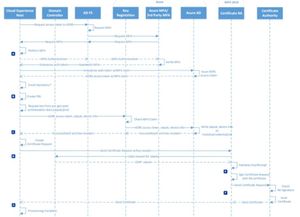
Good morning !!! Hope you had a good start of the day. I am actually setting up “WHfB with cert-trust-model” and have one quick and binary question. Appreciate your help. Is "device writeback" mandatory for JUST "Windows-Hello Cert-Trust-Model" ? I am NOT interested in obtaining enterprise-PRT through ADFS. Mine is a simple use-case of https://docs.microsoft.com/en-us/windows/security/identity-protection/hello-for-business/hello-how-it-works-authentication#hybrid-azure-ad-join-authentication-using-a-certificate MS has done a good job depicting the flow below but if you focus on the bottom part of the flow where “certificate-creation-request” is sent from the hybrid-device to “Certificate-RA”, my understanding is, that request NEED NOT have to be signed by the device-private-key. Of course user-key or at least user-key-receipt is needed but cert-generation is NOT dependent on device-writeback. Later on, if enterprise-PRT through ADFS is requested then definitely device-writeback is mandatory but that is not I am interested in. Am I correct in my understanding ? Thanks.Re: activity-based timeout
if I can qualify a little more, we know that this Activity Based Timeout is for idle-time out on browser. So if I do not do anything on the app opened on browser for eg., 15 min., then after 15 min., I will see the Azure-AD popup to sign in again. The doc says that application need to support activity-based timeout. I am not sure, what kind of support AAD is expecting from the web-app and secondly how does AAD find out that I am idle on the app-browser ? Thanks.860Views0likes0Comments
Recent Blog Articles
No content to show