User Profile

jefmeyer
Iron Contributor
Joined 6 years ago


User Widgets
Recent Discussions
Web Content toggle is now missing
Hi All- Starting yesterday, the toggle for "web content" in m365 Copilot has disappeared. And when searching for content, we see this alert: "Your organization has turned off web search. Copilot responses won't include the latest data from the web." No changes have been made on our end and we have the Cloud Policy for "Allow web search in Copilot" enabled. Anyone else having issues?Re: Custom Scripts policy breaks editing Custom Fields in PDPs (Project Online)
RodFromm - I understand how to revert the script setting, however this doesn't seem to be a good long term solution. If I understand correctly, it's possible to delay this change, but come November 2024, the script blocking will be enforced and then it will require SP admin action to revert for a 24 hour period. Since this seems to be a limitation of the Project Online web parts, are there any available or planned updates to Project Online to address this? If not, this seems like a nail in the Project Online coffin.3.2KViews2likes7CommentsHow are you managing individual Forms ownership transfers?
Hi All- Curious to know how others are handling individual Forms ownership changes when users leave the company? Are you transferring ownership for the form or telling the users to rebuild the form? Would be nice to have an option to default to Group based Forms and have the user select if it should be individual. Thanks in advance.1.1KViews0likes3CommentsRe: Sharepoint and Power Automate Copy Information and Leave fresh template
You could do this with Power Automate running on a weekly schedule: 1. create a "clean" file with your Excel file format. This is just a template file. 2. have a current week file, used for your weekly input. 3. when the week is completed, the Power Automate could rename the current week file to whatever name you want. 4. the Power Automate could then copy the "clean file" and save as the current week file.Re: Multiple custom SharePoint list forms
Depending on the number of item types and fields you're storing in the list, you could have a separate screen for each item type. When the form loads, the user would select the inventory type and then based on that selection, show the appropriate screen. A simpler approach would be to show/hide fields based on the item type selected, but keep everyone on one screen. In either case, the item type would drive the fields to display. PowerApps doesn't support content types, so that's not an option.Re: Unique Email address - Power Automate
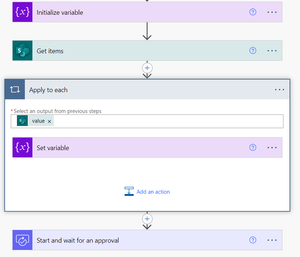
wilson1231805 - Yes, correct. You'll need at least two columns in the list: 1) for looking up the approvers. 2) Approvers column. You can then use the Get Items (SharePoint connector) to retrieve the approver from the list. This approach will return a collection and when trying to access the result (this throws people sometimes). It should look something like this; The other approach to retrieve the data would be the "Send an HTTP Request", but this is a bit more effort to implement. It's more efficient, but a little harder to implement. It should look something like this: https://learn.microsoft.com/en-us/sharepoint/dev/business-apps/power-automate/guidance/working-with-get-items-and-get-files Send an HTTP request info: https://learn.microsoft.com/en-us/connectors/sharepointonline/#send-an-http-request-to-sharepointRe: Teams | Using Power Automate to create Teams Channel Calendar Appointment from a message
I don't think Teams Channel Meetings actions are currently available in the Teams connector. You could explore Graph API and see if it's possible there. https://learn.microsoft.com/en-us/graph/choose-online-meeting-api If you're ok using your account for creating the meetings, you should be able to use the Create a Teams Meeting action on the Teams connector: https://learn.microsoft.com/en-us/connectors/teams/#create-a-teams-meetingRe: Power Automate sending messages on Teams Chat
FabricioMiranda - This is not expected behavior. How is the SP List being updated (what's triggering the workflow)? Does each Teams message show the same data or each field updated? Depending on your flow, you may also want to implement Trigger Conditions. I see you have a condition step somewhere in your flow and a trigger condition may be more efficient. https://learn.microsoft.com/en-us/power-automate/triggers-introduction#customize-a-trigger-by-adding-conditionsRe: How are you managing individual Forms ownership transfers?
RobElliott - Awesome and thanks for sharing. May I ask how you enforce that rule? I'm assuming it's a written policy and communicated to end users, not something you've automated to enforce. We do a similar approach; however, we don't build the Forms for users. Unfortunately, some "critical" processes have been built as individual Forms, which is why we're trying to see what others are doing. Take care!1.1KViews0likes1CommentRe: No attachment in meetings with externals
Dlewis-79 - This is by design. https://learn.microsoft.com/en-us/microsoftteams/communicate-with-users-from-other-organizations#things-your-users-can-do You'll need to send a link to the file with the permission shared to the external users.1.9KViews0likes0CommentsRe: Display Form Unique ID after submit (part of thank you message)
You can modify the "Thank you" message, but I don't think you can add dynamic data. I'd recommend searching through the submissions and upvoting where appropriate. Or create a new idea if none exists: https://feedbackportal.microsoft.com/feedback/search/0ab9de26-ff1b-ec11-b6e7-0022481f8472?q=thank+you7KViews0likes0Comments
Recent Blog Articles
No content to show