User Profile

AndySvints
Iron Contributor
Joined 6 years ago


User Widgets
Recent Discussions
Re: Invalid input parameters Tenant Admin can't modify first party documents
Hello TejaPennada, As far as I am aware, CallingEndtoEndEncryptionEnabledType is an Enum and has two options: Disabled (which is the default one) and DisabledUserOverride. DisabledUserOverride - allow user to turn on end-to-end encrypted calls, Disabled - prohibit. Please try the following: Set-CsTeamsEnhancedEncryptionPolicy -Identity "Tag: User Controlled" -CallingEndtoEndEncryptionEnabledType DisabledUserOverride Reference: Set-CsTeamsEnhancedEncryptionPolicy Hope that helps.2.6KViews1like3CommentsRe: exchange distribution list and inviting new members to exisiting meetings
Hello jptate, I would like to piggy back to the previous reply and add some context: At the time of delivery of the email items (including meeting invites) to the distribution list, server is responsible for expanding DL and directing email items to each member. So once you add new members, it will only affect future deliveries not the past ones. Hope that helps.772Views0likes0CommentsRe: Evaluating whether to submit code
Hello dcressey, I think you should share it. It doesn't matter if the script/module/cmdlet is simple or extremely complex. When you was creating it you were solving some specific problem, you had a vivid use case in mind. There is very high chance that other people will also face the same problem/use case and will benefit from your code. Hope that helps.481Views0likes0CommentsRe: Export DL Memberships from Exchange 2013 and Import to 365 via PowerShell
Hello Curious_Kevin16, Script provided by elieelkarkafi is for exporting data from M365 and will not fit directly to your use case. In your case logic is pretty straight forward: Exchange Server 1. Get All Distribution Lists 2. For each group export Members M365 1. For each Exchange server DL get exported members 2. Foreach member add him/her to DL in M365 Example code: #Exchange Server $DistributionList=Get-DistributionGroup foreach($dl in $DistributionList){ Get-DistributionGroupMember -Identity $dl.Name | Export-CSV -Path "C:\Temp\$($dl.Name)-DLMembers.csv" } #M365 #Connect to Exchange Online $DistributionList=Get-ChildItem -Path "C:\Temp" -Filter "*-DLMembers.csv" foreach($dl in $DistributionList){ $Memberships = Import-Csv -Path $($dl.Name)-DLMembers.csv" foreach($m in $Membership){ Add-DistributionGroupMember -Identity $dl.Name -Member $m.PrimarySmtpAddress } } Please note that this sample code will not handle expanding group which is a member of another group. Hope that helps.586Views0likes0CommentsRe: get-Mguser: How to get more than 100 users when looping through userIds
Hello RachJ2255, If I understood your use case correctly -All should do the trick for you. You just need to add it to Get-MgGroupMember not Get-MgUser.l cmdlet. Like this: $groups = Get-MgGroup -ConsistencyLevel eventual -Count groupCount -Filter "startswith(DisplayName, 'XX-XXX')"|Select DisplayName, Id foreach ($group in $groups) { $members = Get-MgGroupMember -GroupId $group.Id -All foreach ($member in $members) { $user = Get-MgUser -UserId $member.Id $ObjectId = $user.Id; $UserDisplayname = $user.DisplayName; $userPrincipalName =$user.Mail; $GroupDisplayname = $group.DisplayName; #and then here I create an insert SQL statement to persist the results in a table } } Hope that helps.3.4KViews2likes1CommentRe: Not getting the values in CSV
Hello Ameerm2023, Just my two cents on how to make your script more efficient. You are calling Get-MgUser 4 times, although 2 would be more than enough (Actually it can be achieved with just one but we have to start somewhere). Basically you can cut the execution time in half: Write-Host "Script started at $(Get-Date)" $Disabled = ".\UserUsage\DisabledUsers.csv" $enabled = ".\UserUsage\EnabledUsers.csv" Connect-MgGraph -ClientId "123" -TenantId "123" -CertificateThumbprint "123" Sleep -Seconds 10 $allEnabledUsers = Get-MgUser -All -Filter 'accountEnabled eq true' -Property id, FirstName, LastName, Jobtitle, displayName, CompanyName, State, OfficeLocation, department, signInActivity, userPrincipalName,userType, createdDateTime, accountEnabled, passwordPolicies, mail, lastPasswordChangeDateTime, Phone | select id, displayName, FirstName, LastName, Jobtitle, CompanyName, State, OfficeLocation, Phone, department, userPrincipalName, userType, createdDateTime, accountEnabled, mail, lastPasswordChangeDateTime, passwordPolicies, @{N='LastSignInDateTime';E={$_.signInActivity.LastSignInDateTime}}, @{N='LastNonInteractiveSignInDateTime';E={$_.signInActivity.LastNonInteractiveSignInDateTime}} Write-Host "Enabled Users: $($allEnabledUsers.Count)" Sleep -Seconds 10 $allDisabledUsers = Get-MgUser -Filter 'accountEnabled eq false' -All -Property id, FirstName, LastName, Jobtitle, displayName, CompanyName, State, OfficeLocation, department, signInActivity, userPrincipalName, userType, createdDateTime, accountEnabled, passwordPolicies, mail, lastPasswordChangeDateTime, Phone | select id, displayName, FirstName, LastName, Jobtitle, CompanyName, State, OfficeLocation, Phone, department, userPrincipalName, userType, createdDateTime, accountEnabled, mail, lastPasswordChangeDateTime, passwordPolicies, @{N='LastSignInDateTime';E={$_.signInActivity.LastSignInDateTime}}, @{N='LastNonInteractiveSignInDateTime';E={$_.signInActivity.LastNonInteractiveSignInDateTime}} Write-Host "Disabled Users: $($allDisabledUsers.Count)" $allEnabledUsers | Export-CSV -NoTypeInformation $enabled Write-Host "CSV file for Enabled Users exported at $(Get-Date)" $allDisabledUsers | Export-Csv -NoTypeInformation $Disabled Write-Host "CSV file for Disabled Users exported at $(Get-Date)" Disconnect-MgGraph Write-Host "Script finished at $(Get-Date)" Hope that helps.1KViews0likes1CommentRe: script for failed task scheduler
Hello Nicola1976, One of the possible options is to add table and format your email in HTML. Something along those lines: $SmtpClient = new-object system.net.mail.smtpClient $MailMessage = New-Object system.net.mail.mailmessage $SmtpClient.Host = "smtp.gmail.com" $SmtpClient.Port = 587 $smtpclient.EnableSsl = $true $mailmessage.from = ("email address removed for privacy reasons") $mailmessage.To.add("email address removed for privacy reasons") $mailmessage.Subject = “Import Server Alert ID322” #Render email as HTML $mailmessage.IsBodyHTML=$true #Get your event $Event=Get-WinEvent -MaxEvents 1 -FilterHashtable @{ logname='microsoft-windows-taskscheduler/operational';ID=322} #Create simple HTML table $mailmessage.Body=@" <p>Server <b>Dat-TaskScheduler-Event 322</b>. Richiesta di avvio ignorata. Istanza già in esecuzione. Si prega di rivedere i dettagli di seguito </p> <table style="width:100%"> <tr> <th>Time</th> <th>Source</th> <th>EventId</th> <th>ResultCode</th> <th>Message</th> <th>EventLog</th> </tr> <tr> <td>$($Event.TimeCreated)</td> <td>$($Event.ProviderName)</td> <td>$($Event.Id)</td> <td>$($Event.Properties.Value[2])</td> <td>$($Event.Message)</td> <td>$($Event.LogName)</td> </tr> </table> "@ $smtpclient.Credentials = New-Object System.Net.NetworkCredential("email address removed for privacy reasons", "password") $smtpclient.Send($mailmessage) Hope that helps.2.9KViews1like1CommentRe: Password management for Powershell scripts
Hello dmarquesgn, Please look into Microsoft.PowerShell.SecretManagement module. You can use it to store your secrets in Local store, as well as in othe vaults ( Azure Key is supported). Use Register-SecretVault to register your Azure Key vault. $params = @{ Name = 'Azure' ModuleName = 'Az.KeyVault' VaultParameters = @{ AZKVaultName = 'MyAzureKeyVault' SubscriptionId = (Get-AzContext).Subscription.Id } DefaultVault = $true } Register-SecretVault @params Hope that helps.880Views0likes0CommentsRe: PowerShell Novice: Script Timeout #WSUS
Hello Taff4Ever, For starters, please try to run separate cleaning tasks for each parameter. If you will still receive timeout error for individual parameters, please look into increasing timeouts, as it mentioned in references. References: WSUS cleanup aborts WSUS cleanup aborting: Increase timeout for database and IIS P.S. I am not gonna lie this info is from the 1st page of Google search. Hope that helps.2.8KViews1like0CommentsRe: How can I protect a password within this login script?
Hello Baron164, You can look into Microsoft.PowerShell.SecretManagement ( provides a convenient way for a user to store and retrieve secrets), which supports multiple secret vault types. For starters, you can use Microsoft.PowerShell.SecretStore ( Local secure store extension vault). Hope that helps.971Views0likes0CommentsRe: Need assistance with automating MS Authentication in a PowerShell script
Hello Lorenz33, You can look into Microsoft.PowerShell.SecretManagement ( provides a convenient way for a user to store and retrieve secrets), which supports multiple secret vault types. For starters, you can use Microsoft.PowerShell.SecretStore ( Local secure store extension vault). Hope that helps.1.7KViews0likes0CommentsRe: Need assistance with automating MS Authentication in a PowerShell script
Hello Lorenz33, In addition to suggestions mentioned by Alex_Rechs, you can also look into 2 extra options: (1) using ServicePrinciple with ClientSecret Prerequisites: Register App in AAD and create ClientSecret. Code to authenticate will be something like this: $TenantId="[TenantId]" $ClientId="[YourRegisteredAADAppClientId]" $ClientSecret="[YourRegisteredAADAppClientSecret]" $PWord = ConvertTo-SecureString -String $ClientSecret -AsPlainText -Force $Credential = New-Object -TypeName System.Management.Automation.PSCredential -ArgumentList $ClientId, $PWord Connect-PowerBIServiceAccount -Tenant $TenantId -ServicePrincipal -Credential $Credential (2) using ServicePrinciple with Certificate Prerequisites: Register App in AAD and upload certificate (self signed will suffice). Authentication code will looks like this: $AppId= "[YourRegisteredAADAppClientId]" $Cert="[Thumbprint]" Connect-PowerBIServiceAccount -ServicePrincipal -CertificateThumbprint $Cert -ApplicationId $AppId References: Connect-PowerBIServiceAccount Create an Azure Active Directory application and service principal that can access resources Hope that helps.1.7KViews0likes2CommentsRe: SharePoint Online: Get the Site Owner using PowerShell
Hello michael1900, One of the options to get Site Admins is to get list of all members of the site and then identify who has IsSiteAdmin property equal to True: $SiteAdmins = (Get-SPOUser -Site $URL -Limit ALL | Where-Object { $_.IsSiteAdmin -eq $True} Here is your code with the added line: $AdminCenterURL = "https://<TenantName>-admin.sharepoint.com/" $CSVPath = "c:/temp/danny.csv" Connect-SPOService -url $AdminCenterURL Connect-AzureAD $Sites = Get-SPOSite -Limit ALL $Results = New-Object 'System.Collections.Generic.List[psobject]' forEach($s in $Sites) { If($_.Template -like 'GROUP*') { $GroupOwners = (Get-AzureADGroupOwner -ObjectId $s.GroupID | Select -ExpandProperty UserPrincipalName) -join "; " } Else{ $GroupOwners = $s.Owner } $SiteAdmins = (Get-SPOUser -Site $s.URL -Limit ALL | Where-Object { $_.IsSiteAdmin -eq $True} | Select-Object -ExpandProperty DisplayName) -join "; " $Results.Add( $(New-Object PSObject -Property $([ordered]@{ 'Site Title' = $s.Title 'URL' = $s.Url 'Owner(s)' = $GroupOwners 'Admin(s)' = $SiteAdmins }))) } $Results| Export-CSV -path $CSVPath -NoTypeInformation -Encoding utf8 Hope that helps.8KViews0likes0CommentsRe: Import non existing CSV rows to SharePoint online list
Hello Kaddrik, One of the possible options would be something like this: Get SharePoint List Items Get CSV file Compare two collections and identify the diff, items that are present in CSV but are not present in SharePoint list Foreach diff item add it to the SharePoint #Parameters $SiteUrl = "https://m365x45097644.sharepoint.com/sites/Contoso" $ListName = "ProjectList" $CSVPath = "MyFile.csv" #Get content $CSVData = Import-CsV -Path $CSVPath #-Delimiter ";" #Connection to site Connect-PnPOnline $SiteUrl -UseWebLogin $ListItems=(Get-PnPListItem -List $ListName ).FieldValues | Select-Object @{l="Title";e={$_."Title"}} , @{l="Department";e={$_."Department"}}, @{l="Project";e={$_."Project"}} $Diff=Compare-Object -ReferenceObject $ListItems -DifferenceObject $CSVData | Where-Object {$_.SideIndicator -eq "=>"} | Select-Object -ExpandProperty InputObject ForEach ($Row in $Diff) { Write-Host "Adding Application $($Row.Title)" #Adds items Add-PnPListItem -List $ListName -Values @{"Title" = $($Row.Title); "Department"=$($Row.Department); "Project" = $($Row.Project); } } Hope that helps.1.1KViews0likes1CommentRe: How to split rows into column by specific delimiter
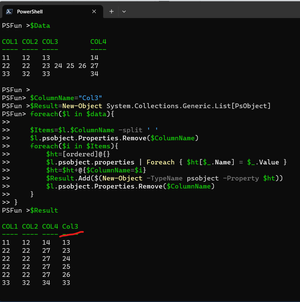
Hello tcboeira, Yes, the code provided is exactly for the use case that you are describing. Here is the execution of it on your data set: One caveat is that the order of the columns will be messed up. Column in question will be all the way in the end. Hope that helps.4.5KViews0likes0CommentsRe: How to get from 3 different sources in the Microsoft cloud (ExchangeOnline, AzureAD and O365)
Hello Miguel_Alegria, To be honest, I did not execute the full script. I've tested some bits and pieces of it. The error that you receiving looks like to be related to the last line and escape character which I've added accidentally. Also, I've noticed that EmployeeID was not added to the object. Here is the updated code: Connect-MsolService Connect-ExchangeOnline Connect-AzureAD $aux = Get-MsolUser -all $total = ($aux).count $usuarios = @() $usuarios= New-Object System.Collections.Generic.List[PSObject] foreach ($user in $aux) { $u=$user $i=0 if($u) { Write-Progress -Activity "Procesando ($i) de $total Usuarios." -Status "Porcentaje de Avance..." -PercentComplete ((($i)/ $total)*100) $EmployeeID=$(Get-AzureADUserExtension -objectid $u.ObjectId).EmployeeId $BU=(Get-EXORecipient –Identity $u.UserPrincipalName -PropertySets Custom).CustomAttribute5 $Pais=if($u.UserPrincipalName.Split("@")[1] -eq "ACME.com"){ "pe" }else{ $u.UserPrincipalName.Split("@")[1].Split(".")[-1] } $usuario = $u | Select-Object @{l="UPN";e={$u.UserPrincipalName}},DisplayName,@{l="EmployeeID";e={$EmployeeID}},@{l="BU";e={$BU}},BlockCredential,IsLicensed,UsageLocation,@{l="Dominio";e={$u.UserPrincipalName.Split("@")[1]}}, @{l="Pais";e={$Pais}} if($u.Licenses){ while($u.Licenses[$i].AccountSku.SkuPartNumber) { $usuario | Add-Member -MemberType NoteProperty -Name $u.Licenses[$i].AccountSku.SkuPartNumber -Value $u.Licenses[$i].AccountSku.SkuPartNumber $i++ } } $usuarios.Add($usuario) } } $usuarios | Export-Csv -NoTypeInformation -Path "C:\scripts\O365\Reportes_O365\LicenciasAsignadas_$((Get-Date -format yyyy-MMM-dd-ddd hh-mm tt).ToString()).csv" Hope that helps.593Views0likes0CommentsRe: Assistance with looping through multiple subscriptions
Hello Subhankar131, Get-AzVMBackupInformation.ps1 is the name of the function that you posted. So the algorithm is the following. Save your posted function to Get-AzVMBackupInformation.ps1 file and then code that I've provided is additional function which will executed the existing one. Hope that helps.5.6KViews0likes3Comments
Recent Blog Articles
No content to show