User Profile

Star_D
Iron Contributor
Joined 6 years ago


User Widgets
Recent Discussions
Text question needs character counter to warn when approaching the character limit
Posting here since https://microsoftforms.uservoice.com/forums/386451-welcome-to-microsoft-forms-suggestion-box/suggestions/43699461-text-question-needs-character-counter-to-warn-when is going away: The Text question type in MS Forms has a 4000 character limit. It does not warn the respondent when they are approaching the limit; it just stops accepting additional input. A character counter below the text box would therefore be very useful. It could either show the remaining characters or the ratio of characters entered/total (see mockup screenshot showing examples of both).1.5KViews3likes0CommentsRe: Responses changing from number to text
This make sense when you think about it (but doesn't stop it from being annoying): the only question type I know of in MS Forms that has "restrictions" in the more settings is the Text question. The restriction is specifying that you can only use the numeric part of an alphanumeric answer, BUT it is still a TEXT question, and it is formatted as such in Excel. What is needed in Forms is a actual Number question type, not a modified Text question tpe. If there were an actual number type question in MS Forms than we could have actual number formatting options like # of decimal places, Integers only, currency, # of digits (as opposed to using Restrictions > Between), etc. Again, not saying I approve of it...but if you remember that a "TEXT question with restrictions" is still a "TEXT question" at its core, then it makes sense.6.4KViews0likes0CommentsRe: Prevent members from starting a meeting within larger Teams Channel
It's definitely an issue for the domain level team that your admin created, as well as the OOtB Org-Wide Team MS provides. See https://techcommunity.microsoft.com/t5/microsoft-teams/org-wide-team-settings/m-p/26577596.7KViews1like0CommentsRe: Understanding Limited Access
Though I wish it had a different name. Maybe something like "specific access", since it grants access to specific resources? It would make it easier to explain to site owners using check permissions that "limited access" does NOT mean their access (or their users) has been limited.78KViews0likes0CommentsRe: Is there any way to merge conversations when people don't click Reply?
Sean Ellis wrote: As UI Guru Bruce Tognazzi puts it: "It doesn’t matter how fine a logical argument you can put together for how something should work. If users expect it to work a different way, you will be facing an uphill and often unwinnable battle to change those expectations. If your way offers no clear advantage, go with what your users expect." Sean Ellis , Yep. "The rat is always right."5.6KViews0likes0CommentsRe: Multiple Choice answers with branching per answer
ChrisLangfield , but isn't that human logic? Computers don't think like people. For a program, doesn't every permutation have to be iterated on the back-end for that routing to take place? ***DISCLAIMER: I am not a programmer***12KViews0likes4CommentsRe: Understanding Limited Access
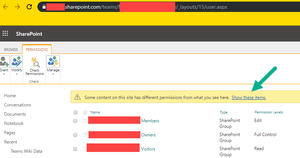
GirlFlyingkrh , Doesn't it have the banner in advanced site permissions that tells you to click to see the specific items with limited access permissions? eg. https://contoso.sharepoint.com/teams/TeamName/_layouts/15/user.aspx (substituting your tenant name, teams URL prefix, and team name)94KViews0likes2CommentsRe: On Mac, when switching between desktops to select teams app, it wouldn't be the active window.
I know from one of my users that the issue is still present, in Sept 2021. MS has announced they are moving away from UserVoice: https://support.microsoft.com/en-us/office/uservoice-pages-430e1a78-e016-472a-a10f-dc2a3df3450a TechCommunity is one of the recommended alternatives.12KViews1like0CommentsRe: Multiple Choice answers with branching per answer
Yes, possible & unwieldy can still be better than not possible. I just wanted some clarification on how it worked in this other tool. I wasn't trying to imply it was worse; I was just curious in case anyone at my workplace asks me if there are tools that will do multi-answer branching, since Forms free currently doesn't.82KViews1like0CommentsRe: Multiple Choice answers with branching per answer
adriengCorum , That sounds great. Do you have to do else if statements for every permutation? Or can it just be if a choice is not selected, go to end? Eg. in BeckyLC's example, if "None" is selected she wants it to branch to the next question. In Typeform, can it just be if None is selected, go to next, else if None is not selected, go to end?Or would she need to have option for moving on for every possible combination: None, None+Challenges, None+EducationalLunch&Learn, None+FitnessBootCamp, None+Yoga, None+Other, None+Challenges+EducationalLunch&Learn, None+Challenges+EducationalLunch&Learn+FitnessBootCamp, None+Challenges+EducationalLunch&Learn+FitnessBootCamp+Yoga, None+Challenges+EducationalLunch&Learn+FitnessBootCamp+Yoga+Other, None+Challenges+EducationalLunch&Learn+FitnessBootCamp+Yoga+Other None+Challenges+EducationalLunch&Learn+FitnessBootCamp+Yoga+Other, None+Challenges+FitnessBootCamp+Yoga, None+Challenges+FitnessBootCamp+Yoga+Other None+Challenges+EducationalLunch&Learn+Yoga, None+Challenges+EducationalLunch&Learn+Yoga+Other, None+Challenges+EducationalLunch&Learn+Other, None+Challenges+Other, None+Challenges+Yoga+Other None+Challenges+FitnessBootCamp+Other, None+EducationalLunch&Learn+FitnessBootCamp, None+EducationalLunch&Learn+FitnessBootCamp+Yoga, None+EducationalLunch&Learn+FitnessBootCamp+Yoga+Other, None+FitnessBootCamp, None+FitnessBootCamp+Yoga+Other, None+FitnessBootCamp+Other, ...etc82KViews0likes2CommentsRe: Org-wide Team Settings
jcgonzalezmartin , Agreed, and that inability to prevent meetings and/or their associated system-generated messages from showing up in the channel is a BIG problem for us. Scenario: 1. A sensitive topic meeting (budget, a firing, an investigation, downsizing, etc) is accidentally posted by an employee to the General channel of the Org-wide team. 2. The entire organization has therefore been "invited" to that sensitive meeting, and moreover there is a post in the General Channel announcing it (showing the meeting title, etc). 3. The meeting organizer cannot edit the meeting to change the meeting channel. 4. The Org-wide Team's owner(s) cannot delete a (non-cancelled) meeting post from the Org-wide General channel, even if policy is applied to allow Team owners to delete posts. SEE SCREENSHOT 1 5. The meeting organizer must first cancel the meeting, which allows the Team Owner to delete the initial meeting post itself, but... 6. the reply post that says "[meeting organizer] cancelled "[sensitive topic]" meeting" cannot be removed, even when the messaging policy has been set to allow Team Owners to delete posts. SEE SCREENSHOT 2 We don't want to disallow users from posting meetings to channels in other Teams. Unfortunately, there's no per Team setting to disallow it on the Org-wide team only.4.9KViews3likes0Comments
Recent Blog Articles
No content to show