User Profile

JordyBlommaert
Brass Contributor
Joined 6 years ago


User Widgets
Recent Discussions
Re: Hybrid Azure AD Join Implementation Check
DNEel StuartK73 You should not remove those Azure AD registered devices. This happens when a user add his work or school account towards his/her device. When you enable Hybrid Azure AD Join the Azure AD registered devices should automatically be removed when a device become Hybrid Azure AD Joined. We've implemented this at multiple customers and didn't removed the Azure AD registered devices prior to enabling Hybrid Azure AD Join1.1KViews0likes0CommentsRe: Conditional Access Policy - Persistent Browser Session exemptions
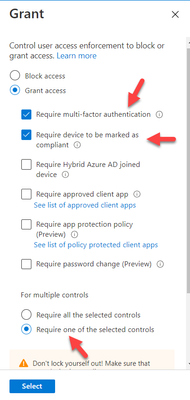
vas_ppabp_90 You can implement your conditional access policy to exclude devices that are compliant in Microsoft Intune so that they are not prompted for MFA in that specific condition. Another solution is to grant access in the policy and use the OR scenario which means PASS the policy when a user performs MFA prompt or is compliant in Microsoft Endpoint Manager:12KViews1like2CommentsRe: How to change Azure AD B2C Domain Name
MohammadAliItani It's the same when you create a new Office 365 tenant. Once created you cannot change the .onmicrosoft.com address as this represent the identity of your tenant. It's not possible to rename a tenant. It's only possible to add custom domains names.11KViews1like0CommentsRe: Two "tenants", two ADs... Teams Membership.
malt10102 Try to run following powershell commands Install-Module AzureAD Connect-AzureAD Get-AzureADUser -SearchString "UPN of user" Get-AzureADUser -SearchString "UPN of user" | Set-AzureADUser -UserType member This can convert a user Guest type to a member type781Views0likes0CommentsRe: Azure AD Sign-ins Logs
Office 365 Shell WCSS-Client is the browser code that runs whenever a user navigates to (most) Office365 applications in the browser. The shell, also known as the suite header, is shared code that loads as part of almost all Office365 workloads, including SharePoint, OneDrive, Outlook, Yammer, and many more The other apps can be apps that are registered in Azure AD. For example developers that are creating Apps in connection with Azure AD. Therefore they need to create an app registration. If you go to Azure Active Directory -> App Registrations you get an overview of all registrations that are connected towards your Azure AD tenant.92KViews1like9CommentsRe: Conditional Access Reporting
gd-29 You can use Log Analytics to create your own alerts I've found following article how to implement your custom alerts: https://tech.nicolonsky.ch/conditional-access-and-azure-log-analytics-in-harmony/ They also requested this feature on uservoice but it's still not implemented: https://feedback.azure.com/forums/169401-azure-active-directory/suggestions/19331617-change-tracking-for-conditional-access-policies You can also use Azure Sentinel. connect your Azure AD Data Connector: https://docs.microsoft.com/en-us/azure/sentinel/connect-azure-active-directory And implement your own Rules11KViews0likes1Comment
Recent Blog Articles
No content to show