User Profile

reachuslittleroboz
Copper Contributor
Joined 6 years ago


User Widgets
Recent Discussions
Re: Stream video is showing authenticated user not reauthorized to view the video message for owner
Tomislav Karafilov I am not using any desktop apps, I am accessing teams & stream both are from Browser. I have problem with one video rest of all videos are playing good. This particular video is from one of our Teams meetings, i can only accessing this from teams. Its not showing even in Streams - discover - videos options. I still believe something went wrong with permissions. Thanks.Re: Stream video is showing authenticated user not reauthorized to view the video message for owner
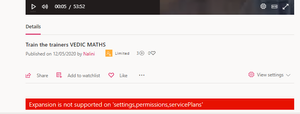
Tomislav Karafilov Thanks a lot for your solution directional response. Yes , it is working perfectly in incognito mode, I was working with multiple user base and it was not worked properly for me and after your advise it is working as expected. However still I am having an open issue with one of the meeting video ( which I mentioned in my earlier post) is still not playing and showing the same error message. I did not find any exceptions in meetings notes and it is published on the meeting chat as below when we try to play its showing message as "no authorisation for authenticated user" Published like below after trying access it to play Thanks for your support.Stream error message - Expansion is not supported on 'settings,permissions,servicePlans'
When i am trying to access the video from stream not found the add to chaneel option even i am global admin. and also found an red colour text message like below Expansion is not supported on 'settings,permissions,servicePlans'Not able to access the settings / admin settings options from Profile pic of admin portal
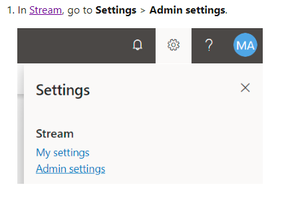
I read this below article in this they mentioned that we access the admin settings from https://docs.microsoft.com/en-us/stream/assign-administrator-user-role But when I login my admin portal or any other portal as global admin it is still not showing in settings options where i am not able to assign or access the Stream features . I am holding office 365 A1 license. Thanks.Stream video is showing authenticated user not reauthorized to view the video message for owner
Hello team, I am new to Office 365 community , we have Office 365 A1 licenses for our school. One of our faculty has two videos first one getting played perfectly without any issues but the second one is showing below message to everyone includes owner of the video and global admin of the O 365. Second thing to fix this I tried to open the Stream in separate browser as global admin, it is not allowing me to access the ADMIN settings , I am missing that option in my profile and its showing as blank screen as below. also when I am trying to create new video channel its not redirecting to desired page just staying same page. when I am trying to add a working video to a existing channel it is saying like below which is worked last two days perfectly. However I am not sure , can we access the full functionalities such as accessing videos / uploading videos / creating the new channel in Stream with Office 365 A1 License. Your all help is much appreciated. Thanks.Solved


Recent Blog Articles
No content to show