User Profile

preuley30
Iron Contributor
Joined 6 years ago


User Widgets
Recent Discussions
Android Enterprise (fully managed) App installation stuck at pending
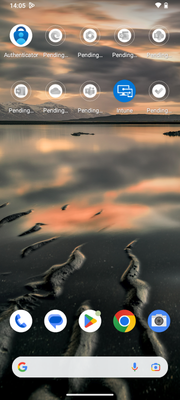
Hi everyone I have an Android Device enrolled with the Android (fully managed) profile. There are several Apps that get deployed to this device. However, the installation stuck at "pending" as seen in my screenshot. After I click on the pending App, the Play Store opens. Then I click on cancel and then install. After that the App gets installed. My Managed Google Play Store Apps in Intune are all Required and targeted to "All users". The Apps get automatically installed on my personally-owned work profile Phones without any issues. When I look under Device install status from the deploying App, I see the device with Status "Failed" and Status Details "The application failed to install, possibly because of insufficient storage or an unreliable network connection. The installation will be retried automatically. (0xC7D24FBA)" Does anyone face the same issue or know how to solve it? Thanks for your help ❤️Re: Conditional access blocks, even when Smartphone is marked as compliant
Hi Rudy. Thanks so much for your contribution! That's exactly my problem. After turning off requiring device compliance in the CA Policy and just require MFA, I was able to connect my Exchange Mailbox with the Gmail App. Unfortunately, I couldn't figure out how to force using the Gmail App in the Work Profile. With this configuration, I can connect my Mailbox to the Personal Profile Gmail App as well, which isn't optimal. Do you have an idea on how to achieve this? Kind regards, Alexej.1.9KViews0likes0CommentsConditional access blocks, even when Smartphone is marked as compliant
Hi Everyone. I'm trying to access my Exchange Mailbox over the Gmail App on my Pixel 8 Pro. Now my Problem is that a conditional access policy is blocking the access. I've created a policy that grants access to the "Office 365 Exchange Online" Resource, if passwordless MFA is satisfied and the device is marked as compliant. At the beginning I was trying to grant access if the Gmail App is protected by an app protection policy, which didn't work because Gmail does not support app protection policies, so I turned that off. So, my Smartphone is a BYOD and I've enrolled it into Intune with the "Android (personally-owned work profile)" enrollment method. A compliance policy is assigned, and Intune shows me that the device is compliant. Intune deploys the Gmail App to my work profile. I've read several documentations and I also deployed Google Chrome, Google Calendar and the Bing Search App just to be sure. But it still blocks access to the resource. I also made an Email configuration profile, to auto-setup the Gmail App with my Credentials. So everytime I open the Gmail App in my Work Profile, it tries to setup the account, I get an MFA number-matching prompt from MS Authenticator and then it tells me to download the company portal app and enroll my smartphone into Intune. Strange behavior because as I mentioned above, my Phone is indeed managed and marked as compliant in Intune. I was going through the Sign-in Logs, and I've seen that every logged attempt claims that the device is not compliant and not even managed. I feel like that I'm missing a big point. I would be thankfull if anyone has an idea to solve this ❤️ Thanks.SolvedRe: Notification for incoming calls without options to accept/decline call
Hi, thank you for your response. I understand that part with the webhook but we're using Teams Direct Routing in the customer's tenant. Do you know a way to catch the incoming calls and trigger an action that is sending the information to the webhook? As what I've found, there is no Graph API support for Teams Direct Routing.1.2KViews0likes1CommentNotification for incoming calls without options to accept/decline call
Hi everyone. I have a very special customer with a special requirement... I've got asked, if it possible to notify people about incoming calls, without options to accept/decline the call. The customer just wants a simple notification about incoming calls, which show the number/person that is calling. Has someone an idea on how this could be achieved? Thanks for every answer ❤️restrict anyone link creation to specific users/groups per site
Hi everyone. I have a scenario here with a customer, where we want to restrict "anyone" link creation to specific users/groups per site. I know it's possible tenant wide as described https://learn.microsoft.com/en-us/sharepoint/turn-external-sharing-on-or-off#more-external-sharing-settings under "Allow only users in specific security groups to share externally". But we need to do this per SharePoint Site. Example of what we want to achieve: SharePoint X: Every Owner and Member can create anyone sharing links SharePoint Y: Only User1 and User2 or Security Group Y can create anyone sharing linksSolved1.1KViews0likes1Commentmanage Exchange Online Mail Contacts with Graph API
Has anyone a solution to manage Exchange Online Mail Contacts over Graph API? This would be the preferred way. On Microsoft Learn I've found this https://learn.microsoft.com/en-us/graph/api/resources/orgcontact?view=graph-rest-beta but it's still in beta and can't be used to create Contacts rn. Otherwise, I would try to achieve this with the https://learn.microsoft.com/en-us/powershell/module/exchange/new-mailcontact?view=exchange-ps and Azure Automation. I've never got in touch with Azure Automation but what I've seen, it should be possible, I think.Solved2.9KViews0likes2Commentsaccess Azure File share on Azure AD joined Devices with Azure AD Credentials
Hi everyone We're currently testing Azure File for a customer. The customer already has an AVD environment, and we need an Azure File share for a specific application that runs on the AVD instance. We can mount the Azure File share on AVD with no problems and Azure AD credentials. All local and physical Windows Devices from the employees, which they use to open the AVD Application, are Azure AD joined. However, we also need to mount the Azure File share locally on every Azure AD joined Device. Problem is that we're not able to do that. We're able to mount the Azure File share with the storage account key, but this is a no-brainer. We're not giving out the storage account key to achieve this. Tbh, I'm not very fit in all these Azure Stuff but I think it's an authentication issue, because we're able to mount the Azure File share locally with the Storage Account Key. If we want to mount the share with the user logged on Azure AD credentials, it throws an error back that the network path could not be found (0x80070035). I think there is smth I'm missing out, which prevents me to mount the Azure File share on a Azure AD joined Devices and authenticate it with the user logged on AAD creds. Thanks for every reply, advice & help ❤️7.1KViews0likes3CommentsRe: exclude non Wi-Fi enabled devices for Wi-Fi Configuration Profile
Hi Harm_Veenstra. Thanks for your reply. I did it with a dynamic group like you mentioned. Since we're having more Devices that are Wi-Fi capable than Devices which are not, I've created a dynamic group with these Device Models that aren't Wi-Fi capable and put them in excluded groups. However, I hoped that I could automate it in a deeper way. Now I must edit this dynamic group every time we get a new device which doesn't have Wi-Fi capability.3.4KViews1like1Commentexclude non Wi-Fi enabled devices for Wi-Fi Configuration Profile
Hi everyone We have a WiFi Configuration Profile in Intune that applies to all company users. Problem is now that the profile tries to apply these WiFi Settings to devices which don't have WiFi capability and Intune throws errors back on these devices. My idea is now to create a group or a script, which checks the device for the presence of a WiFi MAC. When the device has a WiFi MAC, the profile gets applied. Has anyone an idea about how I can achieve this? Or what are your solutions for this scenario? Thanks for every reply 🙂Solved3.9KViews0likes7CommentsCurious about lock symbol
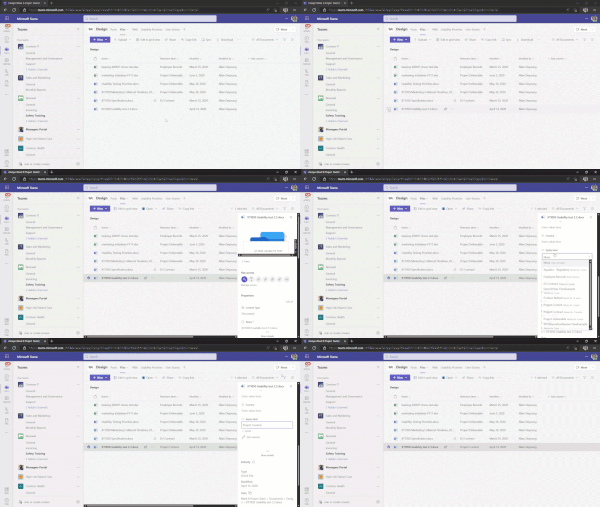
Maybe it's a pointless question, but I've read about applying sensitivity and retention labels today and I stumbled over this GIF here: You can see, on the Document "XT1050 Specification.docx", there is a little lock symbol. I'm asking myself where this is coming from and how I can configure the same. Is it possible that it has smth to do with the records management system? Article where I found this GIF: https://learn.microsoft.com/en-us/microsoft-365/compliance/create-apply-retention-labels?view=o365-worldwide#applying-retention-labels-using-microsoft-365-groups Thanks for your help and additional information.Solvedmanage Interactive logon & Windows Hello multi-factor unlock
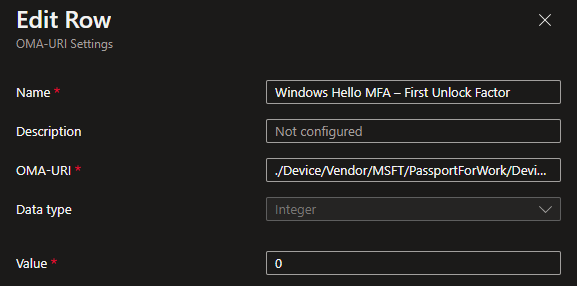
Hi everyone, We're going step by step on the passwordless strategy from Microsoft. Windows Hello multi-factor unlock is deployed in a Pilot Group but now I have two questions, which I hope someone here can answer. Question 1: disable Windows Hello multi-factor unlock Managed to enable WHMFU over custom OMA-URI Settings. But how can I disable it again? I tried it with a second custom OMA-URI Settings configuration profile which is configured as follows: It works, but it seems, that it isn't disabled correctly. Sometimes I still get a message in the logon process which says something like "additional factor needs to verify" but it displays very quickly, and I verified that I can log on with only one factor again. Disabling the second unlock factor is configured like this as well. Question 2: Enable "Interactive logon: Require Windows Hello for Business or smart card" We want to enable this security option. However, Intune doesn't offer to manage this setting. So, I think that I must enable this over a custom OMA-URI Setting too or PowerShell script. How can I achieve this? Thanks so much for any support ❤️Windows Autopatch • Dynamic group for device registering
Hi everyone I want to create a dynamic group for Windows Autopatch device registering. The dynamic group should be able to find which user has an E3 license and then add his device(s) to this group. So far, I haven't found any practical solution. So, it would be nice if someone could share his experience with automating this device registering process. Thanks for any advice 🙂SolvedEdge Default App Associations and Azure AD registered Devices
Hi all. I recently made a configuration profile in Intune which sets the default app associations for Microsoft Edge Browser in Windows. Export XML with "dism /online /export-defaultappassociations:appassoc.xml" removed all non-Microsoft Edge browser-related application associations converted XML in Base64 Enter the code in Settings Catalog > Application Defaults > Default Associations Configuration Assigned to Device Group So far so good. The policy gets applied on AADJ and AADR Devices says Intune but in practice the AADR Device doesn't change the associations. On AADJ Devices it works fine and I also have an Event Viewer entry with ID 814, which is missing on the AADR Device. Is it possible that AADR Devices can't get this policy applied? And what are the Intune limitations for AADR Devices, I really couldn't find any useful documentation. Many thanks for advice and help ❤️2.4KViews0likes5CommentsRe: Device marked as not compliant even it should be marked as compliant
Hi Niels. Thanks for your explanation. I think I got the point, but this depends on the organization's needs. All our users get company owned devices and they need to be compliant for conditional access. If we would assign a compliance policy to users, every device they sign in to would be checked if it's compliant. But we don't want to get devices marked as compliant which aren't company owned.12KViews0likes0Comments
Recent Blog Articles
No content to show