User Profile

millerblair
Iron Contributor
Joined 6 years ago


User Widgets
Recent Discussions
Re: Released to WW - Chapters on audio and video files in SharePoint, Teams, Yammer, and OneDrive
Thanks for the quick reply Marc Mroz. Just wanted to make sure I wasn't missing something or the documentation. I have submitted the suggestion through the Feedback portal here (in case anyone wants to upvote it ) https://feedbackportal.microsoft.com/feedback/idea/436ce44d-d2f3-ec11-a81b-000d3a03dba23.4KViews1like0CommentsRe: Released to WW - Chapters on audio and video files in SharePoint, Teams, Yammer, and OneDrive
Marc Mroz Is it possible to share a link to a specific chapter in the video on SharePoint? The design of these features is better than Classic Stream, especially chapters. For education and training videos, it would be helpful to be able to link to a specific chapter and I can't see a way to do so at the moment as the URL doesn't change when clicking on the chapter.3.5KViews0likes2CommentsRe: Missed activity in Teams is still being sent even if turned "off"
AwsAyadWe are working with Microsoft on this issue in our tenant. We have an open Technical Support Service Ticket with them. As yet, it has not yielded any additional suggestions other than noted above. I am going to try forcing a check for updates, but I highly doubt this will resolve the issue as my Teams was last updated yesterday (You have Microsoft Teams Version 1.5.00.11163 (64-bit). It was last updated on 2022-04-27). Your observation about the 32 v. 64 bit version is interesting, but I'm curious why this would have any effect on the actual notifications received. I assume the app is being used to set the value for the notification settings, but that information is stored with the rest of my Teams data in our tenant and used by the Notifications infrastructure to determine whether to generate notification emails for me. The notifications isn't done by the app itself, so it seems strange that the different versions would generate different results. In addition, not all users in our tenant are experiencing it, so it may be the same in your tenant that you as a user aren't experiencing it, but others are unrelated to the app version. My original suggested solution was to turn On the Notification settings (or change the frequency), sign out of Teams. Though this appeared to work for a day, it did not last and the issue persists.11KViews0likes2CommentsRe: Missed activity in Teams is still being sent even if turned "off"
Justin418Users in our tenant were experiencing this issue after the recent failure in the Microsoft Teams notification infrastructure (March 31/April 1). After the solution for the infrastructure issue was applied, users (including myself) started receiving missed activity emails or activity notifications for categories of activities that were turned off. Microsoft suggested signing out of Teams and restarting the computer should fix the issue when we opened a service ticket with them. I had already tried these steps in advance of the response from Microsoft and didn't find that it solved this issue. However, turning the offending category of notification on then signing out of Teams before signing back on and turning it off again seemed to work. Here are the instructions I wrote for users experiencing the same issue: Click on the 3 dots on the top right of Teams beside your profile picture>Settings Click on the 'Notifications' at the left Change the setting for 'Missed Activity Emails' from 'Off' to 'As soon as possible' Click on your profile picture>Sign out and close Teams Start Teams again>Repeat Steps 1 to 3 above changing the 'Missed Activity Email' setting back off Note: If you are receiving notifications in your Activity Feed for other activity that you shouldn't be (posts in channels you don't want to follow, likes and reactions to your posts, etc.). You might try turning those on in Step 3 as well before signing out of Teams then turning them back off again in Step 5. Please note that these steps have not maintained the settings and the issue is still being experienced by users in our tenant, including myself. Apologies that I posted a suggested solution, which was not thoroughly tested. We have a service ticket in with Microsoft, but so far their continued "solution" seems to be signout/restart (spoiler alert: this doesn't work).12KViews2likes3CommentsEditing assignment pop-up window error
We are currently an issue in our tenant for some users attempting to edit the details of an assignment. It generates a 'Sorry, something went wrong' message for any assignment editing that opens up a pop-up/additional window (i.e. add/edit rubric, change close date). This only seems to be affecting the Windows desktop version of the app at the moment as the feature still work in the web and mobile apps for the same users. Clearing the Teams cache doesn't seem to be effective in fixing this issue. Anyone else experiencing this or have suggestions for solutions?Re: Distributed pages now become subpages?
Andre_Huyzers If the page that your distributing is a subpage in its original location (Content Library, Collaboration Space), then it will be subpage when it is distributed to the student notebook sections, even though the original top level page may not be present. It will become a subpage of the last page in the section by default. In order for the page being distributed to be a top-level page in the student notebook section, it would need to be at that level before distribution. Once distributed you could deprecate it again to being a subpage.925Views0likes1CommentRe: Option to "lock out" Distributed pages during assessment?
Andre_Huyzers Are you distributing the pages from the Class Notebook attached to a Team, or a stand alone OneNote Class Notebook? The easiest way to do this would be to distribute the page as an attachment to an assignment in Teams. Make sure that you set a closing date for the assignment as well if you want to prevent further changes, but still allow late submissions. After the closing date, students will not be able to make changes to the page even if late submissions were allowed. Alternatively, don't allow late submissions and students shouldn't be able to edit the page after the due date. There is no way to lock distributed pages in the stand alone OneNote Class Notebook.861Views0likes1CommentRe: Form (not Quiz) as assignment via MS Teams
sncl2mw It is possible to assign a quiz with no marks in Teams. Just ensure that when you create the quiz, you delete the points for each question. The points available on the Quiz in Teams is automatically generated from the total points available on the individual questions in the Quiz. If no points are available on each question then no points will be available on the assignment in Teams and you can just return it with feedback. It would be nicer to be able to attach a Form in this way, but that caused the problem with the individual question feedback being not visible to students. Attaching the Form share link to the assignment is okay as a workaround.1.9KViews0likes0CommentsRe: Various groups within a course on Teams
MayaBirch Our District creates separate Teams for each group/section of the same course. We have a custom application that generates the Teams based on data from our Student Information System (SIS). Unfortunately, we aren't able to make use of School Data Sync (SDS) due to limits of our SIS, so Team membership is not automatically updated after the initial Team creation. Teachers (K-12) can then combine sections of the course into a single Team if they wish to administer the course in the same way to both groups. This can be done easily by adding the Microsoft 365 Group name for any additional course groups as members of the Team of the course group that is to be used as the primary Team for the course. The additional course group Teams can then be deleted after the members are added to the single Course Team. It is very difficult to segment information to different groups within a Team. Tags only work for @ mentions. The other big limitation of having all the groups combined in one course is that depending on the group sizes you can run up against the limits of Assignment distribution, though that has recently been bumped up to 300 members. In general, Assignments seem to cause the biggest issue (different due dates, tracking assessment, assigning to select students from a large group, inability to sort students) in a combined course. Some of the limitations of the private channel (no channel meetings) can be worked around (using calendar meetings inviting the channel by email address, not adding a channel) and others can't (moderation settings). We provide teachers recommendations on ways to provide the course materials across the multiple sections without needing to upload them into each Team - Class Notebook copying existing content, Sharing OneDrive folder of Class Materials read-only with 'Manage access' to permission, and creating a separate "Course Team" without members to store resources and build SharePoint pages for video sharing that can again be shared with multiple groups by managing access to the SharePoint site. Hope this helps.1.4KViews0likes0CommentsRe: Disconnect Microsoft Teams calendar from Outlook calendar
Mike_Joke Each Team created is its own Microsoft 365 Group and has a group calendar. All members/owners of this Team will see all events from the Group Calendar on their Teams Calendar. All channel meetings in the Team, any other meeting where the Team has been invited by name/group email address as an attendee, and assignments (if the option is selected) will show up in the Group Calendar. There is no way to toggle the display of the group calendar events in the Teams Calendar. In the Outlook Calendar, all groups that you are a member of should show up under the 'Group Calendars' section in the bottom left panel of Outlook Calendar. The only limit I am aware of here that would prevent a group from showing up is that Outlook can only display a maximum of 30 calendars in Schedule View. By default, group calendars should be toggled off in Outlook Calendar. However, this is the location where you would turn the display of those calendar events off in Outlook. This will not affect the display of these events in the Teams Calendar however.24KViews2likes0CommentsRe: How long does it take for a recorded Teams meeting to be uploaded to Stream?
ryantlAs of early 2021, all meeting recordings should be stored in SharePoint (Channel Meetings) or OneDrive (Standard calendar meetings). Either way the meeting recording should be stored in a folder called 'Recordings' in either OneDrive/My Files or the Documents folder of the Channel in the Team's SharePoint. See this article for more information on the recording storage locations: https://support.microsoft.com/en-us/office/play-and-share-a-meeting-recording-in-teams-7d7e5dc5-9ae4-4b94-8589-27496037e8fa You might also want to read further on the changes to Stream currently under way: https://docs.microsoft.com/en-us/stream/streamnew/new-streamRe: Microsoft Teams Assignments and SharePoint Documents
mwalsh43It is not possible to change the folder structure or easily download a single assignment for all students in the SharePoint of the Team. The one place I have seen this strategy necessary is where students are submitting PDFs as the work for the assignment and the teacher wants to annotate the document with feedback. It isn't possible to do that within the Teams environment, so teachers having the files all in one folder would be super helpful. The workaround that I have helped some teachers use is to use the Request Files option in OneDrive and attach this link to an assignment. As long as students are signed-in, it should show which student submitted the work. Teachers can then share the document back to the student when done and enter the score/additional feedback in the Teams assignment.27KViews0likes0CommentsRe: Form (not Quiz) as assignment via MS Teams
sncl2mwwhen you create a new Assignment in Teams, you can choose one of two options: Assignment Quiz Assignments can contain any file from OneDrive, new Office documents, links, Teams, or connected apps (MakeCode, Reading Progress). Quiz type assignments can only contain 'Quiz' type Forms created in Microsoft Forms. If you still want to attach the previously created 'Form' type Form then you would need to create an 'Assignment' and attach the form as a link that you are able to retrieve under 'Share' form. You would then have to review the results from Forms and enter your mark/feedback manually within the Teams Assignment tab. It used to be possible to attach a 'Form' type form to an assignment as a 'Quiz', but that may have changed because students weren't able to see individual question feedback when teachers attached 'Form' type forms, as opposed to 'Quiz' type forms to Teams assignments. See this discussion and my reply on Microsoft Answers for more information on this issue: https://answers.microsoft.com/en-us/education_ms/forum/all/students-receiving-feedback/64cdab0f-32ef-48b2-be43-dde635fe407b1.9KViews1like2CommentsRe: New to Stream
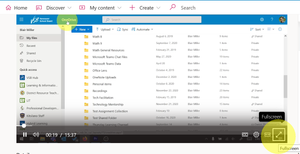
GrovePIf you have the link to the video then open the video using the link. From the player, over the bottom of the video and click on the line with the arrows to enter fullscreen mode (hit ESC to exit full screen) - see the screenshot below. Each user will have to do this when viewing the video, there is no way to force maximised screen view for all viewers on Stream directly. A workaround if you wanted to do that would be to embed the Stream video(s) in a PowerPoint slide and make the embedded video as large as the slide. Share the PowerPoint presentation in a Team.Re: can't join a team even with the right code
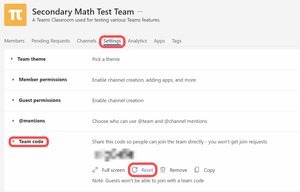
TrungNguyenyou could ask your teacher kindly to reset the 'Join code' for the Team. Perhaps, a new Join code will work better. The teacher can get a new join code for the Team by clicking on the 3 dots beside the Team name>Manage Team>Settings, expand the section for Team Code and click on 'Reset' (see diagram below). This will create a new code that they can copy and send to you. If the Join code doesn't work, they could also click on the 3 dots beside the Team name>'Get link to team' and send you this link. When you click on the link, it will allow you to make a request to join the Team, which your teacher will then have to approve or decline. The only other thing to make sure is that you are signed in to Teams with an address in your organisation, as Team membership in your Teams environment might have guest access turned off.7.2KViews0likes0CommentsRe: Can not enter team
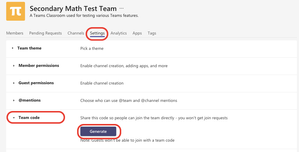
aziemzulthe instructor should be able to get you a Join code for the Team. The difference between using a Join Code and a link to the Team is that with the Join code you are automatically added to the Team as a member, where as with a link to the Team the request has to be approved or denied. There is no request generated when a Join code is used. The instructor can generate the Join code and send it to you to join the Team by following these steps (see attached screenshot) : Click the 3 dots beside the Team name>Manage Team Click on 'Settings' at the top Click on 'Team code' to expand the section Click on the 'Generate' button to create a 'Join code' for the Team Copy and send the 'Join code' for you to use The only other factor that I noted in your screenshot is that it says the Team is limited to specific groups. If these are Microsoft 365 groups and you are not a member of one of these groups then it could be blocking your request. Also ensure that you are not signed in with other Microsoft accounts in the same browser that could be interfering with authentication.1.1KViews0likes0CommentsRe: Modern Stream and OneDrive Capacity
Kotus-Tech365you might find this section of the Microsoft Stream Roadmap helpful: https://docs.microsoft.com/en-us/stream/streamnew/new-stream#how-will-storage-quota-work Basically, the new Stream will provide tenant administrators with greater flexibility in managing, deleting and cleaning-up recordings. Part of that will the ability to set a default 'life-span' for meeting recordings. In other words, meeting recordings will auto-delete after 60 days. My understanding is that there will be some way to specify whether a recording is 'education or training' related so that it isn't automatically deleted.1.1KViews1like2Comments
Recent Blog Articles
No content to show