User Profile

mpeters_all41
Copper Contributor
Joined 6 years ago


User Widgets
Recent Discussions
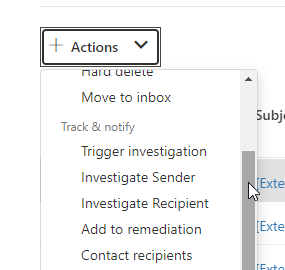
Possible actions within the "Explorer" in the Microsoft Defender Portal
Hi everybody, I have a problem understanding the possible actions in the email "explorer" within the Microsoft Defender portal. In the meantime I have spent a lot of time browsing the Micrsosoft Docs and have not found a good answer. Does anyone know what the system does for the following actions? For me, only the feature "Trigger Investigation" is clear, because this starts an "automated investigation and response" process. But as I mentioned, for the other actions, I was not able to find an answer. Thanks a lot in advance Kind regards, Marvin Peters3.1KViews0likes1CommentAIP Protected pdf files - cannot be opened with Edge Chromium Browser
Hi everyone, actually I have a problem with labeled pdf documents and the Edge Chromium browser. I hope that someone has an idea how it can be solved. The problem is, that when I label a pdf document with protection (custom permissions) and set view only rights for another whole domain, they are not able to open the pdf with the actual Edge Chromium browser. With the AIP UL Client and Adobe Reader, there is no problem. When opening it with the Edge Chromium browser, the error "Need Permissons - Contact the owner of the file to give you permissions" appears. Does anyone have an idea how to fix this? Thanks in advance Marvin PetersSolved7KViews1like4CommentsM365 Defender ATP - manual run antivirus scan for a device starts very slow
Hi Everyone, I have the problem that when I want to manually start an antivirus scan over the Microsoft Defender Security Center on a specific device, it takes a very long time (sometimes up to one hour) before the scanjob really starts. Does anyone have an idea what I can do to make the scan start immediately on the client when I start the scan job? Thanks in advance Kind Regards Marvin PetersSolved2.1KViews0likes2CommentsFailure by sending an email with smtp authentication
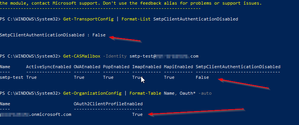
Hi Everyone, actually, I have a problem with sending an email via smtp authenthication. I have already tested it successfully with a Demo Tenant and with my productive tenant, it doesn´t work. There is a ticket system which must send emails with EXO. Following my tests: create a test account and assign the Office 365 license UserName: smtp-test@test.com added the user to each conditional access policy as an execution (the user can log on to the ELT-Tenant without restrictions) check the SMTP Auth Settings in the Tenant: send a test mail via SMTP with PowerShell (the following website helped https://community.spiceworks.com/how_to/90853-how-to-test-office-365-smtp-server-using-powershell [community.spiceworks.com]) $username = 'smtp-test@test.com' #must be the same like the From parameter in the Send-Mail cmdlet $recipient = test@test.com' #can be changed $subject = 'SMTP Auth Test Mail' $Body = 'This is a test mail via smtp authentication and powershell' $smtpSrv = 'smtp.office365.com' $cred = Get-Credential -UserName $username -Message 'please enter your password' Send-MailMessage –From $username –To $recipient –Subject $subject –Body $Body -SmtpServer $smtpSrv -Credential $cred -UseSsl -Port 587 Result: summary: Basically it works, so I tried it in the productive tenant Test in the productive tenant: create a test account and assign the Office 365 license UserName: mailto:smtp-test@productive.onmicrosoft.com added the user to each conditional access policy as an execution (the user can log on to the ELT-Tenant without restrictions) check the SMTP Auth Settings in the Tenant: send a test mail via SMTP with PowerShell $username = 'smtp-test@productive.onmicrosoft.com' #must be the same like the From parameter in the Send-Mail cmdlet $recipient = 'test@test.com' #can be changed $subject = 'SMTP Auth Test Mail' $Body = 'This is a test mail via smtp authentication and powershell' $smtpSrv = 'smtp.office365.com' $cred = Get-Credential -UserName $username -Message 'please enter your password' Send-MailMessage –From $username –To $recipient –Subject $subject –Body $Body -SmtpServer $smtpSrv -Credential $cred -UseSsl -Port 587 Result -> not successful I hope someone can help me, why it works with the demo tenant an not with the productive tenant. Thanks in advance Best regards Marvin Peters8KViews0likes1CommentRe: AIP and OME
Thijs Lecomte I know what you mean, but I need these labels. And my problem is, that I can select the label on the "encrypt" button when I write a new email. When I select the label via the "encrypt" button, the label isn´t set, only the encryption which is configured in the label-options is selected.2KViews0likes0CommentsAIP and OME
Hello everybody, when I want to write an encrypted Email, normally I can only see the "Encrypt only" and "Do not Forward" button under the "Encryption" function in Outlook. Since a few weeks, I can additionally see my labels in which I turn the encrytion on. For example "Confidential/Recipients Only". Then the Email won´t be labeled, but the permissions are set. Can I turn this off, so that I can only see the "Encrypt only" and "Do not Forward" button again under the "Encryption" function in Outlook ? PS.: This problem only exists in the Outlook Client, in OWA I can only see the "Encrypt only" and "Do not Forward" button under the "Encryption" button. Thanks in advance Best regards Marvin Peters2KViews1like2Comments
Recent Blog Articles
No content to show