User Profile

DanielNiccoli
Iron Contributor
Joined 9 years ago


User Widgets
Recent Discussions
Re: The new tech community is user hostile
Hi Allen , Thanks for taking the time to respond—and for sharing the screenshot pointing out the Edit button. That alone highlights another UX issue. The Edit button is tucked away in the far upper-right corner of the page, far from the post itself. That’s inconsistent with how comments are handled (where the edit option is located directly on the comment) and with common UI patterns in general, where controls are placed close to the content they affect. It’s a small thing, but it adds to the larger sense of friction in the interface. To clarify: When I described the experience as hostile, I wasn’t suggesting bad intent. I meant that the interface actively gets in the way of accomplishing simple tasks—starting a discussion, navigating hubs, or even using the search. These things used to be straightforward in the old Tech Community and now feel needlessly complicated and are frustrating. I’ve already invested time providing detailed feedback, yet key issues remain unaddressed—such as the confusing and inconsistent process for starting a discussion. Some pages bury the button behind redundant layers, and in the Security Hub, it’s completely missing. It’s frustrating to be asked for more feedback when these critical points haven't been acknowledged. This kind of design creates unnecessary friction and undermines confidence in the platform. I do appreciate your openness to feedback. My hope is that this input helps improve the experience for everyone—especially those just trying to ask a question or get help quickly. Daniel66Views2likes1CommentThe new tech community is user hostile
The new tech community is user hostile. In the past it was so simple to drop by and ask a question or read new blog posts. The user hostility starts already with the menu bar at the top. "Tech Community", "Community Hubs", "Products", "Topics", etc. What is all that? It is overwhelming. Then I click on "Lounge", because I remember from before that this was the place to discuss the Tech Community itself. I immediately see a list "Recent Discussion". Ok, great, I am at the right place. But how in the world do I start a new discussion? There is no button to be found on the entire page. Aber searching for another 5 minutes, by pure chance, I see a small link "Discussion Spaces" above it and click it. Now "Spaces" is displayed to me and a space "Tech Community Discussion" is shown. I click it. A new page loads, that looks exactly like the page I just left. I see the same "Recent Discussion", but here they're called "Latest Discussions". And – Oh, wonder! – Now there's a blue button on the right called Start a Discussion. But I'm not done. The reason I write this post is because I have a question about editing PIM role settings. The documentation is everything but helpful. I want to ask for help. What was straight forward in the old forums is horrendous in these forums. Where in the main menu bar at the top would I even start? I click on "Community Hubs". Ok, looks good. As I don't immediately see a Hub related to Microsoft Entra ID, I use the search. I type "entr" (because I'm lazy) – nothing. I type "sec" – again nothing. I type "azu" – nothing. But wait, nothing on Azure? That cannot be! I type "azu" and then slowly continue to type in the other characters. Once I hit "Azure" I get a result. I'm surprised and type "security" – oh now there is a result! The search refuses to actually search for substrings. That is surprising, and surprisingly hostile! Since I haven't found anything on Microsoft Entra ID, I decided to write something in the Security hub. I click on it. After scrolling down I see "Recent Discussions", but no button to start a new discussion. After having written all this, I go back to the space with everything I learned and search for the "Discussion Spaces" button, and there is not one! Why is there no "Discussion Spaces" button, when on the Lounge there is? How do I start a discussion on the Security Hub? Not counting the time I write this feedback, it took 15 minutes out of my day just trying to find a place where I can ask my question and I never had this problem in the old forums. At this point, I give up. I'm frustrated and I am angry. How do you (Microsoft, YOU) think this is acceptable?322Views4likes6CommentsNo Header/Footer Support In Modern Templates?
I'm learning about modern templates and created the first few to play around with the feature. I noticed that headers and footers are not support. This makes the feature useless for our use-cases. Is it planned to support headers and footers?111Views0likes2CommentsRe: MDDGs: You'll know exactly to whom the message is being sent
That does not feel right. Why would they state "you'll know exactly to whom the message is being sent" in the docs about the modern DGGs? With the old DGG we also knew exactly to whom a message is being sent. MDGG's have the UI option to expand them much alike regular DGs. This is new and was not the case with regular DGs. See below And since the members are cached, the wording and the change to the UI would make sense, because the cached member information can be send to the client equal to regular DG's.57Views0likes1CommentMDDGs: You'll know exactly to whom the message is being sent
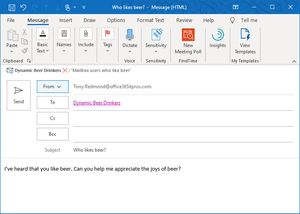
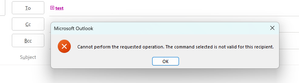
I'm currently reading about modern dynamic distribution groups (https://learn.microsoft.com/en-us/exchange/recipients-in-exchange-online/manage-dynamic-distribution-groups/modern-dynamic-distribution-groups). The documentation states You'll know exactly to whom the message is being sent, I was first positively surprised that users are now finally able to see who an email is being sent to, much alike to regular distribution groups. So I created a MDDG a couple of days ago and now tried to expand it. In the Outlook desktop client, I see an error: And in OWA simply nothing happens after confirming to expand the MDDG. As an administrator I can confirm in the Exchange Admin Portal that this group has members. Does this work for you?190Views0likes4CommentsRe: Show More reloads page and sends me to the top
It's happening on https://techcommunity.microsoft.com/category/community-info-center/discussions/communityquestions I was trying it on other pages like https://techcommunity.microsoft.com/category/microsoft365 and there it does not seem to happen. Using Firefox114Views1like1CommentRe: List of all RSS feeds?
I host my own RSS reader. I was scraping that page daily to get links to any new blogs that I'm not subscribed to, to add them to my RSS reader. So whenever I visit my RSS reader, I have all new blogs and feeds at my disposal, without having to manually add anything. It's convenience, more than anything else. This was possible, because the old forum served HTML, supported or not.1.4KViews0likes1CommentShow More reloads page and sends me to the top
Clicking "Show More..." in the discussion lists loads additional posts, then completely reloads the page and sends me to the top of the page. Not having pages is annoying enough, but when the implemented alternative isn't also working, that's just ridiculous.161Views0likes3CommentsList of all RSS feeds?
Before the community update, I've been programmatically collecting a list of RSS feeds to subscribe to, by scraping https://techcommunity.microsoft.com/t5/custom/page/page-id/Blogs. The page is gone and the "successor" https://techcommunity.microsoft.com/Blogs does not include a list of blogs in the HTML. Can you please point me to the new resource?1.7KViews0likes3CommentsRe: Allow removal of "Connected to Windows" accounts from Edge profiles
dloderThat is not a fix. That's an entirely different new feature. I don't want to be signed into my browser. I want a blank profile that is not connected to anything. Not to Windows. Not to Edge. Only websites. A proper fix is removing this stupid "Connected to Windows" without additional requirements like having to sign into the browser.5.8KViews1like0Comments
Recent Blog Articles
No content to show