User Profile

AlvinKang
Copper Contributor
Joined 6 years ago


User Widgets
Recent Discussions
Re: unable to delete email in deleted item
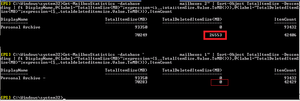
AlvinKang When i check mailbox statistics by database , it show 26553mb in deleted item. So i try to move that mailbox to into another database ( another exchange Server), it show 0mb in deleted item. now i will try to move it to office365. Hope it will work.16KViews0likes0CommentsRe: unable to delete email in deleted item
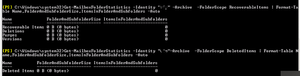
VasilMichev I had disable Single Item recovery and try empty the deleted items. it still has the same error and not allow to delete it. I try to go into light version of OWA. It allow to delete it as a subfolder under manage folders Deleted is 138 bytes and Recoverable items is all 0 bytes I still cannot migrate this mailbox to office365. it still shows the same error. Error: MigrationPermanentException: Mailbox dumpster size 30 GB (32,213,335,723 bytes) exceeds target quota 30 GB (32,212,254,720 bytes). Mailbox dumpster size 30 GB (32,213,335,723 bytes) exceeds target quota 30 GB (32,212,254,720 bytes).16KViews0likes5CommentsRe: unable to delete email in deleted item
VasilMichev If change -SearchDumpsterOnly to -SearchDumpster, will it solve my issue? -SearchDumpster The SearchDumpster parameter specifies whether to search the Recoverable Items folder, which is the storage location in which items deleted from the Deleted Items folder or hard-deleted items are stored until they're purged from the mailbox database. By default, the Recoverable Items folder is always searched. To exclude the folder from the search, set the SearchDumpster switch to $false, for example,-SearchDumpster:$false17KViews0likes7CommentsRe: unable to delete email in deleted item
VasilMichev I had try run clean up but the email still inside the deleted items Search-Mailbox -Identity "peter" -SearchDumpsterOnly -TargetMailbox "backup" -TargetFolder "Deleted" -DeleteContent The search has Succeeded. Started by: Start Time: 23/07/2020 5:25:42 PM Size: 0 B (0 bytes) Items: 0 Results: Staff\Backup Errors: None Operations performed: Messages were copied to the target mailbox and deleted from the source mailbox. Query: Search Dumpster: True Logging: Basic Mailboxes to search: (1) staff\peter See attachments for additional logging information when full logging is enabled. Get-MailboxFolderStatistics -Identity "peter" -FolderScope RecoverableItems | Format-Table Name,FolderAndSubfolderSize,ItemsInFolderAndSubfolders -Auto16KViews0likes8Commentsunable to delete email in deleted item
I try unable to delete the email in deleted item It shows this error "Some items cannot be deleted. They were either moved or already deleted or access was denied" I also try to migrate this mailbox to office365 It shows this error : Mailbox dumpster size 30 GB (32,213,335,723 bytes) exceeds target quota 30 GB (32,212,254,720 bytes). --> Mailbox dumpster size 30 GB (32,213,335,723 bytes) exceeds Anyone have solution for this issue?17KViews0likes10CommentsOutlook - use different sorting between different PC for the same email account
The first PC's outlook was set as sorting by date. When I change the sorting to by categories in the second PC's outlook, the first PC's outlook follows the second PC's outlook sorting setting. Both PC have the same email account. Are we able use different sorting between different PC for the same email account?Solved1.3KViews0likes5CommentsShared Mailbox's inbox does not update itself
One of my user had access to one of the Shared mailbox and she found out that shared mailbox not auto update email in inbox. She have to manually click on send/receive then it will updated. Her mailbox and shared mailbox are in office365 exchange online. Disable caching of all shared folders => i try this method but user told me when she access to shared calendar very slow. Change the configuration of the secondary Exchange mailbox to a second Exchange account in your profile => I also try this method on outlook 2013 and outlook 2016, it had same issue as before. There is an acticle say the outlook 2013/2016 have limited 500 shared folder only ===> the shared mailbox have 760 folders Is outlook 2013/2016 not support more than 500 shared folder? Will it work if i install in outlook 2013/2016 ProPlus? or I must use Office 365 ProplusSolved7.9KViews0likes3Comments



Recent Blog Articles
No content to show