User Profile

MarcVDH
Iron Contributor
Joined 9 years ago


User Widgets
Recent Discussions
Cannot delete a tag added through an Asset rule
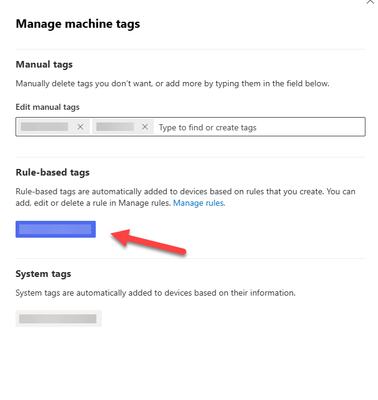
Hello, We had created in the past an asset rule to assign a tag to a few machines. Now we are trying to remove the tag but we can't find the right way. We have delete the Asset rule. (it was turned off more than 2 months ago) When I go to the machine details and click on 'Manage tags', I can see a section called 'Manual tags' (there I can add remove tags from the console) and a section called 'Rule-based tags' with the description 'Rule-based tags are automatically added to devices based on rules that you create. You can add, edit or delete a rule in Manage rules.' Going through powershell and the API, it doesn't work either. Even getting the details from a machine only shows the manual tags. How do we remove then such a tag ? Thanks in advance for your help. Marc135Views0likes3CommentsRe: SenseNdr.exe is slowly eating the memory
For us, we are still continuing the testing with Microsoft because the problem is not solved. We have still machines who are experiencing the problem randomly. It is still happenning only on machines with high network usage. The only thing that has change is the speed at which sensendr.exe commit the memory (much faster now).990Views0likes0CommentsRe: SenseNdr.exe is slowly eating the memory
I don't know if it is linked to the fix they have deployed but the problem just got worse now. Before today, sensendr.exe was taking between 12 to 20 hours to have 60GB of commited memory. This evening, I just got 4 machines where the problem occured and it took less than 3 hours to commit the same amount of memory !! I have sent new logs to MS to troubleshoot this problem. In the meantime I think I will recreate the scheduled task to kill sensendr every hour.1.2KViews1like0CommentsRe: SenseNdr.exe is slowly eating the memory
@ Everyone I just got a mail from Microsoft that the solution/fix deployed last week was to solve a problem with a non-paged pool memory leak and not with the commited memory !! In my case, the problem is not with the non-paged pool but with the commited memory. Can you all tell me with what type of memory you experience a problem ? I ask that because apparently I am the only customer case with the problem being with the commited memory !! It's a big disappointment because I made it clear since the beginning of the case with MS that it was a problem with the commited memory.490Views0likes2CommentsRe: SenseNdr.exe is slowly eating the memory
Yes, I was contacted by Microsoft yesterday. They are going to push the new solution within 48hrs from the backend worldwide and that there is no further action needed from our side. I will wait until monday and then I will remove our scheduled task to kill sensendr and we will see how it goes. Fingers crossed.3KViews2likes9CommentsRe: SenseNdr.exe is slowly eating the memory
The consequence I see is that you might miss alerts in case of supect network activity as the packets won't be analyzed. The good thing is the process being re-launched automatically after being killed. In our company I have deployed a GPO with a scheduled task to kill it regularily. It is certainly not the nicest solution but it does the job until a valid solution is found.3.3KViews0likes0CommentsRe: SenseNdr.exe is slowly eating the memory
Hello, We patched 2 machines last Friday to first test the impact on aur applications. We started patching the other machines after that. Unfortunately, today, on of the 2 machines started to exhibit the memory problem again; sensendr ahs already 28GB of committed memory. We are going to watch the process to see if it will really take all the available memory because in Microsoft answer to the problem, they said 'sensendr will automatically manage and release memory before it reaches a critical level of impact'. But what is the critical level of impact ? Sensendr maybe trying to catch up in the packets analysis until a certain time. We will see but having already eaten up 30GB (and it is still climbing) of the 64GB available is not a good sign.4.4KViews0likes4CommentsRe: SenseNdr.exe is slowly eating the memory
actenherkel Good news ! We have an open case for this with Microsoft and we just received a mail saying they have found the root cause. The memory becomes full of captured packets (by pktmon) because sensendr is not able to process them as quickly as they arrive. They have developed a long-term solution that, as they said, will automatically manage and release memory before it reaches a critical level of impact. I don't have any more info about how this solution will be distributed.6.8KViews1like11Comments
Recent Blog Articles
No content to show