User Profile

NickEckermann
Copper Contributor
Joined 6 years ago


User Widgets
Recent Discussions
Re: Intune compliance issues Windows 11 22H2
Marco_van_Egmond This seems to be resolved in the March build of Windows 11 21H2. I am unsure when it may have been resolved in 22H2. We had this issue starting in January and continuing to February. Microsoft recommendation at the time was to continue to reboot the device until it became compliant. ;( Rudy_Ooms_MVP did some awesome troubleshooting, and you can read the details in his post. https://call4cloud.nl/2023/04/are-you-there-intune-its-me-hac/ We didn't have the same missing cert issue, because we are on different TPM vendor, he found but still experienced the issue and running the scheduled task over and over or restarting would resolve the issue. We had at one point almost 40% of our devices having this issue.2.8KViews0likes0CommentsRe: Trying to get Intune device hardware information with Graph, but some of the data comes back null
Based on comments from another post I was able to achieve what I wanted with this below. Disconnect-Graph Connect-MgGraph -Scopes DeviceManagementManagedDevices.Read.All, Directory.ReadWrite.All Select-MgProfile -Name beta $ManagedDevices = Get-MgDeviceManagementManagedDevice -Filter "Model eq 'HP EliteBook 840 G8 Notebook PC'" foreach ($ManagedDevice in $ManagedDevices){ # Get hardware details for the device $ManagedDeviceHardware = (Get-MgDeviceManagementManagedDevice -ManagedDeviceId $ManagedDevice.Id -Property "hardwareInformation").HardwareInformation # Flag which basebase board the device is and add ExtensionAttribute per baseboard if (($ManagedDeviceHardware.Model -eq 'HP EliteBook 840 G8 Notebook PC') -and ($ManagedDeviceHardware.SystemManagementBiosVersion -like 'T76*')){ Write-Output -InputObject "$($ManagedDevice.DeviceName) is a HP EliteBook 840 G8 Notebook PC with the 880D Baseboard" # Parameters for setting ExtensionAttribute $Parameters = @{ ExtensionAttributes = @{ ExtensionAttribute1 = "HP EliteBook 840 G8 Notebook PC 880D" } } # Add ExtensionAttribute1 to Device Update-MgDevice -DeviceId $ManagedDevice.Id -BodyParameter $Parameters }elseif (($ManagedDeviceHardware.Model -eq 'HP EliteBook 840 G8 Notebook PC') -and ($ManagedDeviceHardware.SystemManagementBiosVersion -like 'T39*')) { Write-Output -InputObject "$($ManagedDevice.DeviceName) is a HP EliteBook 840 G8 Notebook PC with the 8AB3 Baseboard" # Parameters for setting ExtensionAttribute $Parameters = @{ ExtensionAttributes = @{ ExtensionAttribute1 = "HP EliteBook 840 G8 Notebook PC 8AB3" } } # Add ExtensionAttribute1 to Device Update-MgDevice -DeviceId $ManagedDevice.Id -BodyParameter $Parameters }elseif (($ManagedDeviceHardware.Model -eq 'HP EliteBook 840 G8 Notebook PC') -and ($ManagedDeviceHardware.SystemManagementBiosVersion -like 'T37*')) { Write-Output -InputObject "$($ManagedDevice.DeviceName) is a HP EliteBook 840 G8 Notebook PC with the 8AB8 Baseboard" # Parameters for setting ExtensionAttribute $Parameters = @{ ExtensionAttributes = @{ ExtensionAttribute1 = "HP EliteBook 840 G8 Notebook PC 8AB8" } } # Add ExtensionAttribute1 to Device Update-MgDevice -DeviceId $ManagedDevice.Id -BodyParameter $Parameters }else { Write-Output -InputObject "Unable to determine the Baseboard " } }3KViews1like0CommentsTrying to get Intune device hardware information with Graph, but some of the data comes back null
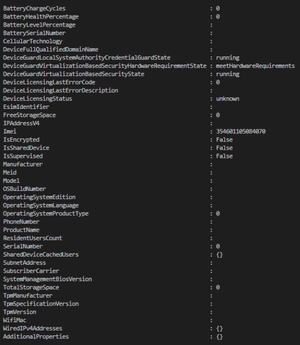
Hello I am trying to get Intune device hardware data with Graph and I am not having any luck. Most of it comes back null At this point I am just trying to get the System Management BIOS version which shows in Intune on the hardware tab of a device. Using this command (Get-MgDeviceManagementManagedDevice -ManagedDeviceId $ManagedDevice.Id).HardwareInformation The documentation show it should return data. https://learn.microsoft.com/en-us/graph/api/intune-devices-windowsmanageddevice-get?view=graph-rest-beta https://learn.microsoft.com/en-us/graph/api/resources/intune-devices-hardwareinformation?view=graph-rest-beta The graph explorer also returns null data. GET https://graph.microsoft.com/beta/deviceManagement/managedDevices/xxxxxxxx-xxxxx-xxxxx-xxxxx-xxxxxxxxxxx The data is in Intune as you can see here. Where is this data stored in Graph? Any help would be appreciated.Solved3.5KViews1like1CommentWVD Connection from Android and Windows Apps Error: AADSTS50011
I am receiving the following errors trying to connect to a WVD Tenant/Host Pool with the RD Client Apps. The webclient works just fine. Any suggestions to get this resolved? We are using ADFS. Android RD Client (Preview) URL to Subscribe: https://rdweb.wvd.microsoft.com/api/arm/feeddiscovery Android Message: Request Id: b6293e62-4916-4129-9377-30c31c9f4c00 Correlation Id: bed61f21-71a9-4dda-8838-782778ae71fc Timestamp: 2020-05-04T04:59:16Z Message: AADSTS50011: The reply URL specified in the request does not match the reply URLs configured for the application: 'a85cf173-4192-42f8-81fa-777a763e6e2c'.Solved3.6KViews0likes6Comments
Recent Blog Articles
No content to show