User Profile

AdminJoe
Brass Contributor
Joined 6 years ago


User Widgets
Recent Discussions
Re: MS Teams is lowing other sounds when receiving notifications
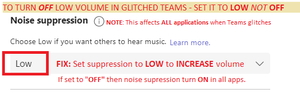
Muzykant Teams is BUGGED: FOUND THE FIX - TEAMS HAS A GLITCHED SETTING THAT DOES THE OPPOSITE OF WHAT IT SAYS THERE IS A GLITCH IN TEAMS WHERE NOISE SUPPRESSION SET TO "OFF" CAUSES VOLUME DECREASES IN ALL APPLICATIONS - SET IT TO "LOW" TO FIX THIS GLITCH, TO INCREASE THE VOLUME IN ALL APPS THIS IS THE FIX - IT COUNTER-INTUITIVE BUT CORRECT: You have to turn ON "Noise Suppression" in teams to turn OFF "Noise Suppression" in Teams and everything else The rest below is just so no one claim that any of the other settings are the fix. The below settings did not fix the issue - and cover pretty much all setting you would noramlly try in fixing this issue. And so no one claims that we aren't using the correct settings - here are all the other settings you should use when troubleshooting such a problem. Note that NONE OF THESE fixed the issue: SO AGAIN, THE FIX IS TO ENABLE NOISE SUPPRESSION IN TEAMS I verified this in 4 different affected PC's in our company now.34KViews0likes0CommentsRe: The new Outlook search in the title bar is disconnected from the content it searches
Adam Lein Aint gonna happen. People begged and begged MS to leave the menu bar as an option you can turn on and off, instead of have to use the ribbon; where you literally have to go to google to find out where they have a hidden a function in it that you need (I still do to do this day, and I think most people have to to find something they don't use often). And that was over a decade ago. Fortunately third party addin Classic Menus fixes that, but as a system admin my users wanted to throw their PC's out the Window when we upgraded to Ribbon-using Office versions. They seem to be equally pissed about this search bar's terrible location. It completley breaks the flow of work. Not intuitive - and objectively clunky.219KViews4likes0CommentsRe: The new Outlook search in the title bar is disconnected from the content it searches
MaryB Thanks Microsoft... another change that no one wanted - and it is explicitly less convenient than the previous UI. The old search bar was quick and easy to access, and I didn't fill half your screen with its drop down menu, and it wasn't of garbage suggestions that I don't want or need, all before you start typing ANYTHING. The old ones drop down was small and simple. Please don't force this down our throats. If you focus grouped this Microsoft you didn't do your due diligence, I doubt you survey existing Outlook users. Your crappy consulting firm likely focus grouped man-on-the-street type people... Who don't Outlook 2016 every single day. This is another feature that I don't see anyone liking. People have adjusted to the ribbon that you forced years ago, but you still have to Google where thigns are anytime you use a function that your don't use regularly; the ribbon because completely non-intuitive (you could have lept the option to keep the menu bar, and you know this). I dare say this search bar is a worse change than the ribbon.199KViews7likes1Comment
Recent Blog Articles
No content to show