User Profile

David2Felix
Copper Contributor
Joined 6 years ago


User Widgets
Recent Discussions
Re: SharePoint Online - Copy site pages between site collections - is that possible?
pgawde_800 I solved using PNP-PoweShell, afterwards I only had to upload the images to the Image WebParts. try{ $srcSiteURL = "https://xxxxx.sharepoint.com/sites/xxxxx/" $destSiteURL = "https://xxxxx.sharepoint.com/sites/yyyyy/" $pageName = "test.aspx" Connect-PnPOnline -Url $srcSiteURL -Credentials SharepointCredential $tempFile = [System.IO.Path]::GetTempFileName(); Export-PnPClientSidePage -Force -Identity $pageName -Out $tempFile Connect-PnPOnline -Url $destSiteURL -Credentials SharepointCredential Apply-PnPProvisioningTemplate -Path $tempFile Write-Host "Success" } catch{ Write-Host -ForegroundColor Red 'Error ',':'$Error[0].ToString(); }34KViews0likes1CommentFormat View - On list load or refresh list all values disappears
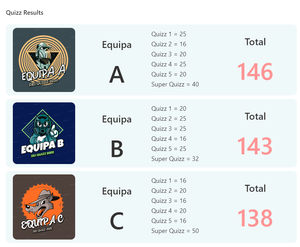
Hello, I have a list with with 9 columns, and I created a JSON formatted view which displays the list like this: All is well if I make the "All Items" view the default view and then select the formatted view, it displays the result above; but when I'm in the formated view and do F5 all the content from the list disappears I'm stuck with the content that is uploaded by the JSON (example - "txtContent": "Equipa") and all of columns content is gone, even the images. And if I set the formatted list view the default view when a user enters the list all is empty also...? Can someone help me? Thank you.1.3KViews0likes1Comment
Recent Blog Articles
No content to show