User Profile

Dolinhas
Brass Contributor
Joined 6 years ago


User Widgets
Recent Discussions
Group Policy object did not apply because failed error code:0x80070709 The printer name is invalid
Hi Everyone, I have a few AVD pools where we publish an app for users to access. Users report that printers are not being mapped after login. We use GPP user side to map printers and set as default. Many a times we see these events logged: VALUE>The printer name is invalid.</VALUE></PROPERTY>-</INSTANCE> Event ID 4098 is logged in the Application Log: Log Name: Application Source: Group Policy Printers Date: <DateTime> Event ID: 4098 Task Category: (2) Level: Warning Keywords: Classic User: SYSTEM Computer: server.fabrikam.com Description: The user 'HP Printer' preference item in the 'Define Printers {XXX-XXXX-XXXX-XXXX-XXXXXXXXXXXX}' Group Policy object did not apply because it failed with error code '0x80070709 The printer name is invalid.' This error was suppressed. For this one I found this https://learn.microsoft.com/en-us/troubleshoot/windows-server/group-policy/group-policy-printer-preferences-not-set-default-printer#resolution which is really not helpful since there is no possible solution as the client is a AVD VM and used by many users at the same time. VALUE> No printers were found.' VALUE></PROPERTY>-</INSTANCE> Event ID 4098 is logged in the Application Log: Log Name: Application Source: Group Policy Printers Date: <DateTime> Event ID: 4098 Task Category: (2) Level: Warning Keywords: Classic User: SYSTEM Computer: server.fabrikam.com Description: The user 'Accounts - Main Printer' preference item in the 'Printers - Global {zzzzzzzzzzzzzzzzzzzzz}' Group Policy Object did not apply because it failed with error code '0x80070bc4 No printers were found.' This error was suppressed. VALUE>The specified printer has been deleted.</VALUE></PROPERTY>-</INSTANCE> Event ID 4098 is logged in the Application Log: Log Name: Application Source: Group Policy Printers Date: <DateTime> Event ID: 4098 Task Category: (2) Level: Warning Keywords: Classic User: SYSTEM Computer: server.fabrikam.com Description: The user 'Sales-Printer' preference item in the 'Printers - Global {zzzzzzzzzzzzzzzzzzzzz}' Group Policy Object did not apply because it failed with error code '0x80070771 The specified printer has been deleted.' This error was suppressed. No KB's or posts out there to help with these 2 errors. Really need assistance and printers are not being mapped on first logon, users need to come out of AVD and go back and relaunch the app to see the printers mapped. This is the same case with our internal app or Notepad. Thanks, MIssues with "Azure Virtual Desktop | Custom image templates" scripts
Hi Everyone, I have 2 issues with the new "Azure Virtual Desktop | Custom image templates" from the Portal: 1 - https://github.com/MicrosoftDocs/azure-docs/issues/111376 2- https://github.com/MicrosoftDocs/azure-docs/issues/111372 Basically the scripts are out of date (there a new ones in the github repo) and the language scripts automatically add a reboot to the template which fails the build. I am not the best on json so I don't know how to create this from cmd line and that is why I am using the portal GUI. Thanks for your help. M1.3KViews0likes1CommentRe: Add customscriptextension while deploying hostpool in WVD spring 2020
NKC25 Please can you share your ARM template file and parameters file? I cannot find a way to install Sophos after the VM is added to the host pool and like you said there is a way to do this now but I need the right json files. Thanks, M1.4KViews0likes0CommentsMigrate on-prem file server cluster to Azure
Hi I have a 2 x node clustered file server on-prem with Netapp san for disks. I need to move these to Azure native VM's. Can I do clustering on Azure ( I think I can)? Is this a supported scenario? What is the best way to go thru with this? Thanks M1.8KViews0likes2CommentsHow to enable archive on-prem?
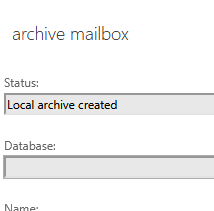
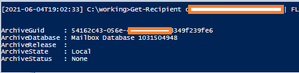
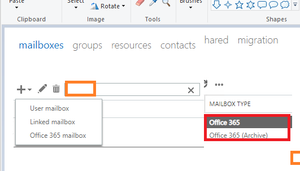
Hi Hybrid here, we create our mailboxes on-prem (Exchange 2013-no mailboxes on-prem) and let them sync up to the cloud. However for some reason some mailboxes are not showing on-prem anymore but are fine in the cloud. I can recreate the mailbox on-prem so via EAC by editing the attributes on the AD object or by creating a new User Mailbox but the archive is not set/created/defined on-prem (All archive should be done in the cloud.), this only happens if I use the wizard > + > Office365 mailbox: So to exemplify: The first account had an AD object and a O365 mailbox but no present in EAC The second account I created using the Office 365 mailbox: We can see the ArchiveGUID and ArchiveState filled in on the second one. In EAC we can see the Mailbox type is different for both accounts: Office365 for the account I edited in AD/EAC Office365 (Archive) for the account I created using the Office365 mailbox and selecting enable archive All archive should be done in the cloud. My question is how can I populate the ArchiveGUID and ArchiveState properties for the account I modified? Bit long .... sorry...Solved6.4KViews0likes7CommentsWhere is image: "Microsoft Windows 10 + Office 365 ProPlus"
Where is image: "Microsoft Windows 10 + Office 365 ProPlus" Hi I haven't been to the Market Place for a while and today I was looking for an updated image of W10 21H1 with Office but I can only find one with 21H1... Where has the office image gone? Thanks1.1KViews0likes1CommentRe: Failed to update boot image after SCCM v2006 update : "File = "..\\sspbootimagepackage.cpp";"
Dolinhas For future lookers. This was caused by NTFS permissions missing from the folders where the files are written to. Once replicated from the root all is OK. Good luck guys2.1KViews0likes0CommentsRe: WVD - FSLogix - Reduce profile container size - exclude Teams Cache with redirections.xml
Hi raymondesray I am seeing a huge amount of LRS hot writes, some posts I saw suggest working with the redir.xml file to exclude apps. So far all I am excluding it Teams folders. Is there a way to find out what is writing so much into my VHDX's because is starting to cost a bit? Thanks M61KViews0likes0Comments3 x remote desktop services infrastructure agent versions installed!
Hey all - merry xmas On my WVD machines I can see 3 x version of RDS Infra agent installed. (see pic) We don't certainly install these on the gold or versioned images. Any ideas where this is coming from and how should the config be (only one agent I suppose) and where to find a version list (googled no luck) Muchas gracias all.2.5KViews0likes1CommentFailed to update boot image after SCCM v2006 update : "File = "..\\sspbootimagepackage.cpp";"
Got the new ADK and PE all installed. Error in SMSPROV: Failed to copy file '\\SCCM-Server\SMS_CSF\OSD\\bin\x64\ccmcore.dll' to 'C:\WINDOWS\TEMP\BootImages\{5A21EF4D-9AFE-493E-AD98-D60123456D54}\mount\sms\bin\x64\ccmcore.dll' Full error: Error: The wizard detected the following problems when updating the boot image. • Failed to insert OSD binaries into the mounted WIM file The SMS Provider reported an error.: ConfigMgr Error Object: instance of SMS_ExtendedStatus { • Description = "Failed to inject OSD binaries into mounted WIM file (often happens if unsigned drivers are inserted into x64 boot image)"; • ErrorCode = 2152205056; • File = "..\\sspbootimagepackage.cpp"; • Line = 5482; • ObjectInfo = "CSspBootImagePackage::PreRefreshPkgSrcHook"; • Operation = "ExecMethod"; • ParameterInfo = "SMS_BootImagePackage.PackageID=\"CSF00005\""; • ProviderName = "WinMgmt"; • StatusCode = 2147749889; Little help here cos I am googled out.... Thanks2.3KViews0likes2Comments
Recent Blog Articles
No content to show