User Profile

Monir
Iron Contributor
Joined 6 years ago


User Widgets
Recent Discussions
Re: Is it now recommended or okay to create subsite under a Communication or a Teams site?
Thanks Sigi7. Yes, the usage of subsite can be case by case and in some cases it’s probably makes better sense. However, in the future, Microsoft may say subsite is no longer supported and all subsites needs to be on it’s own site collection and that could be a tedious task then. For example Microsoft is retiring Stream (classic) and forcing to use Stream (on SharePoint).4.2KViews1like0CommentsRe: Is it now recommended or okay to create subsite under a Communication or a Teams site?
Thank you Dave. Microsoft should set the recommended options as default. People tend to use what they find by default in most cases. In the past subsite was a norm so users are used to use them in regular basis. However, there’re benefits of using subsites. For example: you have a project/program that has multiple initiatives - in this case each initiative can have a subsite dedicated to it under a project/program site collection. In the new site recommended structure you have to create new site collection for each initiative and managing permissions and keeping track of them could be challenging for all these site collections.4.6KViews1like4CommentsIs it now recommended or okay to create subsite under a Communication or a Teams site?
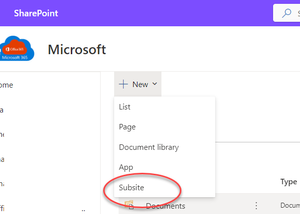
Hi All, just trying to clarify, is creating as subsite under a SharePoint Online Communication or a Team site okay now? Asking this as I see now the option to create a subsite under the New dropdown menu - image below. Creating a subsite was a normal practice in the beginning, then Microsoft says don't do it and now seeing the option to create subsites. So, is is okay now to create a subsite? Thank you advance.Solved5.2KViews0likes6CommentsRe: Logitech Rally/Tap with Windows. Devices stuck on blank screen after nightly reboots
We had the same problem with Logi Rally Bar Mini. We ere confirmed by Logitech Iris driver version 30.xxx has issues so rolled back to 27.xxx and that resolved the issue. Since then intel has updated the Driver version to 31.xxx and we applied that per Logitech and seems working now too. Below is the link to the latest driver https://www.intel.com/content/www/us/en/download/19344/intel-graphics-windows-dch-drivers.html15KViews1like0CommentsRe: Why is manager getting this email.. "FW: Final Notice: Joe Blogg's OneDrive for Business contents"
For fyi - Per Microsoft, the notified email is only sent when an user acct is deleted and not disabling/blocking/unlicensing an user .. "The retention period for cleanup of OneDrive begins when a user account is deleted from Azure Active Directory. No other action will cause the cleanup process to occur, including blocking the user from signing in or removing the user's license." ref: https://docs.microsoft.com/en-us/onedrive/retention-and-deletion?redirectSourcePath=%252farticle%252fef883c48-332c-42f5-8aea-f0e2366c15f917KViews0likes0CommentsRe: In public preview: Meeting co-organizer
Thank you for sharing the update. We've been waiting for ages for this feature. Microsoft kept changing the date on the roadmap site months after months for it's availability. However, I still don't see the co-organizer option on the Meeting Options page as the article suggested. I have the Public Preview turned on with the Teams Desktop App. what am I missing? ThanksRe: What exactly happen when users Follow a site
Found this article - https://support.microsoft.com/en-us/office/set-your-sharepoint-email-notification-preferences-5bd63d8a-d43e-48cc-82b3-03a7687d5dc4?ui=en-us&rs=en-us&ad=us but it does not say anything about content changes on site pages...30KViews0likes0CommentsRe: What exactly happen when users Follow a site
In addition to all the points mentioned above, when a site is followed, SharePoint Online sends email notifications on changes made to the site content. That's what we are noticing. Is there any way to limit/filter of the email notifications?30KViews0likes1CommentCan't configure external sharing per site basis for SharePoint site that is connected to O365 Group
Hi There,, I have a security-related concern and was talking to the Microsoft support team and was advised to post my concern here for the developer to take a look... Please see the concerns originally posted with the link below... https://techcommunity.microsoft.com/t5/sharepoint/can-t-configure-external-sharing-per-site-basis-for-sharepoint/m-p/2231211 Thanks743Views0likes0CommentsRe: Can't configure external sharing per site basis for SharePoint site that is connected to O365 Group
That was not an answer but just acknowledging the issue. The issue is - when you set the sharing setting for SharePoint at the tenant level, then those settings are inherited for any O365 Group connected SPO site and you can't apply users desired sharing settings per-site basis via custom provisioning. If the site is NOT an O365 Group connected SPO site then customer provisioning would work. Give it a try.1.6KViews0likes0CommentsCan't configure external sharing per site basis for SharePoint site that is connected to O365 Group
Updates are given below the original post Original post --- Security Concern - Not being able to configure external sharing per-site basis for any SharePoint Online site that is connected to an O365 Group. When you configure external sharing now at the SharePoint Admin Center at the tenant level, all O365 connected sites inherit the sharing settings from the Admin center, we can't configure a per-site basis for those O365 group connected sites. Microsoft recently enabled guess access as the default behavior for Microsoft Teams. As a result, SharePoint online sites are configured for external sharing now. Because of this, any SharePoint Online site that's connected with an Office 365 group, that gets created is configured for external sharing. These sites could be the sites associated with Microsoft 365 services e.g. Teams, Yammer, etc., or just independent sites but connected with an O365 group. Their external sharing is inherited from the SharePoint Online external sharing settings at the Tenant Org level. Noe: If you create a SharePoint team site without an O365 connected group or a communication site then the Tenant level external sharing settings do not get inherited to them and that is ideal so we can decide if we need to enable external sharing to them case by case. But for those O365 connected sites - this is a huge security concern as organizations and we don't want all these sites by default to have the external sharing settings inherited to them from the tenant org level. We want to enable external sharing by request site by site by request. Now we can go in the SharePoint admin center after the fact and reconfigure those sites one by one for not to be allowed for external sharing or set that to your desired settings but that is very unproductive as users create sites left and right. I understand for Teams guest access and collaboration purposes it is needed but that should not be applied to other SharePoint Online sites that are not associated with Teams. So the question is, is it possible to set the O365 group connected sites' external sharing settings not to inherit from the tenant SharePoint org level external sharing settings? Thanks ------------------------------------------------------------------- Updates: I contacted Microsoft support for this issue. They acknowledge this is an issue but seems can't do anything on this now, which is really not acceptable. Support is limited to what they can do. Asked them to contact their development/engineering team to address this concern.1.8KViews0likes2CommentsRe: Teams Rooms experience for a Small Meeting Room
Hi Tomas_S, it looks like the HP Elite Slice G2 is a pure audio system for Teams Rooms. Are you not using the video feature for Teams meetings? If yes, curious to know, what video product you are bundling with your HP Elite Slice G2? Thanks Note: I just talked to HP and they confirmed their Teams Rooms products don't have a video feature at this time.1.9KViews0likes0CommentsRe: Teams Rooms experience for a Small Meeting Room
Tomas_S Thanks. Good to know it's been working out well for you. I suppose there were no major challenges for setting this up or any kind of hiccups besides the cable thingy. Thanks for sharing the tips on keeping an eye on the health status. I'll put this on our list of consideration... thanks1.9KViews0likes0CommentsTeams Rooms experience for a Small Meeting Room
Hi All, We are thinking of trying out the Teams Rooms for a small meeting room and trying to solicit your feedback/experience on this. For this trying out we are budgeting around 2500$ (small room). - What specific Meeting Rooms device you have experienced with, and what kind of device would you recommend, e.g. Logitech, Yealink, Crestron, etc... - what audio/video peripherals you experienced with and what would you recommend - what are the challenges you have encountered to setup/configure the Teams Rooms devices - Appreciate any other tips if you could share Thanks in advance...2.2KViews0likes5CommentsWhat is really guaranteed in Azure SLA?
Hi All Looking for some clarification on what is guaranteed in an Azure Service Level Agreement (SLA). Is it the : A. uptime Or B. feature availability One of the the below two links says it is for feature availability and the other says uptime and connectivity. So which one is the correct answer if I had to answer this on the exam? https://azure.microsoft.com/en-us/support/legal/sla/summary https://azure.microsoft.com/en-us/support/legal/sla Thanks MK Ask in the azure forum to confirm4.9KViews0likes1Comment
Recent Blog Articles
No content to show