User Profile

madcat
Copper Contributor
Joined 6 years ago


User Widgets
Recent Discussions
O365 / Azure AD - two accounts for admins v. PIM
I refer to this existing post which neatly sums up my query: https://techcommunity.microsoft.com/t5/admin-center/admin-roles-for-user-accounts-vs-separate-admin-accounts/m-p/88333/thread-id/674 Basically is it a good idea with O365 admins to have a regular daily use account separate from the admin account and then only use the admin account as required in an incognito browser window and sign out when finished (MFA on all accounts regardless a given)? Benefits I see: minimises risk of being struck by virus or malware while logged into admin account mitigates risk of admin user accidentally changing office 365 admin settings / azure ad tenant config ensure any content created by admin user is owned by their regular user account I didn't think the admin account would need to be assigned an O365 licence but then I realised it would have no mailbox associated with it so how would it get admin alerts? VasilMichev suggests Privileged Identity Management (PIM) is a better solution to this in the original post but that would more than double our monthly user cost as it requires Azure AD P2 and we are just using O365 Essentials with Azure AD basic right now. So assuming PIM is not in our is having two accounts a good idea and if so does the admin account actually need an O365 licence to be able to receive email alerts?8.8KViews0likes3CommentsDid I accidentally provision Apple Internet Accounts with my own Azure AD user account
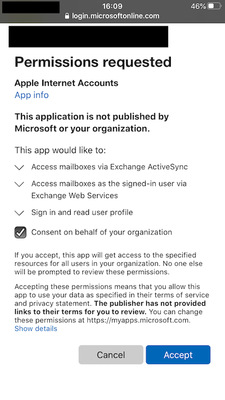
I was adding my O365 email account to my iPhone (Exchange Active-Sync) when I was prompted with the request below. I blindly tapped Accept (yes really should have read the fine print) and realised I probably should have lingered there a bit longer. Sure enough in Azure AD user audit log is a Add app role assignment grant to user event followed by the following events from Apple Internet Accounts: Add app role assignment grant to user (my account now a member of Exchange Admin, Helpdesk admin, Service Support and a few others A Remove app role assignment from user event (not sure which one) Add a deletion-marked app role assignment grant to user as part of link removal I'm not even sure I want to provision Apple Internet Accounts in my tenant and certainly not with any of its services tied to my current account which was set up for me as global admin. (I am converting it to a regular account and setting up a separate admin account - see my other post on this matter: O365 / Azure AD - two accounts for admins v. PIM). Can I remove my user account from all those admin roles? Do I want to use Apple Internet Accounts even? I would think not?? as we don't provision devices (BYOD). Can I un provision Apple Internet Accounts for now? Can they make that sign in page look less like a phishing attempt lol?Solved142KViews1like11CommentsEnabling Security Defaults seemed to have no effect; MFA policies not applied etc. (Azure AD Basic)
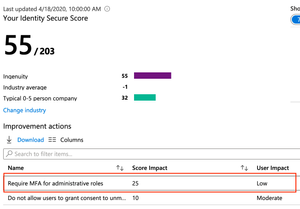
I manage a Basic Azure AD tenant for a small business. I just turned on Security Defaults under Properties > Manage Security Defaults but it seems to have had no effect at all. According to this document, https://docs.microsoft.com/en-us/azure/active-directory/fundamentals/concept-fundamentals-security-defaults , this should have made a number of changes including but not limited to: Unified Multi-Factor Authentication registration Multi-Factor Authentication enforcement for the following roles: Global administrator, SharePoint administrator, Exchange administrator, Conditional Access administrator, Security administrator, Helpdesk administrator or password administrator, Billing administrator, User administrator, Authentication administrator After enabling security defaults I checked the Security Identity Score and it is unchanged and recommending enabling policies that security defaults should have fixed. I can't enable these policies manually as we have Azure AD Basic. This situation of documented Azure AD functionality requiring a Premium upgrade is getting ridiculous. At the very least Basic should have applied Security Defaults as documented.7.6KViews0likes4CommentsRe: Enabling Security Defaults seemed to have no effect; MFA policies not applied etc. (Azure AD Basic)
Moe_Kinani you were right my security score is bumped up considerably now and the policies are definitely enable as my new users are getting grilled by AD when choosing passwords. Obviously takes few days for changes to be reflected here.7.4KViews1like1CommentRe: Did I accidentally provision Apple Internet Accounts with my own Azure AD user account
Thank you so much for your response and the blog links. Do you think Azure Basic has sufficient functionality to secure our tenant against such threats? We are only on Office 365 Essentials and trying to minimise costs at this difficult time (COVID) but I keep coming across documentation about elements such as conditional access policies, MDM, PIM etc. and wonder if they are necessary even for a small business.134KViews0likes3CommentsRe: Did I accidentally provision Apple Internet Accounts with my own Azure AD user account
Thanks for the reply Thijs Lecomte! That sounds like it could be useful although it does add an additional security concern as our O365 deployment is purely cloud based at the moment and adding the macOS mail client to the ecosystem would increase our attack surface a little. What would happen if I deleted the account I used to provision it or changed that account's role memberships? Would Apple Internet Accounts still work? Also to the best of my knowledge we don't have or use Apple Business Manager. More to the point the only Apple ID on my iPhone is my personal one and I certainly don't have it so I wonder what triggered that prompt on my device?136KViews0likes7Comments
Recent Blog Articles
No content to show