User Profile

nhtkid
Iron Contributor
Joined 6 years ago


User Widgets
Recent Discussions
Request to enable preview feature - Face Check with CAP
Dear Microsoft, I am on a business premium plan for my home test tenant. I cannot raise ticket nor do I have an account manager. I know this is in private preview. I would like my tenant to be enabled to test this new Verified ID feature to have "Face Check" in CAP as one of the Grant conditions. tenant id: bc85b508-0107-4472-a49c-fc8cefd4f0d7 Thank you.Is Edge Copilot susceptible to Prompt Injection Attack?
I am getting lots of negative vibe when reading about OpenAI's Altas browser. But what about Edge browser? Let's say if you have Copilot in Edge turned on with Page Content allowed. You asked the Copilot to summerise the page you are browsing and the page has hidden text to initiate a prompt injection attack. Is it safe to say that as long as Copilot does not have control over your browsing or desktop, the damage is limited. The worst thing it could happen is the change of AI behaviour, meaning the response returned from your question may not be what you asked for. There is zero DLP risk, right?139Views0likes1CommentStolen session token from Edge
We can steal the session token from Edge using tools like Burp Suite or Fiddler to intercept proxy traffic on the mobile phone, even when the Edge is MAM protected by Intune. This makes the Edge browser unsafe to use for Enterprise Applications on personal mobile. Recently I discovered that the https://learn.microsoft.com/en-us/entra/identity/conditional-access/concept-token-protection in Conditional Access Policy. However it is only available for Windows. I am wondering if anyone knows when it would become available for mobile on Entra roadmap. Also, if you know any Edge configuration, I could use to stop Token Theft, please let me know! Thank you everyone.218Views0likes2CommentsEntra Verified ID: CAP Preview Feature to require Face Check
During one of the MS demo video, I saw a preview feature for Conditional Access Policy to require "Face Check". I have now enabled Entra Verified ID and also switched on Face Check. When I create a new CAP, I do not see the "Require Face Check" option under the Grant. How can I request to have this feature released to my tenant? Thanks!Go Links on Edge Mobile
Dear community members, We use Intune managed computer and Zscaler that delivers DNS Search Domain. When user type a https://go/links in Edge browser, it automatically appends the FQDN to the address bar to become https://go.mycompanydomain.com/links. It is a quite common practice for Enterprise to provide convenience to access internal shortened URLs. With Intune managed mobile (also has Zscaler), can we achieve the same goal for Edge mobile? For the mobile use case, it is less of typing the go links directly in the browser. Because there are a lot of go links shared in Email and Chats from communications and newsletters, when user click them in Outlook or Teams on the phone, it will open in Edge. I am hoping when Edge opens these links, it automatically appends the search domain like on computers. I have looked up all Intune device and Edge documentation, chatted with three different LLMs, couldn't figure out a solution. All ideas are welcome! Thanks. Best regards,Solved186Views0likes1CommentRe: SharePoint News web part with customised sorting buttons
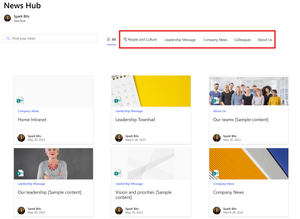
Hi KripalKavi , I was able to build it using PnP Search Verticals to achieve most of my goal. The layout customisation of the Search Results web part is fantastic. However, if we could have a bit more control over the verticals look and feel, it would be even better. As you can see, I was able to add a FluidUI icon but that's about it. I like to change the vertical looks, for example, maybe add a circle around these vertical words, make them look like a button to attract people to click them. It is just like the YouTube example I showed, give it a bit of shading. Thanks all and thank you for the PnP Modern Search app, it is great (but still hard to use).91Views0likes0CommentsRe: SharePoint News web part with customised sorting buttons
Thank you DaveMehr365, I was able to get it working after mapping my custom column to RefinableString00. Function wise, I think it's okay. When I click different quick links, it loads up different news in PnP Search Result web part based on the news category I set in the quick links. However, every time I click quick links, it refreshes the whole page, so as a button (I tried it too). I think the reason is because these are simple hyperlinks, and it reloads the whole page every time you click it. Is there a more elegant way, when you click these button to filter, on the PnP Search Result web part refreshes, instead of whole page reloads? Cheers,104Views0likes0CommentsRe: SharePoint News web part with customised sorting buttons
Thanks DaveMehr365 , that looked promising. I tried my best to follow the article but get lost in the end. I am going for the option 2 with the template. The site page that has the PnP and Quick Link web parts added is https://airdeepmindcom.sharepoint.com/sites/HomeIntranet/SitePages/News-Hub.aspx The custom property I am using is called "News Category" I struggled with the query template. Based on the article, is it supposed to be: {searchTerms} path:"https://airdeepmindcom.sharepoint.com/sites/HomeIntranet/SitePages/News-Hub.aspx"RefinableString00:"News Category":{?QueryString.NewsCategory} I don't understand what the RefinableString mean from the example. Also my property has a space in it, which makes it tricky. Appreciate your help! Thanks86Views0likes2CommentsSharePoint News web part with customised sorting buttons
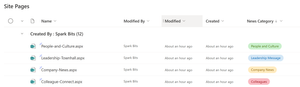
Dear community, All my news articles are already categorised using managed property like shown https://www.youtube.com/watch?v=ngZ_Fakxums&list=PLR-TCFHBe8JFUPWhCjaOAHrxob3BbAVgz&index=5. My goal is to display all news in one single News Web Part from all channels, not filtering using the web part properties, but to create buttons on the top of web part that serves as filtering buttons. It will look like what you see from YouTube home page. You will be defaulted to "All" that display news from all channels. You can also click on other buttons which will filter the news dynamically. These buttons will be corresponding to the news category that was set on the articles. Is there a way to achieve that? Thanks! nhtkidSolved358Views0likes6CommentsSharePoint Webpart to display PowerBI reports for current user
Dear Community, When you add a PowerBI webpart on the page, you usually provide the URL to the report, which is static. How can I customise to display a list of PowerBI reports based on the logged in user, like a dynamic card? If possible, based on all the reports that the user has access to, sort them in the order of last visited or most visited and display like top 5 reports. Thanks!57Views0likes0CommentsRe: Platform SSO for macOS not working
Hi DanEngelsmeier, you are asking all the right questions and I have the same issue here. Currently there is no good way. You need to use a script to downgrade onboarding user to Standard, coz that's your staff user account. Then you need another script to create a local admin if required and remove it afterwards. It's not a good solution. Also, if you keep a separate local account on the device all the time, I don't think that's good idea either. Also the script can only be applied once the device is registered in Intune. The quickest way is to apply to All Devices with a filter, do not use a Dynamic Group. But when exactly does the script will be applied and create that local account for you, nobody knows. There is no gradually control. The best thing Intune could happen, is while waiting for the final confirmation, the script will be executed during the holding stage so once user is logged in, everything is ready. But that is just a nice wish. It never worked for me, which means when the user is logged in, it is still an admin and he/she will have enough time to create another local admin before the script downgrade his/her account. This is a pretty big security gap! On the topic of local admin, what do you guys think about this? https://support.apple.com/en-au/guide/deployment/depca092ad96/web It clearly said that Apple now supports a remotely managed admin accounts and Intune just needs to build it in.1.2KViews0likes0CommentsRe: Platform SSO for macOS not working
Hi PatrickF11, I have gone through all these so what you experienced resonate a lot with me. My overall experience with Platform SSO is seamless and works great (touch wood). It's a night and day change. First of all, my implementation is super simple and straight forward, following the MS Doc, just one https://learn.microsoft.com/en-us/mem/intune/configuration/platform-sso-macos#step-2---create-the-platform-sso-policy-in-intune, nothing else. Regarding the URLs, I only used that top three. I don't agree with the MS support. You do not need another device feature profile to configure the SSO extension. That's the old stuff, now should be superseded by Platform SSO. Secondly, the FileVault setting is buggy! I have it forced on via the deployment profile. Most time it works. You can see it pops up during the enrollment and tell you it needs to be switched on. Occasionally, the enrollment completes in a flash and completely skip the FileVault. Then I get a prompt at home screen like you shared. I constantly wiping my device and I could see it happen from time to time. This is no good for us because disk encryption is a requirement. I also have a script to convert the onboarding account from Admin to Standard. Now that script alone is a hidden and miss that I could start a brand-new thread on it. However, if it worked, and if FileVault got skipped, then there is no way to enable it after login, because it requires privileged account. Thirdly, your CP registration prompt. My experience has been great and it always prompts. However it does gets buried in a dozen of other system prompts which is super annoying. I was gonna ask you whether you know to suppress them. The only notification that is useful really, is the CP. When it doesn't prompt you to register the device though, if you manually open CP, does it work? Cheers,1.2KViews0likes0CommentsRe: Platform SSO for macOS not working
Hi PatrickF11 you are absolutely right. Secure Enclave is considered the most secure, advanced passwordless authentication method that MS offered for Mac. However, I don't use it. Secure Enclave will leave you with a local password. Unlike WHfB, when users forget the PIN, they can still log in using Entra password as a backup, if users forget the local password for Secure Enclave, they cannot log in. It's not like a password admin could help users to reset via Entra or ABM. I don't know how you can work around this issue. If you do, please let me know coz I do like to use Secure Enclave. On the other hand, "Password" authentication syncs the local password with Entra so you don't have this issue. It's no better than the old school NoMAD setup, but the process is definitely simpler and seamless with MS.1.4KViews0likes0CommentsRe: MFA Requirements for external users
Nice one. Good to know. Since you mentioned about MFA, another place to check is your CAP that require guests to use MFA. In that particular CAP under the "Session" setting, it configures how often to re-authenticate. Your case is more like an idividual thing since it's not affecting the mass.2.3KViews0likes0CommentsAzure B2B, B2C or Entra External ID for OneDrive/SharePoint external collaboration
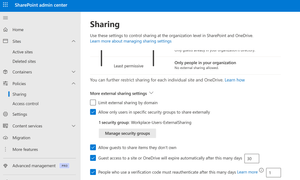
Dear Community, We have a business requirement that internal staff needs to collaborate files with external customers. Staff share individual files from OneDrive for Business or SharePoint Online library. External customers will be required to register as guests. External customers will be required to use MFA for authentication. I am able to get it somewhat working by enabling https://learn.microsoft.com/en-us/sharepoint/sharepoint-azureb2b-integration. The benefit is that external customers will be added as guests even when you share single files, which is not possible by default. Then the default guest CAP will require guests to have MFA turned on during first registration. The reason I said somewhat working is that the user experience is not that great. For example, the page for guest registration cannot be customised so the process seems clunky and confusing for non-technical user, so as the guest registration email. The SharePoint file sharing email that customers receive are also not customisable. It looks like a spam. It seems like without using Azure B2C or now the next generation of External ID, I cannot use separate company branding just for my guests. When comparing different features, it also comes to my understanding that even with an external tenant, the customised signup/signin user flow needs to associated with an enterprise app. And this document specifically called out OneDrive/SharePoint cannot be used to trigger the signup/signin user flow. https://learn.microsoft.com/en-us/entra/external-id/self-service-sign-up-user-flow The above link is for B2B but I think for B2C, it is the same deal, even though it didn't say explicitly. https://learn.microsoft.com/en-us/entra/external-id/customers/how-to-user-flow-sign-up-sign-in-customers Any advice is welcome. Thank you so much! nhtkid660Views0likes0Comments


Recent Blog Articles
No content to show