User Profile

hungnq39
Copper Contributor
Joined 6 years ago


User Widgets
Recent Discussions
Universal Print Create Print Job Memtype Properties
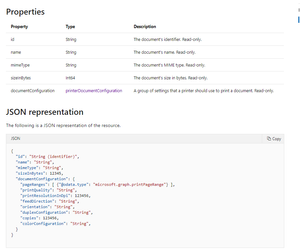
Hello everyone, I am currently using the Universal Print Create Print Job API and am having a problem with the memType property of PrintDocument. I tried the values like application/pdf and application/msword but the server returned the code 415 and the message "Unsupported document-format: application/pdf" This is document My Dummy Data And This is Response after I call API Please tell me which attribute is valid to be able to create printJob1.2KViews0likes4CommentsError when using document data for IPP send Document Request
After Register Printer with Universal Print Service, I build a IPP Proxy App as a connector to connect Output Device with Infrastructure Printer. After implement Fetch Document IPP Operation , UP Services response document data. But if I use this data to Send-Document Operation to Output Device. This data is not type Buffer. It return type string. I see Graph API have a api return same data. It shown below https://docs.microsoft.com/en-us/graph/api/printdocument-get-file?view=graph-rest-beta1.5KViews0likes1CommentUniversal Print (UP) Printer Registration Invalid Invalid Token, The Audient Invalid
According to the document https://docs.microsoft.com/en-us/universal-print/hardware/universal-print-oem-printer-registration , I obtained the Access Token in step https://docs.microsoft.com/en-us/universal-print/hardware/universal-print-oem-printer-registration#121322-retrieving-the-user-token Retrieving the user token. This token can be used in the required authorization header (described in section 1.2.1.1.2) when sending a request to register a printer with Universal Print. But when I send the request to api https://register.print.microsoft.com/api/v1.0/register , an error code returned as 401 Unauthorized with description Bearer error = "invalid_token", error_description = "The audience is invalid" Let me know what to do?1.4KViews0likes2CommentsInvalid_client while authen and Permission, Scope in Universal Print Apllication
Hello, I am currently developing OEM Printer Client Application Application Registration. https://docs.microsoft.com/en-us/universal-print/hardware/universal-print-oem-app-registration I have added the necessary permissions for my application as shown below : In my application, when I add scope, the rights are OAUTH_SCOPES = 'profile offline_access user.read user.read.all' then the login application is normal, but if I add permissions like printers.Read or Printers.Create then When logged in, an error message returned is invalid_client. How do I use Universal Print permissions within the scope of the web app.805Views0likes1CommentUniversal Print (UP) Printer Registration
Link Document : https://docs.microsoft.com/en-us/universal-print/hardware/universal-print-oem-printer-registration The DeviceCertRequest object has a data attribute. A property that contains a base64-encoded PKCS # 10 certificate request RFC4211. The certificate request MUST use an RSA public key algorithm with a 2048-bit key, a SHA256WithRSAEncryption signature algorithm, and a SHA256 hash algorithm. But I don't know what the information fields should be transmitted. In the sample code sample, the fields are as follows var values = new Dictionary<DerObjectIdentifier, string> { {X509Name.CN, "Microsoft"}, //domain name inside the quotes {X509Name.O, "Microsoft Corp"}, //Organisation\'s Legal name inside the quotes {X509Name.L, "Redmond"}, {X509Name.ST, "Washington"}, {X509Name.C, "US"}, }; But I don't know my request properties ?659Views0likes0CommentsRe: Error while printing using universal print
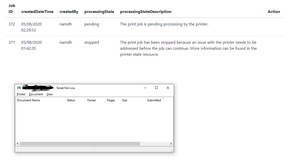
Phillipp Clausing Thank for your answer, But I don't know it. Step 1 : I install PrinterConnector On window Step 2 : I add my physical printer on window printer & device Step 3 : I register my printer to Universal Print by Printer Connector It successfully, But when I create a print Job on my app, It show on Azure but not show on Physical printer Queue. Can you help me ?5.2KViews0likes0CommentsRe: https://microsoft.com/devicelogin设备登录报错000000000000,提示权限问题,但是权限已经赋权
SongLei Hello, it looks like you have not granted your application permission yet. Go to azure AD and in app registration, go to API permission to grant the application permission. In addition, in the client application's env, it is also necessary to grant these rights to the scope1.7KViews0likes0CommentsHow to print a document with Universal Print from Web Application
Hello, I am currently developing web applications and Universal Print. I have successfully performed 3 steps: create print job, upload Data and start Job on a printer that is registered Universal Print with PrinterConnector. The printer has also met the conditions like Shared, ... but we do not see the job done on a physical printer. Please ask what we need to do to print the document. How does a physical printer receive print jobs of Universal print ?1.3KViews0likes1Comment

Recent Blog Articles
No content to show