User Profile

Ichwan
Copper Contributor
Joined 6 years ago


User Widgets
Recent Discussions
Group write back without azure ad premium
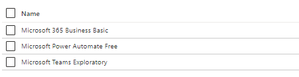
Hi, i have trial tenant and have a plan to implement E1, this is my current tenant license. I already implement group writeback and able to sync office 365 group user to my AD with my existing license. My question is, is it true group writeback do not need azure ad premium ? i read in this article group writeback do not need premium https://c7solutions.com/2015/07/configuring-writeback-permissions-in-active-directory-for-azure-active-directory-sync but, i also read from microsoft article group writeback is need premium license https://docs.microsoft.com/en-us/azure/active-directory/hybrid/how-to-connect-group-writeback. i need to verify, is it group writeback features available in E1 ? because my existing license is similar with E1 Thanks Regards Ichwanbulk assign license only for exchange online plan
Hi, i have requirement to disable only exchange online plan in all user, and i already know the step. I need to disable exchange online license because of i have two mailbox running both on premise. to achieve exchange hybrid requirement. but, i cant find solution to enable it again. I need to enable license when i running exchange migration. is there any solution that can bulk enable exchange online license trough power-shell ? Thanks Ichwan ZSolvedOn Premise User Outlook keep pop up when lookup On Cloud user calendar
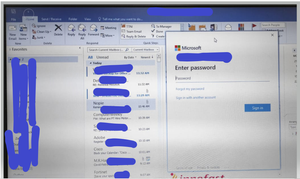
Hi, I have issue. I have Exchange 2013 Hybrid with Office 365. I have two on prem users, UserA and UserB. UserA can see UserB calendar via outlook. That is normal. today I move UserB to Office 365. After that UserA (On Premise) show outlook pop up like this picture bellow. outlook pop up show like O365 pop up, but it happened at On Premise users. when i try to check outlook connection status, the issue happened when user try to access on cloud calendar (UserB). I already try to add two registry, but no effect, when i open outlook at the first time, the pop up still showed, i already try to create new profile, but no effect also. have you ever experienced the same thing? please help Thanks Ichwan949Views0likes0CommentsExchange Hybrid unssported version
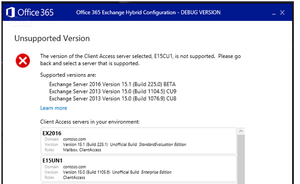
Hi, i read this hybrid requirement from this article https://docs.microsoft.com/en-us/exchange/hybrid-deployment-prerequisites , and there is no specific requirement for Exchange on premise running Hybrid configuration wizard. My Organization Exchange version is 2013 CU7. But, i found article that shows unsupported version while running HCW, for example this article https://techcommunity.microsoft.com/t5/exchange-team-blog/introducing-the-microsoft-office-365-hybrid-configuration-wizard/ba-p/604207 . My question is, is there any minimum Exchange 2013 version requirement for HCW ? Thanks Ichwan Z555Views1like0CommentsBest Approached to demote last exchange and keep Azure AD Connect
Hi Team, I have exchange 2010 and plan to migrate to Office 365. I have +- 50 mailbox. My requirement is, I need to demote all Exchange in On Premise and use Azure AD Connect to run PHS. what method is best suited to meet these requirement ? Thanks Regards Ichwan1.3KViews0likes2CommentsPTA single tenant two forest
Hi, I have question, i have two forest contoso.com and fabrikam.com. I plan install Azure AD Connect on contoso.com and sync contoso and fabrikam user to cloud with single tenant. My question is Can I use PTA and place PTA in two forest ? if user login to @contoso.com, login will be handle by contoso PTA server and same with fabrikam. If user login to @fabrikam.com, login will be handle by fabrikam PTA server Is there any related document that support my scenario ? Thanks Ichwan Z1.2KViews0likes1CommentAccount lockout Azure AD gray
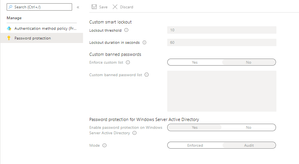
Hi, i have tenant, and account lockout policy looks like this accout lockout menu show gray, and show value "lockout threshold" 10. My question is, what is default of my tenant lockout threshold ? is it 10 times, or no lockout threshold ? Thanks Regards IchwanSolved1.3KViews0likes3CommentsRe: Multiple forest exhange hybrid without forest trust
Hi,SeanMcAvinue I already test with conditional forwarders, but conditional forwarders is not suitable with my environment. lets give me example, i have two forest. contoso.com and fabrikam.com If i enable conditional forwarder fabrikam.com in contoso DNS, all record to fabrikam.com will route trough dns A record. if contoso client try to ping http://www.fabrikam.com, it will resolve by internal ip, and the routing is not availble, the result is ping http://www.fabrikam.com is RTO. My requirement is when contoso client ping http://www.fabrikam.com, it will resolve by ip public i curious, is it any solution that suit to my requirement ? is it hostfile available to do that ? Thanks before1.6KViews0likes1CommentRe: Multiple forest exhange hybrid without forest trust
Hi, SeanMcAvinue happy to hear there is no trust required if I already make azure ad connect and other forest dc ping each other, is there any other requirement like conditional dns forwarder ? because not all the resource/ip address is routable each domain. I just need to run sync user only. Thanks for your reply1.6KViews0likes3CommentsMultiple forest exhange hybrid without forest trust
Hi, i have to make sure the requirement, I have two forest and want to deploy Exchange hybrid with single tenant. based on this article https://docs.microsoft.com/en-us/exchange/hybrid-deployment/hybrid-with-multiple-forests there is no requirement to configure forest trust to deploy Exchange hybrid is it correct we can do without trust ? how azure AD Connect recognize the other domain without trust ? thanksSolved1.7KViews0likes5Comments
Recent Blog Articles
No content to show