User Profile

stevemorgan
Copper Contributor
Joined 6 years ago


User Widgets
Recent Discussions
Re: Deleting malicious emails from all O365 mailboxes
jstump1972 To use the process VasilMichev mentioned earlier with this doc: https://docs.microsoft.com/en-us/microsoft-365/compliance/search-for-and-delete-messages-in-your-organization?view=o365-worldwide You'll need to open Admin Center > Scroll down on the left pane and choose the Security admin center (or go to https://protection.microsoft.com) From there, you'll need to click on permissions and then assign the permissions mentioned in the doc he provided. After that you can follow the steps using that method. As mentioned Search-Mailbox is end-of-life soon: "WARNING: WARNING: On July 1, 2020, the Search-Mailbox cmdlet is being retired and Microsoft Support will no longer provide assistance. See https://go.microsoft.com/fwlink/?linkid=2113221 to learn more. WARNING: The Search-Mailbox cmdlet returns up to 10000 results per mailbox if a search query is specified. To return more than 10000 results, use the New-MailboxSearch cmdlet or the In-Place eDiscovery & Hold console in the Exchange Administration Center."8.8KViews0likes1CommentRe: Deleting malicious emails from all O365 mailboxes
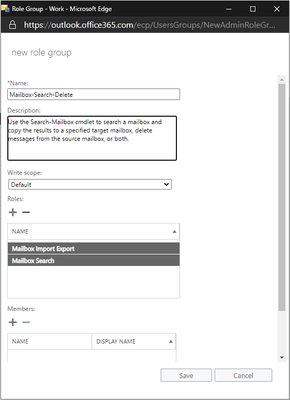
jstump1972 Like I quoted earlier, you'll need to assign yourself the appropriate roles in Exchange Online. These aren't assigned by default to anyone; even when you're a Global Admin or part of Organizational Management in EXO. Have you assigned those roles and established a new connection to Exchange Online? In EXO ECP you can navigate to Permissions > admin roles > click the + to add a new role: Give it name/description Add the two roles mentioned in the first Doc I shared Assign members (yourself) and save. Give it a few minutes, reestablish a powershell connection to EXO and try again.8.7KViews0likes0CommentsRe: Deleting malicious emails from all O365 mailboxes
jstump1972 "By default, Search-Mailbox is available only in the Mailbox Search or Mailbox Import Export roles, and these roles aren't assigned to *any* role groups. To use this cmdlet, you need to add one or both of the roles to a role group (for example, the Organization Management role group). Only the Mailbox Import Export role gives you access to the DeleteContent parameter." https://docs.microsoft.com/en-us/powershell/module/exchange/search-mailbox?view=exchange-ps9.1KViews0likes7CommentsRe: "You currently have not been assigned an Office license that includes the Office desktop apps"
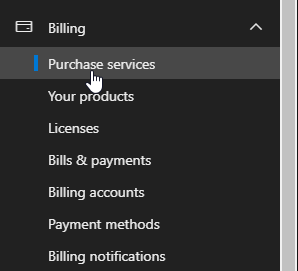
NeilT1540 If you have the appropriate permissions, you would log into admin.microsoft.com > Billing > Purchase Services. You'll find the license you want, add them. https://docs.microsoft.com/en-us/microsoft-365/commerce/buy-another-subscription?view=o365-worldwide36KViews1like0CommentsRe: "You currently have not been assigned an Office license that includes the Office desktop apps"
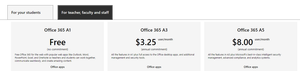
NeilT1540 This is what you should see on that page. It's the 3 license types available for education and explains what is included with each. You would need to obtain an A3 or A5 license in the admin portal and assign to yourself.36KViews1like0CommentsRe: "You currently have not been assigned an Office license that includes the Office desktop apps"
NeilT1540 A1 licenses only cover web versions of the applications: https://www.microsoft.com/en-us/microsoft-365/academic/compare-office-365-education-plans?activetab=tab%3aprimaryr137KViews1like3CommentsRe: Disable Mailing for O365 domain
David1595 Can you validate which mail flow scenario you currently see via message headers? Are you saying the current mail flow looks like this: Internet>MX>O365 Mailbox? Or this: Internet>MX>On Premises>O365 Mailbox? Do you want O365 mailboxes to receive mail at all? Do you want mail to be processed by on premises servers prior to being sent to O365? Is the on premises server new?6.3KViews0likes0Comments
Recent Blog Articles
No content to show