User Profile

dougsbaker
Brass Contributor
Joined 6 years ago


User Widgets
Recent Discussions
Re: External data in MDE advanced hunting
Yes that is an option. you will want to use the External Data operator. https://docs.microsoft.com/en-us/azure/data-explorer/kusto/query/externaldata-operator?pivots=azuredataexplorer Here is an example of how it will work. let AsrDescriptionTable = externaldata (RuleDescription:string, RuleGuid:string) [ @"http://dougsbaker.com/wp-content/uploads/2021/02/ASR-KQL.txt" ] with(format="csv"); DeviceEvents | where ActionType startswith "Asr" and InitiatingProcessFileName endswith ".exe" | extend RuleGuid = tolower(tostring(parsejson(AdditionalFields).RuleId)) | extend AuditMode = parse_json(AdditionalFields).IsAudit | join kind = leftouter (AsrDescriptionTable | project RuleGuid = tolower(RuleGuid), RuleDescription) on RuleGuid | summarize count() by tostring(AuditMode), RuleDescription, ActionType3.4KViews0likes1CommentRe: Generating alerts in test lab
MSFT Used to have some really good lab playbooks on this. It looks like they moved it off Prod Tech net and is only avaialble in Git Hub https://github.com/MicrosoftDocs/ATADocs/blob/master/ATPDocs/playbook-lab-overview.md https://github.com/MicrosoftDocs/ATADocs/blob/master/ATPDocs/playbook-reconnaissance.md https://github.com/MicrosoftDocs/ATADocs/blob/master/ATPDocs/playbook-lateral-movement.md Another option is to use the Built-in Simulation engine from MSFT. https://security.microsoft.com/tutorials/simulations1.5KViews0likes0CommentsRe: Don't allow the Microsoft Authenticator app to popup with approval button
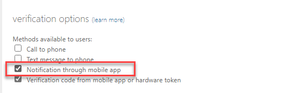
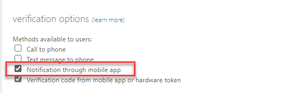
thomasrw thomasrw The Easiest way to disable this for your users is to go to Per-User MFA and disable it for the tenant. https://account.activedirectory.windowsazure.com/UserManagement/MfaSettings.aspx Disable Notifications through Mobile App. This will disable it for everyone. However, there are other options for you if you still want to keep notifications but make them more secure. Specifically Notifications Code Match. https://docs.microsoft.com/en-us/azure/active-directory/authentication/how-to-mfa-number-match you need to go to Azure AD to activate them, here is the link. https://portal.azure.com/#blade/Microsoft_AAD_IAM/AuthenticationMethodsMenuBlade/AdminAuthMethods7.2KViews0likes0CommentsRe: Disable approval popup in MS Authenticator app
thomasrw The Easiest way to disable this for your users is to go to Per-User MFA and disable it for the tenant. https://account.activedirectory.windowsazure.com/UserManagement/MfaSettings.aspx Disable Notifications through Mobile App. This will disable it for everyone. However, there are other options for you if you still want to keep notifications but make them more secure. Specifically Notifications Code Match. https://docs.microsoft.com/en-us/azure/active-directory/authentication/how-to-mfa-number-match you need to go to Azure AD to activate them, here is the link. https://portal.azure.com/#blade/Microsoft_AAD_IAM/AuthenticationMethodsMenuBlade/AdminAuthMethods27KViews0likes2CommentsRe: Mahcines not appearing in security portal even though they are registered in MEM
To have them show in security you additionally need to deploy an EDR policy to the endpoints. https://docs.microsoft.com/en-us/mem/intune/protect/endpoint-security-edr-policy This will register them in Defender for Endpoint and have them appear in the Security portal. Make sure you additionally configure AV settings and security experience. https://docs.microsoft.com/en-us/mem/intune/protect/endpoint-security-antivirus-policy Good Best Practice Guide https://thecloudtechnologist.com/2019/11/26/mdatp-best-practices/1.2KViews1like1CommentRe: Azure ATP Login Issue
Try going direct to your Tenant URL for Azure ATP. https://*instancename*.atp.azure.com. The instance name should be the same as your SPO Url. If that doesn't work you can go to the new defender URL for the Product. https://security.microsoft.com/settings/identities?tabid=sensor1.7KViews0likes0CommentsRe: Configure Password Policy in Microsoft 365
There are not a lot of options when it comes to setting these options in native Azure AD. This Article walks though MSFT's ideology. https://docs.microsoft.com/en-us/microsoft-365/admin/misc/password-policy-recommendations?view=o365-worldwide Here is the breakout of the password policy. https://docs.microsoft.com/en-us/azure/active-directory/authentication/concept-sspr-policy#password-policies-that-only-apply-to-cloud-user-accounts Main things we can configure are, disabling the strong password requirement. https://docs.microsoft.com/en-us/microsoft-365/admin/add-users/strong-password?view=o365-worldwide Password Expiration https://docs.microsoft.com/en-us/microsoft-365/admin/manage/set-password-expiration-policy?view=o365-worldwide Banned Password List https://docs.microsoft.com/en-us/azure/active-directory/authentication/concept-password-ban-bad16KViews0likes1CommentRe: Questions about Defender for office 365 in E5
QCQL69 You can mix and match licenses, buy plan 1 for some users plan 2 for others, or you can activate only certain features when https://docs.microsoft.com/en-us/azure/active-directory/fundamentals/license-users-groups If you decide to mix and match licenses you should scope your technology to the users that have the license. This article has a great walkthrough of those design decisions and how to scope properly. https://docs.microsoft.com/en-us/office365/servicedescriptions/microsoft-365-service-descriptions/microsoft-365-tenantlevel-services-licensing-guidance/microsoft-365-security-compliance-licensing-guidance#microsoft-defender-for-office-3651.5KViews1like1CommentRe: What is the goal of the spoofing intelligence
This article does a pretty good job walking through the Anti-Spoofing Protection and how MSFT is working to defend against those threats. https://docs.microsoft.com/en-us/microsoft-365/security/office-365-security/anti-spoofing-protection?view=o365-worldwide https://docs.microsoft.com/en-us/microsoft-365/security/office-365-security/learn-about-spoof-intelligence?view=o365-worldwide The Tenant Allow/Block is all about the admin override of those technologies. https://docs.microsoft.com/en-us/microsoft-365/security/office-365-security/manage-tenant-allows?view=o365-worldwide Not 100 % but i suspect the goal is to move to the tenant and allow/block instead of using the traditional allow and block options in MDO. THis sis still the best practice i follow for doing allows. https://docs.microsoft.com/en-us/microsoft-365/security/office-365-security/create-safe-sender-lists-in-office-365?view=o365-worldwide1KViews0likes0CommentsRe: can't install AzureATP sensor on DC 2022, help with logs?
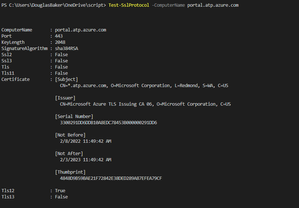
admin Administrator Definitely looks like a TLS issue. I would Double Check that the server can correctly communicate with your ATP portal using TLS1.2 https://gist.github.com/gpduck/db4f984435744e7dde1d I have used this tool in the past and it can be helpful. Just put in your ATP url EX org.atp.azure.com4.3KViews0likes16CommentsRe: Defender for Endpoint devices not showing up in security Portal
Think of it as the Management Plane vs the Security/Response plane. All your Security Configs need to happen in GPO/SCCM/Intune then some of the EDR advanced features/all of the response happens in the Security plane. This PDF is probably best at describing the connection. https://download.microsoft.com/download/5/6/0/5609001f-b8ae-412f-89eb-643976f6b79c/mde-deployment-strategy.pdf https://docs.microsoft.com/en-us/microsoft-365/security/defender-endpoint/deployment-strategy?view=o365-worldwide54KViews0likes0CommentsRe: Syncing 2 forest in Single Ad connect
This is a supported Topology. see the following article. https://docs.microsoft.com/en-us/azure/active-directory/hybrid/plan-connect-topologies#multiple-forests-single-azure-ad-tenant Essentially in AD Connect you need to go in to the connected directories and put the other forest there. Then it can use Password Hash sync or whatever other option you want. https://docs.microsoft.com/en-us/azure/active-directory/hybrid/how-to-connect-install-custom#connect-your-directories1.1KViews0likes0CommentsRe: Change the name of gMSA
Although it's possible to do a name change I think the best approach for this would be to create a new gMSA then swing over to it. if you decide not to you can use the set-adserviceaccount command to change the Display and SAM for CN right click and rename.5.8KViews0likes0Comments
Recent Blog Articles
No content to show