User Profile

xerez1947
Brass Contributor
Joined 6 years ago


User Widgets
Recent Discussions
Re: Can't see sender email address (Outlook web)
Hi, thank you for the information. I don't see any direct form I can fill with all the information I gathered, so I will follow the recommendation of the third link and simply report the emails from Outlook, as usual. Hopefully they will fix this in the next 10 years when a lot of people has been scammed.23KViews2likes5CommentsRe: Can't see sender email address (Outlook web)
DeletedHi, thanks for replying, but like I said before, the problem is not one scammer email address, the problem is that Outlook has a serious security issue with this bug. I can block the email addresses of those scammers, that's easy, but it will not fix the problem, that is only a workaround to me, but what about the other millons of Microsft users that are receiving these emails and they are not able to identify the email as phising because the sender email address is legitimate to them? This is not a solution. By the way, on Monday I got a new scam email using the same bug, and today a new one. Different email addresses. Microsoft needs to fix this ASAP!!!!!24KViews0likes11CommentsRe: Can't see sender email address (Outlook web)
Hi, in this case marking the email as phishing and report ir to Microsoft doesn't help. If I do it, Microsoft may block the sender email address, but the real problem would still be there. The scammers only need a new email address to continue their work, while people will still see their own email address or a legitimate email address as the sender email address. This is the real problem here. Moreover, in the case of the TV Licensing email, the "From" field has two email address, the scammer's one and my own email address. What would happen if I report that email to Microsoft? Would they block my email address? By the way, since I updated this case the 9th of April, I have receive two new emails using taking advantage of the same bug.24KViews0likes13CommentsCan't see sender email address (Outlook web)
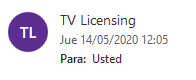
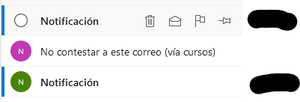
Hi, I've noticed recently that I am not able to see the sender email address for some emails. Why? How can I fix this? Example: If I place the mouse on the sender I see my own email address: I don't have this problem with most of my emails: When I check the source of the TV Licensing email what I see is: Date: Thu, 14 May 2020 03:05:34 -0700 Subject: Your TV Licence expires today Message-ID: <DB8PR02MB58514A4F8FBCF5689D1322CFDCBC0@DB8PR02MB5851.eurprd02.prod.outlook.com> From: TV Licensing <myemailaddress@hotmail.es> , <sirajul_islam1987@hotmail.co.uk> To: mailto:myemailaddress@hotmail.es Does anyone know what is going on? Thank you. --------------------------------------------------- UPDATE 09/04/2021: --------------------------------------------------- Unfortunately I have bad news. Scammers are taking advantage of this bug. Yesterday I got two new emails (indeed both emails were exactly the same) trying to scam me. The procedure is similar to the TV Licensing email. This time, when I place the mouse over the email, I don't see the sender email address: If I place the mouse over a legitimate email, I can see the sender email address: This behaviour is different from the TV Licensing email. In the TV Licensing email I see my own email address as sender email address, while in these two new emails no email address is shown. Moreover, if I check the message source of any of those two scamm emails, what I see is the following: Sender: BitcoinSystem <noreply@pccomponentes.com> To: xxxxxx@hotmail.es<xxxxxx@hotmail.es> From: Notificación, <enzo@newsletter.spartoo.com> Subject: xxxxxx ¡Tiene un pago agregado a su cuenta! Necesitamos una Confirmación Date: Thu, 8 Apr 2021 16:57:19 -0400 I have replaced the first part of my email address by "xxxxxx". Anyway, as you can see the field "Sender" tells me that the sender email address is "mailto:noreply@pccomponentes.com", however, the "From" field tells me the real sender email address which is "mailto:enzo@newsletter.spartoo.com". Finally, I have on my phone (Android) the Outlook app installed. When I check this scam email on my phone, the thing is even worse, because the app shows "mailto:noreply@pccomponentes.com" as sender email. This email address is a legitimate email from the website https://www.pccomponentes.com/. Therefore, some non-advanced users could easily fall into this scam thinking PC Componentes is really sending them an email... Everything this is slightly different from the TV Licensing email, but the final result is pretty much the same. Hence, scammers are taking advantage of this bug and even finding more sophisticated ways to scam people. Thankfully, I am an experienced user, but I am pretty sure that many users will be scammed. It's been almost one year since I post this message and nobody has fixed this bug. Apparently, Microsoft doesn't care about their users security. Maybe is time to switch to another email provider...28KViews3likes22CommentsRe: Can't see sender email address (Outlook web)
Unfortunately I have bad news. Scammers are taking advantage of this bug. Yesterday I got two new emails (indeed both emails were exactly the same) trying to scam me. The procedure is similar to the TV Licensing email. This time, when I place the mouse over the email, I don't see the sender email address: If I place the mouse over a legitimate email, I can see the sender email address: This behaviour is different from the TV Licensing email. In the TV Licensing email I see my own email address as sender email address, while in these two new emails no email address is shown. Moreover, if I check the message source of any of those two scamm emails, what I see is the following: Sender: BitcoinSystem <noreply@pccomponentes.com> To: xxxxxx@hotmail.es<xxxxxx@hotmail.es> From: Notificación, <enzo@newsletter.spartoo.com> Subject: xxxxxx ¡Tiene un pago agregado a su cuenta! Necesitamos una Confirmación Date: Thu, 8 Apr 2021 16:57:19 -0400 I have replaced the first part of my email address by "xxxxxx". Anyway, as you can see the field "Sender" tells me that the sender email address is "mailto:noreply@pccomponentes.com", however, the "From" field tells me the real sender email address which is "mailto:enzo@newsletter.spartoo.com". Finally, I have on my phone (Android) the Outlook app installed. When I check this scam email on my phone, the thing is even worse, because the app shows "mailto:noreply@pccomponentes.com" as sender email. This email is a legitimate email from the website https://www.pccomponentes.com/. Therefore, some non-advanced users could easily fall into this scam thinking PC Componentes is really sending them an email... Everything this is slightly different from the TV Licensing email, but the final result is pretty much the same. Hence, scammers are taking advantage of this bug and even finding more sophisticated ways to scam people. Thankfully, I am an experienced user, but I am pretty sure that many users will be scammed. It's been almost one year since I post this message and nobody has fixed this bug. Apparently, Microsoft doesn't care about their users security. Maybe is time to switch to another email provider...24KViews3likes15CommentsRe: Can't see sender email address (Outlook web)
Hi, thanks por replying, but unfortunately the content of the link is completely useless. Firstly, as I stated in the title of this discussion, the problem is with Outlook Web, not Outlook for Desktops. Secondly, as I showed in the in the description I already know how to check the real source of the email. The problem happens on some emails when you hover the mouse over the email. It says that the source is my own email address when in fact it is not. Moreover, when I open the email and I check the "from" field, it only displays a name, but not an email address (Please see images 1 and 4 of the main message of this discussion. It clearly says "TV Licensing" with no email address (this is a phising email) while the legitimate email shows "Yelmo Cines <info@news.yelmocines.net>").24KViews1like0CommentsRe: Can't see sender email address (Outlook web)
Good luck trying to find a solution. I got in touch with Microsoft using 3 different chats/contact forms and nobody was able to help me. The only solution provided by those agents were to refer me to a different Microsoft team using a new and different form. I wasted a lot of time explaining this problem every time I contacted Microsoft. Apparently, they don't know who can fix this bug or they don't care about it. Anyway, if you eventually find a solution, please let me know, I am still worried about this problem.24KViews1like2CommentsRe: How can I figure out my Office 365 account?
Hi Martin_BG Thank you for replying. I checked Credentials manager but I don't see anything related to Office 365. I know that I activated my Office 365 on this laptop some months ago, but probably after that I log out because I don't like to save my usernames/password on my machines. Actually, I am not using a trial version or similar, this is a full version. I already tried to find something about Office in my mailboxes with no luck. The problem is that I usually create/use some emails account for spam, and I think I created my Office 365 with one of these emails and I can't remember which one. I checked all my emails account I can remember but I didn't find anything... Is there any other way to figure out the account on my machine? I can see two codes in the About section of Word: Product ID and Session ID. Could this help? Thanks1.6KViews1like0CommentsHow can I figure out my Office 365 account?
Hello, I want to install my Office 365 on my desktop machine, however I don't remember the email address I used for Office 365. I have Office 365 installed on my laptop, however there is no an account associated. When I open Word and I go to Account, I don't see my login details. It ask me to Sign in to Office. My Office 365 is working perfectly fine on my laptop. Is there any way to find the account/email I used for this? Thanks.1.7KViews0likes3Comments
Recent Blog Articles
No content to show