User Profile

ArneDD
Brass Contributor
Joined 6 years ago


User Widgets
Recent Discussions
Re: Users missing in Engage
KevinCrossman as far as I understand, Members need a license that includes Viva Engage but Guests don't. All Members do have a Viva Engage license. And as I mentioned, I don't see a pattern. There are some Members with different licenses visible and others with the same licenses are missing, and some Guests are visible and others are not.1.5KViews0likes1CommentAAD Usertype Guest cant be added to Teams and cant see In-Meeting Chat or other In-Meeting Apps
Hello everyone, I am using Teams for 6 years now and worked with Guest Users in my tenant extensively. 6 weeks ago a Guest told me he could not see the Chat Icon in our (calendar) meeting. He could participate in the Meeting but not the chat. I did not find a reason and gave him access to an account of Usertype Member with a Teams license. After the meeting I did a lot of testing a saw that no Guest account in my tenant would see the Chat icon or any other In-Meeting App in Teams. I went through all settings I could think of or found using Google and ChatGPT. There was nothing that might prevent Guest Access. I then realised that when @mentioning someone in the Meeting-Chat there popped up an option to add the person to the chat. After I did this the Guest could see the ChatIcon and other In-Meeting Apps. I opened a support ticket. The support member went through all settings with me again but didnt find a reason. She proposed some other settings and policy changings afterwards (which seemed pretty clueless to me) but nothing helped. I then realised that it was also not possible to add Guests to a Team anymore. The ticket is open since a month now, and nothing helped. The support member once wrote that they are checking some things cause it may be "a problem on their side" without adding more detail. But it all didnt lead to anything helpful. Do others face the same problem? Is there anyone out there who might have a more profound knowledge? Any advice to me?444Views0likes0CommentsUsers missing in Engage
Hi everyone, I am just starting to try out Engage. I have around 1700 Users in my tenant but in the All Company Group there are only 270 Users. Also when I try to add users to a group in Engage or write a private message in Engage, I can only find a few users. I have multiple domains in my tenant, there are some users with a private E-mail adress as Guest, there are many of User type Guest but are internal (so with a UPN under one of my domains) and others of User type Member with different licenses. Be However I was not able to find a pattern of who shows up in Engage and who doesnt. It seems completely random. Do you have any hypothesis or suggestions on how to find out why?1.7KViews0likes3CommentsCustom Teams App with Sharepoint Homesite. Open links inside App instead of opening the browser.
Hi everyone, using the Teams developer portal I created an app with a personal tab that opens my sharepoint homesite in Teams. I know that Viva Connections is meant for that but I dont want to use the dashboard at the moment. My App works on desktop as expected. But on Android everytime I click a link inside the homesite it doesnt open the new page inside the teams app but opens a browser instead to open the sharepoint site. I dont like that behaviour. Do you have an idea why that might happen and how to change the behaviour?1.4KViews0likes1CommentRe: Guest access to personal apps/tabs
@Hunaid, thank you really much for your effort and the detailed answer. I still wonder why there is so few and unclear information about that to find in the web and no discussions on any boards. Pinned apps for guest access would offer great possibilities. So for now pinning an app for a user works like, sending them the link in a private chat and ask them to save the message with the link. When they then go and enter /saved in the searchbar they can see their "pinned" apps. Kind of silly. But I hope for the future to bring pinned apps for guest users. Would be great. Thanks again for your help, I really appriciate it.7.1KViews1like0CommentsRe: Assign licenses to groups
Thanks TomWechsler, that helped me to find the reason. It's not really the group type that matters, but a property called: "securityEnabled". This is always "true" for security groups but for Microsoft365 it can be "true or false". If this is set to "false" you cannot assign licenses to the group. If you create a new group via Teams or admin.teams.microsoft.com, then it is a Microsoft365 group and the property "securityEnabled" is automatically set to "false". The same thing happens when you create a Microsoft365 group through https://portal.office.com/. However, if you create a Microsoft365 group via portal.azure.com, then "securityEnabled" is automatically set to "true". Just one of the daily riddles that Microsoft presents to its users.1.6KViews0likes0CommentsAssign licenses to groups
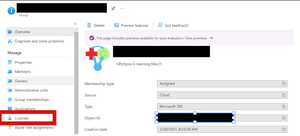
Oftentimes it's much more conveniert to assign licenses via groups and not to the individual users. However in the Azure portal for some of my groups, there is no licenses tab and also, when I choose the way way round and click on the general licenses button and try to assign a license to a group, the same groups don't show up in the list. I was not able to find out why I can assign licenses to some groups but not to others. Take for example these two Groups. I can't find a difference, but one can be assigned licenses to but not to the other: What might be the reason?1.6KViews0likes2CommentsGuest access to personal apps/tabs
As an administrator I can install and pin default personal tabs for all users in my tenant. I hoped I could pin a custom personal app for guests as well, but these dont show up. So I searched for some information whether this is possible or not. It's clear that guests can not add and install apps on their own, but I found no clear information if it is possible for the admin to add apps for the guests. I found this comparison of tenant members and guests in Teams, but it only mentions that Guests can't add tabs on their own, but nothing about using apps someone else has added. https://docs.microsoft.com/en-us/microsoftteams/guest-experience#comparison-of-team-member-and-guest-capabilities Then I found was this site in the docs, but I just don't understand what it's trying to say. So I hope someone could clarify this and explain to me in simple words what is possible and what not regarding custom apps for guest users. https://docs.microsoft.com/en-us/microsoftteams/non-standard-users There it says: Guests can't install, update, or delete apps into a shared context, such as a chat, channel, or meeting, but they can to their personal scope using message extensions and direct links. ---So what does "their personal scope" mean and what kind of direct links? Links to what? Guests don't have access to the Teams app store from the Teams desktop application, ... ---If the docs explicitly mentions "don't have access...from the Teams desktop application" then shouldnt it be different in the webapp or on mobile? ...but they can access it with a direct link. ---and again: What direct link? And what can they actually do with the link? And last but not least, my general question: What kind of apps can be made accessible to and used with guest users in Teams?Solved7.4KViews1like8CommentsRe: When multiple Meetings are started in the same channel, they are all just shown as MeetUp
No, these were all planned meetings with a subject/title. I realized that when I plan a meeting and I'm the first one to join/open the meeting, then the banner will show the correct title. But if someone else is the first to join the meeting that I created, the banner will only show Meet Now. Would be nice to know if others can repeat that error. HenryPhillipsNimbitech2.8KViews0likes0CommentsRe: How to skip a slide in Powerpoint in a Teams Meeting?
Thanks Henry, would be a nice feature if the last position would be remembered. But even simpler to implement would be a simple text box to enter the number of the slide where you want to jump to. Moreover, as powerpoint itself already has the feature to present online with all the needed controls, I dont get why powerpoint in teams doesnt just use the the same userinterface as powerpoint online for presenting? HenryPhillipsNimbitech6.2KViews0likes1CommentRe: When multiple Meetings are started in the same channel, they are all just shown as MeetUp
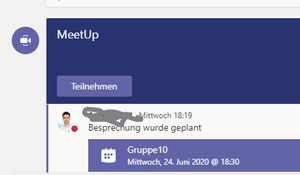
Yes, the meetings have been given titles. In the screenshot you can see that the planned meeting is called "Gruppe10", but as it the started the header shows "MeetUp" instead. HenryPhillipsNimbitech2.9KViews0likes2CommentsWhen multiple Meetings are started in the same channel, they are all just shown as MeetUp
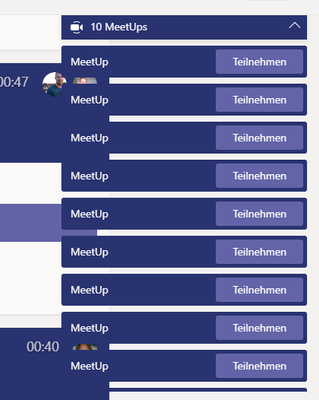
When multiple Meetings are started in the same channel, they are all just shown as "MeetUp" instead of the correct name of the Meeting. I'm sure it is not meant to be like that because it doesnt make sense at all and it would be really helpful to see the correct name in the list. In my case I use multiple meetings as breakout rooms to work in smaller groups. So these Meetings are named Group 1, Group 2,... or named by the subject. It would be great to see the open meetings listed with their names but instead I just see "meetUP" for every meeting which does not help at all. Really confusing to me is that I saw this behaviour some time ago. I planned to make a screenshot to ask here, but then suddenly the list showed the names correctly. But today the error was back again. To you see the same behaviour?3.1KViews0likes4CommentsHow to skip a slide in Powerpoint in a Teams Meeting?
I like the feature of starting a powerpoint presentation directly in a Teams Meeting. It seems to be better with low bandwidth. But I cant see an option to skip a slide or move to a specific slide. When I stop a bigger presentation I have to click through all the slides to get back to the point where I stopped. Do I miss something?Solved6.4KViews0likes3CommentsStream Videos not loading when embeded in Sharepoint
I created a site in sharepoint and embeded multiple MS Stream Videos with the Stream webpart and also tried embed code. I as the admin can see the videos loading when creating the site and also afterwards. But for all other users the videos are not loading. They are asked to login. When they click on login the address in the browser is https://web.microsoftstream.com/null and shows "Seite nicht verfügbar". When I embed the Video directly into Teams the same user see the videos without problems. They can also go to https://web.microsoftstream.com/null and see als videos, but not when they are embeded in a sharepoint site. Any advice?Re: Teams trial license expiring
LinusCansbyThanks for your answer. The license was called "Microsoft Teams Trial (free)", which actually doesnt make to much sense at all, because why would you need a trial for something that is free? When I look in the comparison between the free MS Teams and the full MS Teams, these licenses were definitely free licenses. There was a maximum of 500000 and for example MS Stream was not included. That is part of what is so confusing to me.8.2KViews0likes2CommentsTeams trial license expiring
Hi everyone, I'm confused with licensing for free Versions of Microsoft Teams. I have an Office 365 E1 subscription. Some time ago I started to use Teams with some customers/students. I created user accounts for them in my Active Directory and assigned Teams Trial licenses to them. Now I saw under licenses that all Teams Trail licenses are expiring soon, without any further information about that. Until now everything works as normal and I didnt noticed any change for the assigned users. I googled for expiring trials but found different informations. Will the trial actually end now? Will it end for all users at the same time? what will happen then, with their data? There also is a free plan for Microsoft Teams. Will I be able to assign that to the users under my tennant/domain? What is the difference to the MS Teams Trial?8.4KViews0likes4CommentsRe: Is Microsoft Stream need a license to "read only" videos?
Cian Allner ....but viewing and other features will remain active for a limited time.... This is still so unclear. What is "a limited time"? The earth will exist for a limited time. I think the info if, for example Teams users without a dedicated MS Stream plan will be able to view the videos und meeting recordings in the future or not.

Recent Blog Articles
No content to show