User Profile

LouisMastelinck
Brass Contributor
Joined 6 years ago


User Widgets
Recent Discussions
Re: Assistance Needed with KQL Script for Last Sign-in of Users
hiSergioVargas Does this meet your requirement? Note that I commented line 8 for testing purposes. SigninLogs | where TimeGenerated > ago(30d) | extend DeviceId = tostring(parse_json(DeviceDetail).deviceId), DeviceDisplayName = tostring(parse_json(DeviceDetail).displayName), OperatingSystem = tostring(parse_json(DeviceDetail).operatingSystem), LocationDetailsString = tostring(LocationDetails), UserDomain = tostring(split(UserPrincipalName, "@")[1]) //| where UserDomain == "acme.com | extend City = tostring(parse_json(LocationDetailsString).city), State = tostring(parse_json(LocationDetailsString).state), CountryOrRegion = tostring(parse_json(LocationDetailsString).countryOrRegion) | summarize arg_max(TimeGenerated, *) by UserPrincipalName | project UserPrincipalName, City, State, CountryOrRegion, DeviceDisplayName, OperatingSystem, AppDisplayName, ResourceDisplayName716Views0likes0CommentsAutomate adding users to impersonation protection
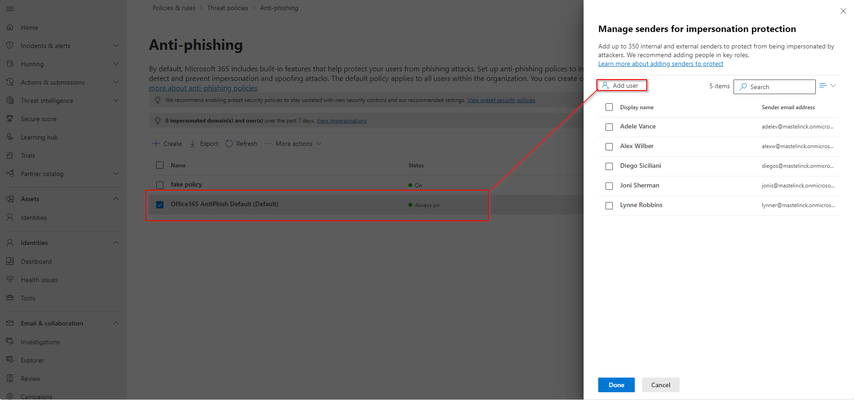
Hi All, Impersonation protection allows you mark 350 VIP users to have them additionally protected from attacks who try to impersonate them. You can add them individually to your policies. But it contains a painful process of having to individually click all the users you want to add... So I automated this in a script so you don't have it manually: https://github.com/LouisMastelinck/set-TargetedUsersToProtect-bulk-script/tree/main More info about the functions used: https://www.lousec.be/mdo/user-impersonation-protected-user-upload-script/ Hope it has a use for anybody who might need it. Kind Regards Louis1.3KViews2likes0CommentsRe: Remediation status for allowed click
Hi Keith, To be honest I disregard the fact that the status is "prevented". I find it a very "vague" explanation "Prevented means that there was no malicious emails in the mailbox for this item (mail or cluster)." Because it is very obvious that there is a malicious URL in the email and see the click event in the logs. (at least in my case, don't know if the URL in the screenshot was indeed malicious or not) I always validate and double-check outside of the automated investigation that is performed by MDO. I sandbox the url and validate the intention of the attack (payload delivery, phishing, redirections, info gathering,...) Then I often find myself using these tables to verify if anything landed: UrlClickEvents - check how many users clicked on the domain DeviceNetworkEvents - validate network requests based on the domain DeviceFileEvents - if the malicious website drops a payload, hunt for it EmailPostDeliveryEvents - see if the email has been removed/quarantined already EmailEvents - hun for simular emails that might not have been discovered. I have a saying: "if the user clicks, then the user changes his password". I don't take any risk and don't trust if SmartScreen/safelinks was already aware of the reputation of the malicious domain. Or that they did the click from an onboarded device. End-users can also be very vague when asked if they entered any credentials or not, hence why I say "clicking = changing". Greets Louis3.8KViews3likes0CommentsRe: Web content filtering and indicator aren't working on third party browser
Hi Spark, Do you have network protection enabled in the configuration of MDE? In order for it to function it requires: - An active content filtering policy - it works on Edge, Chrome, FireFox, Brave or Opera if the network protection feature is enabled in block mode with customer network indicators turned on in the portal.14KViews0likes1CommentRe: MDE import indicators not working
Hi rmiranda98 I was also always fighting with the csv import functionality of MDE for indicators. For some reason its always messed up... So I stopped using it. In the past I created a small script using app registration that would iterate a csv file with indicators and post those via the graph api. Its an old and basic script, but it might give you enough inspiration to make it work. #Basic MDE TI poster script created by Louis Mastelinck # get info from csv $list = Import-Csv -Path "" #sanitise url #$sanitized = $list[1].INDICATOR_VALUE.Replace("[.]" ,"." ) #authenticate to graph $clientsecret = "" $tenantID = "" $clientid = "" $TokenBody=@{ client_id=$clientid client_secret=$clientsecret scope="https://graph.microsoft.com/.default" grant_type="client_credentials" } $accesstoken = Invoke-WebRequest -Uri "https://login.microsoftonline.com/$tenantId/oauth2/v2.0/token" -ContentType "application/x-www-form-urlencoded" -Body $TokenBody -Method Post -UseBasicParsing $accessToken=$accessToken.content | ConvertFrom-Json $authHeader = @{ 'Content-Type'='application/json' 'Authorization'="Bearer " + $accessToken.access_token 'ExpiresOn'=$accessToken.expires_in } foreach ($domain in $list){ #$url = $domain.INDICATOR_VALUE.Replace("[.]" ,"." ) $url = $domain.domain Write-Host $domain.domain $body = @{ "action"= "alert"; "activityGroupNames"= ""; "confidence"= 0; "description"= "Covid19 virus indicator"; "expirationDateTime"= "2020-06-01T21:00:00.5031462+00:00"; "externalId"= ""; "domainName"= $url; "killChain"= ""; "malwareFamilyNames"= ""; "severity"= 0; "tags"= ""; "targetProduct"= "Azure Sentinel"; "threatType"= "WatchList"; "tlpLevel"= "white" } $json = ConvertTo-Json $body $post = Invoke-WebRequest -Headers $authHeader -Uri "https://graph.microsoft.com/beta/security/tiIndicators" -Body $json -UseBasicParsing -Method Post -ContentType 'application/json' } You can also look at the following documentation: https://docs.microsoft.com/en-us/microsoft-365/security/defender-endpoint/post-ti-indicator?view=o365-worldwide Maybe this is an option for you? Kind Regards Louis5.3KViews0likes4CommentsRe: how to get the URL requested by the user in a browser?
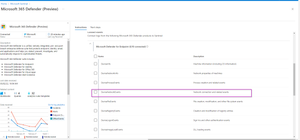
hi AbiPanah I'm going to assume that you are using the Microsoft Defender For Endpoint on your devices. First question: are you syncing your DeviceNetworkEvents to your sentinel workspace? You can verify this via the Microsoft 365 Defender (preview) connector. Be warned: enabling this will increase the data usage of you sentinel workspace and result in an extra cost. If you don't want to enable this you will have to go security.microsoft.com > advanced hunting. There you could write a hunting rule, but that part doesn't support watchlists. In regards to the url data. MDE doesn't ingest the complete url with all of its parameters. DeviceNetworkrequest only contain the domain that was resolved.4.6KViews1like1CommentMicrosoft Operator?
Hi all, We recently had an alert raised in Azure Sentinel about "Rare and potentially high-risk Office operations". When checking the events that triggered the alert. I saw in the "AccountCustomEntity" and "Userkey" field: Microsoft Operator The account name does make it assumable that is activity regarding Microsoft Support perform actions. But we do not have any open cases.... This is not an account that has been made in the tenant, nor can I find any documentation that states the existence or usage of a Microsoft Operator account. I have checked: Azure AD (audit & sign in logs) Exchange audit logs MCAS Even when filtering on the IP address that has been used I can't find any hits. FYI: the IP address is not linked to Microsoft Datacenter. Is this indeed a official Microsoft support account and explain where we can the original logs? Kind Regards LouisSolved5.8KViews1like2CommentsRe: Microsoft IP ranges in Microsoft Cloud App Security
hi Dejvio, Thanks for your reply. Indeed this could be an option but i see this as a short term solution. As on the long-term I would not be able to know if an IP is still in the Microsoft IP Range or not unless I manually verify? The same go's for new IP's that are not ingested yet by Microsoft Defender for Cloud Apps (MCAS), it would require manual work... but if you have 1000 of alerts each month this not manageable. But I do have to say that we haven't encountered this type problem due to fact that we use 3th party resources that help with the IP enrichment as soon an alert is triggered and the alert is automatically enriched.4.3KViews0likes1CommentRe: I am trying to create a watchlist that displays specific alerts from different business units
Hi caitlin2250 I don't have your dataset but I was thinking something like this: Heartbeat | extend ComputerUpper = toupper (Computer) | lookup kind=leftouter _GetWatchlist('DEV1') on tolower($left.ComputerUpper) == tolower($right.SearchKey) | project UNIT, ComputerUpper Give it a try if it will accept this in your syntax.4.7KViews0likes1CommentRe: I am trying to create a watchlist that displays specific alerts from different business units
Hi Caitlin Just thinking out loud here: Could it be possible that the computers in your watchlist are lowercase and in the logs are uppercase (or a mix). And there for now having a match and not showing the data. Could a tolower() be a solution when setting up the join?5KViews0likes12CommentsRe: Notify User of MFA Failure
Hi Tom As you indicating that API's are your thing implementing a Logic app would be more suitable as allot of the connectors already exist. You could create a logic app that checks every hour for users that have failed mfa attempts and for each user he finds you can send them an email with the logs and the message to your linking. This will require a deeper dive into logic apps, but it should be possible to get the job done.2.7KViews0likes0CommentsRe: Azure AD: sign-in risk calculation is wrong?
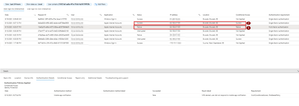
update: Today I have another case of what is according to me wrong risk calculation or risk loss. 1) the user signs-in on apple internet accounts, is interrupted and needs to confirm mfa. Based on the logs the does not complete the mfa request. 2) the next sign-in log to apple internet accounts is a success. Sign-in risk is suddenly "none". Details of sign-in log 1 Details of sign-in log 2 It does not make sense to me that the user loses his risk after a failed mfa request according to the logs.1.3KViews0likes0CommentsRe: Adding custom Threat Intelligence feeds to M365 Defender
Hi Dean, Yes it is also possible for MDE (Microsoft Defender for Endpoint) within the M365 portal. https://security.microsoft.com > settings > endpoints > indicators You can submit file hashes, IP adresses , Urls/domains & Certificates. You can upload a csv file or (what I prefer) post them via the graph api. This documentation should get you going using the graph api to upload indicators. https://docs.microsoft.com/en-us/graph/api/tiindicator-submittiindicators?view=graph-rest-beta&tabs=http5.8KViews0likes0CommentsAzure AD: sign-in risk calculation is wrong?
Hi all, I noticed these past weeks some weird logic in the way sign-in risk is calculated or handled. It especially impactful when MFA is enforced via an CA policy that is based on the users sign-in risk. Some examples: Example 1: User is suddenly active from Russia. No registered device First time sign-in this month in Russia no exclusions in the policy. On the interrupted sign-in there are no CA policies applied. The next sing-in Russia on office365 shell has has a sign-in risk of none? Why do I find this weird? User activity moves from Paris to Russia. The sign-in with the interrupt does not lower the risk as it has been interrupted. So the next sign-in in Russia should still have a risk factor as there has not been a completed mfa request. Example 2: user is suddenly in Italy. Again no previous history in Italy. No azure ad joined device. Sign-in risk was considered none Why do I find this weird? Again a user moved to a country where haven't seen any activity in the last month. There is no registered device in any sign-in log. Example 3: User is suddenly active from Tunisia. Normal activity is France. The user first fails 2 times to sign-in as his primary authentication due to wrong password. 3rd sign-in log he is interrupted as his device requires authentication. 4rd sign-in log he FAILS on completing the MFA request 5th sign-in log the user signs-in using with none sign-in risk. Screenshot of the failed mfa request Screenshot of the successful sign-in his risk Why do I find this weird? This is the one that blows my mind the most. Users go's to new country. Fails 2 times on his password. Then gets prompted with mfa but fails to complete authentication. Logicaly thinking you would thing that this would raise his sign-in risk. 2 failures and 1 mfa prompt not completed. Next sign-in = 0 sign-in risk. As documented Microsoft states the following about risk calculations: But I believe my 3 scenario's have enough evidence that the risk state of these sign-ins should not have the state of none. Especially when previous attempt are failed. Having insights on how this "risk" is calculated would bring us a step further. Anyone who can share an opinion/insights on this? Kind regards LouisRe: KQL Date between range not working
I have not tested your KQL but have you tried moving your Timestap to the top of you query? So your data set is first created within the wanted time range and narrowed down based on the logonType. IdentityLogonEvents | where Timestamp between (datetime(2021-5-02)..datetime(2021-5-03)) | where LogonType == "Failed logon" and isnotempty(AccountName) | project LogonTime = Timestamp, LogonType, Application, FailureReason, AccountName, AccountUpn, DeviceName, DestinationDeviceName27KViews1like1CommentRe: Windows server security
Hi Sandro, If understand correct you are worried that if one of the accounts with local admin is compromised, they are able to compromise other servers with the same account on prem. Maybe the legacy ad Tier model is first step you could look into: https://docs.microsoft.com/en-us/security/compass/privileged-access-access-model#evolution-from-the-legacy-ad-tier-model So depending on which tier of server you are accessing you have a different account. For example for example: AD server, exchange server =tier 0 for example: IIS server = tier 1 for example: endpoints = tier 2 A compromise of an account in Tier 2 will not result in the total compromise of tier 1This not overcomplicated stuff with privileged access workstations.554Views0likes0CommentsUEBA: tables missing in azure sentinel logs
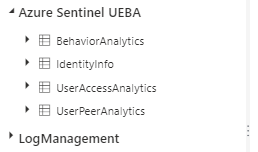
Hi all, so I noticed that cross different tenants the amount of UEBA tables in Azure sentinel are not the same. I assume that you normally have 4 tables: - BehaviorAnalytics - IdentityInfo - UserAccessAnalytics - UserPeerAnalytics This is wat i encountered in on 2 different tenants with the same settings: For some reason on an other tenant the identityinfo table is missing. I have checked the entity behavior settings and all 4 of data sources are enabled. Any idea's? Kind Regards Louis1.9KViews3likes0CommentsRe: Conditional Access and MCAS policies matching
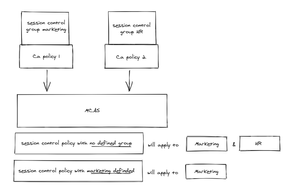
mikkele So I have done additional testing. As soon you enable Conditional app access control all of the people who match the CA policy are forward to MCAS. If the session control policy in MCAS had no group or user scope than it will apply all non scoped session control policies. If you specify in the Session control policy the requirements then you will be able to scope them according to my tests. So I believe you will have to recreate your conditions as good as possible in MCAS.2.5KViews0likes1Comment


Recent Blog Articles
No content to show